
You've just launched your mobile app. The features are solid, the backend is robust, and the development team is proud. But within a week, 77% of daily active users have already abandoned it. Not because the technology failed — because the experience felt confusing, unintuitive, or forgettable.
This guide explains exactly why that is, and what you should do about it.

What Is UI/UX Design in Mobile App Development?
UI/UX design in mobile app development is the discipline of crafting every visual element (UI) and every user interaction flow (UX) so that an app is intuitive, visually compelling, and conversion-optimised — turning first-time visitors into loyal, paying customers.
Before diving into the "why," it's critical to understand what UI and UX actually mean — and why confusing the two leads to costly design mistakes.
User Interface (UI) Design
UI design governs every visual element a user sees and touches: buttons, typography, colour palettes, icons, spacing, and layouts. It answers the question: "Does this app look great and feel polished?" A strong UI builds an instant emotional connection. It communicates professionalism before a user reads a single word.
User Experience (UX) Design
UX design governs how users flow through your app — how quickly they find what they need, how many taps it takes to complete a purchase, and how satisfying the overall journey feels. It answers the question: "Does this app make sense and solve my problem efficiently?"
The table below captures the essential difference:
| Dimension | UI (User Interface) | UX (User Experience) |
| Focus | Visual design — colours, typography, icons | Interaction design — flow, navigation, journey |
| Goal | "Does it look beautiful and professional?" | "Is it easy, fast, and satisfying to use?" |
| Key Output | Mockups, style guides, component libraries | Wireframes, user journeys, clickable prototypes |
| Tools | Figma, Adobe XD, Sketch, Zeplin | Figma (prototyping), Maze, FullStory, Hotjar |
| Business Impact | First impression, brand credibility, trust | Retention, task completion, conversion rate |
The magic happens when UI and UX work in harmony. Instagram's flawless swipe interface is beautiful (UI) and effortless to use (UX). Duolingo's gamified learning flow is visually engaging (UI) and psychologically engineered for habit formation (UX). Great apps deliver both.
Why UI/UX Matters More Than Ever in 2026
The mobile app market has never been more competitive—or more unforgiving. As every company needs UI/UX design services to bridge the gap between function and feeling, here is the critical data your product roadmap cannot afford to ignore.
| Statistic | Source |
| Every $1 invested in UX design returns up to $100 — a 9,900% ROI | Forrester Research, 2024 |
| 88% of users won't return after a single bad experience | Google / Toptal UX Research, 2024 |
| Apps lose 77% of daily active users within 3 days of install | Localytics / Appsflyer 2024 |
| Mobile users are 5× more likely to abandon a task on a non-optimised site | Google Mobile UX Study, 2024 |
| Good UX can increase conversion rates by 200–400% | Baymard Institute, 2024 |
| 42% of users abandon apps due to poor UX within the first session | AppMySite UX Research, 2025 |
For startup founders, the numbers above represent a critical business risk. Every design mistake in your MVP (Minimum Viable Product) translates directly into user churn, negative App Store reviews, and wasted marketing spend driving traffic to an app that doesn't convert.
For enterprise CXOs, poor UI/UX in internal tools and customer-facing apps means lower employee productivity, reduced customer satisfaction scores (CSAT), and ultimately, lost revenue.
7 Key Benefits of UI/UX Design for Your Business
Investing in professional UI/UX design delivers measurable returns across every stage of your app's lifecycle.
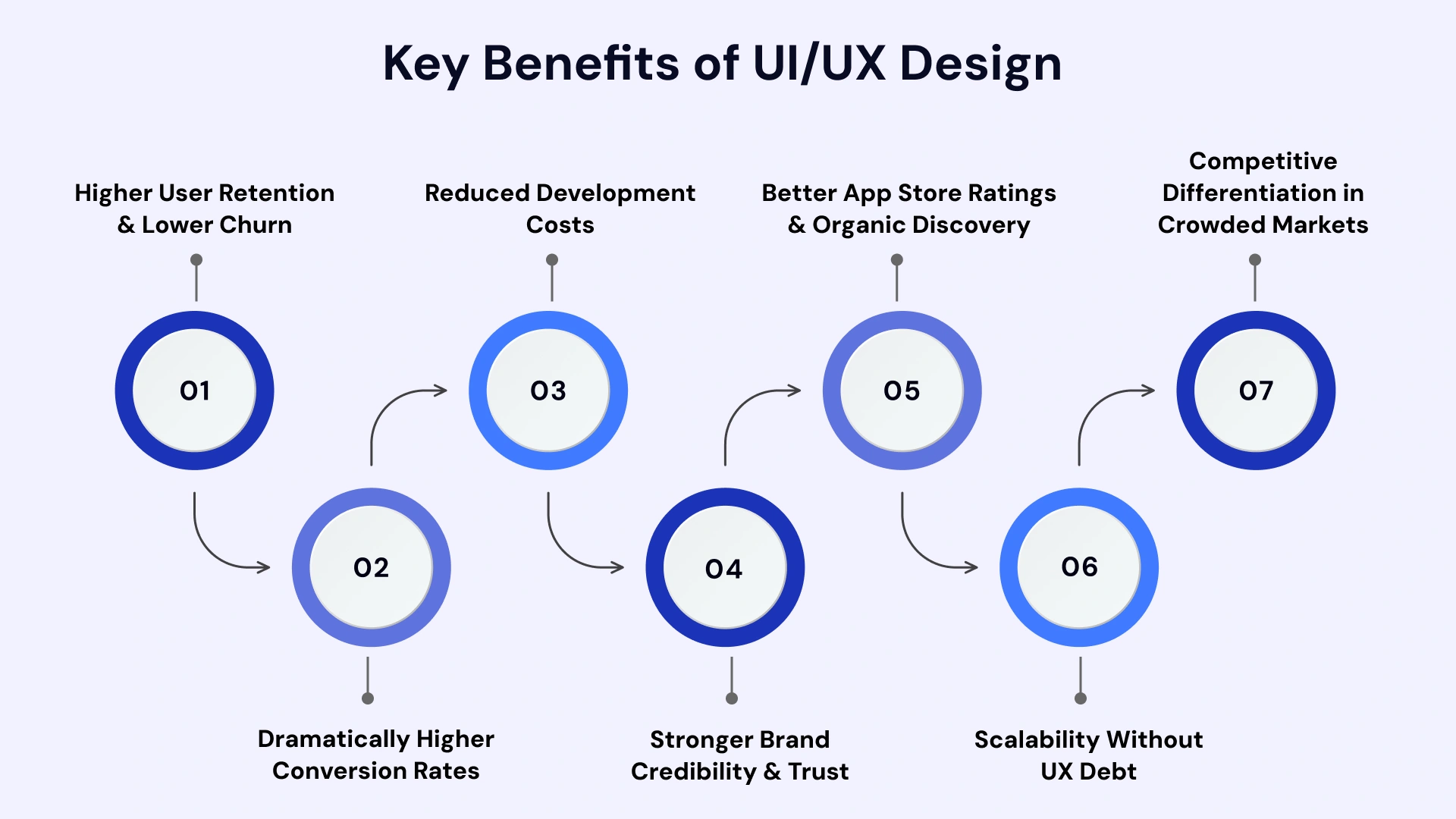
Higher User Retention & Lower Churn
A frictionless onboarding flow reduces the day-1 drop-off that kills most apps. When users find value quickly — within the first 3 minutes — they return. Clean navigation and intuitive interfaces create the habit loop that transforms one-time downloaders into daily active users.
Dramatically Higher Conversion Rates
Every CTA button, checkout flow, and sign-up form is a conversion opportunity. Seamless UX optimised apps remove the friction points that cause users to abandon their journey. Baymard Institute data shows that a well-designed checkout flow alone can reduce cart abandonment by 35.26%.
Reduced Development Costs (The Prototype-First Advantage)
Fixing a UI flaw in a Figma prototype costs $0. Fixing the same flaw in a coded, shipped app costs 10–100× more. VLink's Design-First approach catches usability problems in the wireframe stage — before they become expensive engineering backlogs.
Stronger Brand Credibility & Trust
Your app is your brand's digital handshake. A polished, consistent UI signals professionalism to users, making a split-second decision about whether to trust your app with their time, data, or money. For fintech, healthtech, and e-commerce apps especially, visual trust is non-negotiable.
Better App Store Ratings & Organic Discovery
Scalability Without UX Debt
Apps built with a well-documented design system scale faster. Adding a new feature to an app with an established component library takes hours, not days. Without a design system, every new feature introduces inconsistencies that accumulate into what designers call "UX debt" — costly to fix later.
Competitive Differentiation in Crowded Markets
When two apps offer identical functionality, design wins. In India's hyper-competitive fintech space, apps like Groww and CRED have captured market share primarily through superior UX — not through feature differentiation. The same pattern holds globally across every vertical.
Step-by-Step: How VLink's UI/UX Design Process Works
VLink follows a battle-tested, 7-step Design-First process that has been refined across 500+ mobile app projects for clients in the US, Canada, and India.
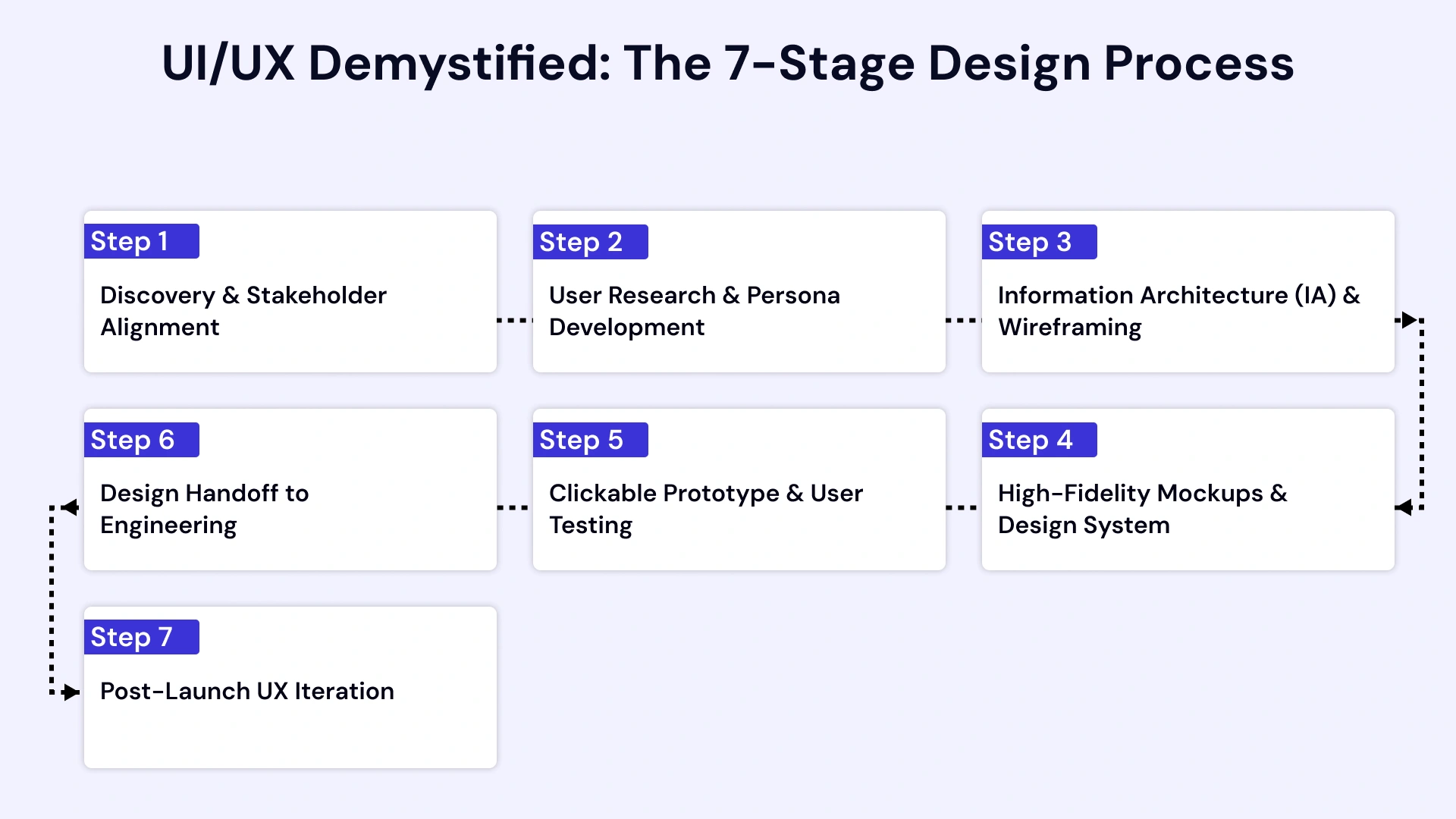
Step 1: Discovery & Stakeholder Alignment
We begin with a structured Discovery Workshop with your product, marketing, and engineering stakeholders. We define: target user personas, core user journeys, business KPIs the design must support (conversion rate, session length, onboarding completion), and competitive benchmarks.
Deliverable: Discovery Report + Product Brief.
Step 2: User Research & Persona Development
Our UX researchers conduct user interviews, competitive analysis, and behavioural pattern mapping. We identify the exact pain points, mental models, and "jobs to be done" for your ICP (Ideal Customer Profile). For US-market apps, we factor in WCAG 2.1 accessibility standards. For India-market apps, we account for regional language patterns and lower-bandwidth optimisation.
Deliverable: 3 validated User Personas + Journey Maps.
Step 3: Information Architecture (IA) & Wireframing
Before a single pixel of visual design is drawn, we map your app's full information architecture — every screen, every navigation path, every decision point. Low-fidelity wireframes are created in Figma and reviewed with your team. This is where 80% of usability problems are caught and eliminated.
Deliverable: Full IA Map + Low-Fi Wireframe Set.
Step 4: High-Fidelity Mockups & Design System
Our UI designers apply your brand identity — colour palette, typography, iconography, motion principles — to create pixel-perfect, high-fidelity screen mockups. We simultaneously build your Design System: a component library of every reusable UI element, ensuring visual consistency across every screen and every future feature.
Deliverable: Full Hi-Fi Mockup Set + Component Library in Figma.
Step 5: Clickable Prototype & User Testing
We convert your mockups into a clickable, interactive prototype design — a fully navigable simulation of your app that requires zero code. This prototype is tested with 5–8 real users from your target ICP. User testing at this stage catches critical UX issues before they enter the engineering sprint, saving an average of 15–20% of total development costs.
Deliverable: Interactive Figma Prototype + Usability Test Report.
Step 6: Design Handoff to Engineering
After your prototype is validated and approved, we produce a developer-ready handoff package: annotated spec sheets, CSS/style tokens, export-ready assets, and a component mapping document. Our designers work directly with your engineering team (or VLink's dev team) to ensure the coded product matches the design intent 1:1.
Deliverable: Developer Handoff Package via Zeplin or Figma Dev Mode.
Step 7: Post-Launch UX Iteration
Great design is never finished. Post-launch, we integrate analytics tools (Hotjar, FullStory, Firebase) to capture real user behaviour: heatmaps, session recordings, funnel drop-off points. We use this data to run structured A/B tests and UX iteration sprints every 4–6 weeks, continuously improving your app's engagement and conversion metrics.
Deliverable: Monthly UX Performance Report + Iteration Roadmap.
The Real ROI of Investing in UI/UX Design
Founders often ask: "How much does UI/UX design cost?" The more important question is: "What does poor UI/UX design cost?"
Core Metrics:
| Investment Tier | UI/UX Design Cost | Typical App Type | Expected ROI Impact |
| Starter | $5,000–$15,000 / ₹4–12 Lakh | MVP / Proof of Concept | 35–50% lower rework cost vs. no-design approach |
| Growth | $15,000–$50,000 / ₹12–41 Lakh | Consumer App / SaaS Product | 200–300% improvement in onboarding completion rate |
| Enterprise | $50,000–$150,000+ / ₹41 Lakh+ | Enterprise Platform / Fintech / Healthtech | Full design system; 9,900% ROI benchmark (Forrester) |
Important note: The costs above refer to UI/UX design engagement costs only, not full-stack app development. VLink provides detailed, transparent project estimates — contact our team for a custom scoping call.
The Cost of NOT Investing in UI/UX
Poor UI/UX is a hidden tax on your growth. To survive an unforgiving market, don't just build—optimize. When you hire the perfect UI/UX designer for your business needs, you trade friction for ROI and turn users into loyal advocates.
Here is why skipping professional design services is the most expensive mistake a business can make:
- Rework costs: Fixing a UI flaw after development is 10–100× more expensive than fixing it in a wireframe.
- User acquisition waste: If your app has a 1.4% conversion rate (VLink's audit finding post-HCU), you need 100 users to generate 1.4 conversions. Improve UX to 4.5%, and you need only 22 users for the same result — a 77% reduction in acquisition spend.
- App Store penalties: Low ratings (< 3 stars) from poor UX directly suppress organic discovery. The Play Store and App Store both factor engagement signals into app ranking algorithms.
- Churn compounding: Every user who leaves due to poor UX represents a lost LTV (Lifetime Value), negative word-of-mouth, and a potential 1-star review that deters future downloads.
2026 UI/UX Design Trends Shaping Mobile App Development
Staying ahead of UI/UX trends is not vanity — it is competitive survival. Here are the seven trends driving app design in 2026:
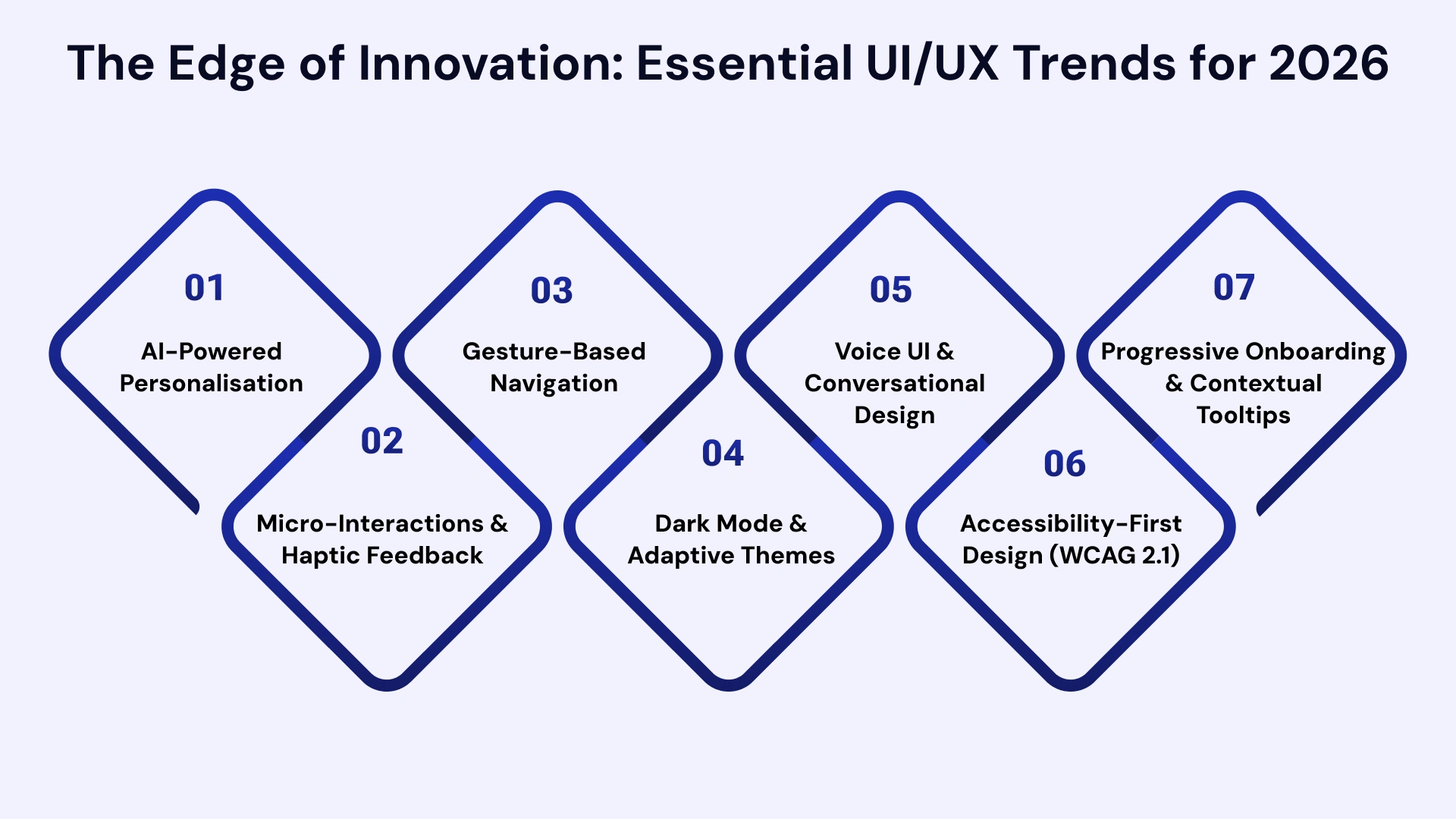
AI-Powered Personalisation
AI now enables apps to dynamically adjust their UI in real time based on individual user behaviour. Spotify's "Discover Weekly" and Netflix's personalised thumbnail system are the most cited examples. For your app, this means serving different onboarding flows, content, and CTAs to different user segments automatically.
Micro-Interactions & Haptic Feedback
Micro-interactions — the subtle animations that confirm a button press, a swipe action, or a successful transaction — reduce user anxiety and increase perceived quality. Combined with haptic feedback on iOS and Android, they make apps feel responsive and "alive."
Gesture-Based Navigation
Swipe-first, tap-second design has become the default as phones grow larger and thumb-reach zones shrink. Navigation patterns that require one-handed thumb operation are now a UX expectation, not a differentiator.
Dark Mode & Adaptive Themes
Over 82% of smartphone users use dark mode at least part of the time (Statista, 2024). Apps that don't support dark mode feel dated and cause eye strain — both of which increase uninstall rates.
Voice UI & Conversational Design
With over 1 billion voice-enabled devices globally, voice UI is no longer a niche feature. Healthcare, logistics, and enterprise apps are rapidly integrating voice commands to reduce navigation friction for power users.
Accessibility-First Design (WCAG 2.1)
Accessibility is now both an ethical imperative and a legal requirement in the US (ADA compliance) and increasingly in India. Designing for users with visual, motor, or cognitive impairments expands your total addressable market by an estimated 15% (WHO, 2024).
Progressive Onboarding & Contextual Tooltips
The days of the 10-screen onboarding carousel are over. 2026's best apps use progressive disclosure — surfacing features and information only when the user needs them, reducing cognitive overload and improving time-to-value by up to 40%.
The Real-World Impact: How UI/UX Shapes Global Industries
Good UI/UX isn’t just about looking good; it is about driving business metrics and making complex systems usable in the real world. Here is how strategic design is transforming the top industries:
1. Capital Markets
- UI Impact: High-density data dashboards use "Heatmaps" for instant market trend recognition.
- UX Impact: Streamlined order-entry flows allow traders to execute in milliseconds, reducing "slippage."
2. Finance
- UI Impact: Gamified progress trackers and encouraging visual cues build user confidence in managing wealth.
- UX Impact: Automated "Round-up" savings features invest a passive, effortless habit.
3. Insurance
- UI Impact: Interactive "Visual Claims" tools let users highlight damage directly on a 3D digital model.
- UX Impact: Rapid 3-step digital filing moves users from "accident" to "settled" in minutes.
4. Healthcare
- UI Impact: High-contrast, large-font interfaces ensure accessibility for elderly or visually impaired users.
- UX Impact: Seamless "Telehealth" flows reduce the time it takes for a patient to speak with a professional.
5. Retail
- UI Impact: "Virtual Try-On" using AR (Augmented Reality) lets users see products in their space before buying.
- UX Impact: Integrated "In-Store Inventory" checks bridge the gap between digital browsing and physical pickup.
6. Manufacturing
- UI Impact: Industrial-grade interfaces with large, touch-friendly buttons for operators wearing gloves.
- UX Impact: Real-time alert systems and predictive maintenance flows reduce costly equipment downtime.
7. eCommerce
- UI Impact: High-resolution video backgrounds and "swipeable" lookbooks mimic a physical shopping trip.
- UX Impact: "One-Click" checkouts and guest login options drastically lower cart abandonment rates.
8. Entertainment
- UI Impact: Dark-mode, edge-to-edge cinematic layouts prioritize the content over the controls.
- UX Impact: "Skip Intro" buttons and "Continue Watching" carousels solve user decision fatigue.
9. Banking
- UI Impact: "Privacy Modes" that hide account balances with a single tap for safe use in public.
- UX Impact: Frictionless biometric authentication (FaceID/Fingerprint) makes logins both fast and secure.
10. Telecom
- UI Impact: Glanceable "Progress Bars" turn complex data usage into simple, visual summaries.
- UX Impact: AI-driven self-service bots solve connectivity issues without the need for a call center.
11. Education
- UI Impact: Vibrant, non-intimidating color schemes and playful avatars make learning feel like play.
- UX Impact: Bite-sized lesson structures and "streak" systems build long-term student engagement.
The role of the designer has evolved from a 'visual luxury' into essential business infrastructure. The impact of hiring top UI/UX designers is now seen across every sector—from building trust in Banking to ensuring safety in Healthcare and driving efficiency in Manufacturing. A user-first approach is no longer optional; it is the most effective way to secure a permanent competitive edge.
VLink's UX team conducted a full audit using session recordings, heatmaps, and 8 moderated user testing sessions. We redesigned the complete UX architecture using our 7-step process, delivering a new clickable prototype within 3 weeks and a fully coded redesign within 8 weeks.
How to Choose the Right UI/UX Design Partner
Finding the right UI/UX designers is the difference between an app that thrives and one that barely survives. Don't settle for 'good enough.' To ensure your product’s success, here are seven non-negotiable criteria to look for when vetting your design team:
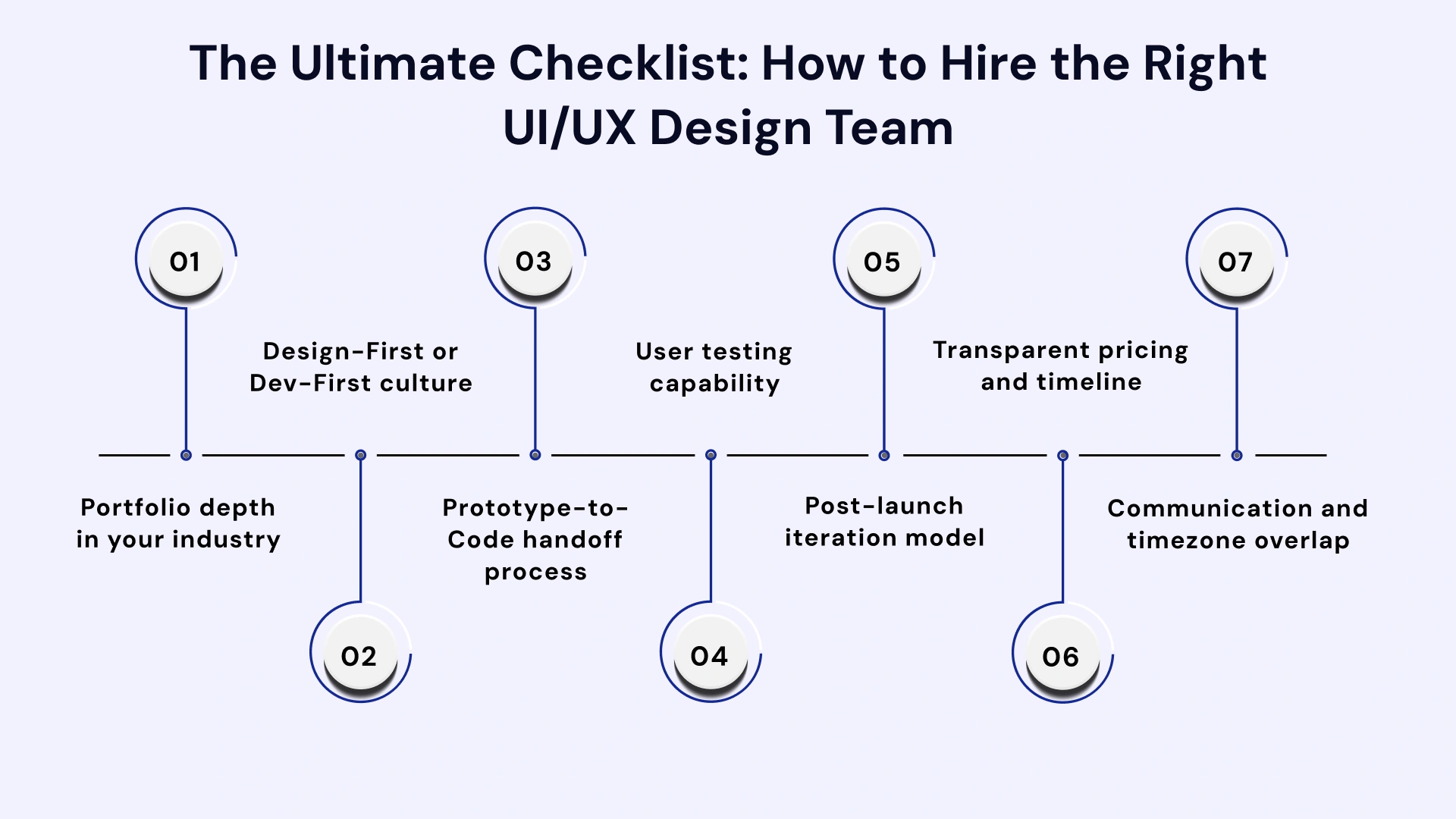
- Portfolio depth in your industry: Ask for 3–5 case studies from your specific vertical (fintech, healthtech, retail, etc.). Generic portfolios signal generic thinking.
- Design-First or Dev-First culture: Agencies that lead with engineering and "add design later" create expensive UX debt. Look for partners who start with Discovery Workshops and wireframes.
- Prototype-to-Code handoff process: How does the design team hand off work to engineering? Look for annotated Figma specs, design tokens, and defined handoff ceremonies — not just "sharing the Figma link."
- User testing capability: Can they conduct moderated user testing before development begins? This single capability can save 15–20% of your total project budget.
- Post-launch iteration model: Does the agency disappear after launch, or do they offer a structured UX iteration programme? The best apps are never finished — they iterate continuously based on real user data.
- Transparent pricing and timeline: Beware agencies that quote "fixed-price projects" with undefined scope. Demand a phased engagement model: Discovery → Wireframes → Hi-Fi → Prototype → Handoff, with clear deliverables and pricing at each stage.
- Communication and timezone overlap: For US-headquartered startups working with India-based teams, the ability to run daily standup calls during overlapping hours (7–9 AM PST / 7:30–9:30 PM IST) is critical. VLink's teams are optimised for exactly this model.
Why Leading Startups and Enterprises Choose VLink
At VLink, we understand that UI/UX is important in mobile app development isn't just a trend—it’s the cornerstone of digital survival. We specialize in UI/UX design for business, transforming complex technical requirements into intuitive, high-conversion interfaces.
By merging "Real-World Impact" with technical precision, we ensure your app resonates with users across the critical industries highlighted in our expertise—from Capital Markets and Healthcare to Manufacturing and Telecom.
The VLink Advantage: What It Means for You
At our core, we are a top mobile application development company in USA dedicated to more than just code.
We’ve refined a delivery model that prioritizes your ROI while maintaining the highest design standards in the industry, ensuring that table-stakes trends like Gen AI and hyper-accessibility are transformed into unique competitive advantages for your brand.
| VLink Advantage | What It Means for You |
| Design-First, Not Design-Last | Every project begins with Discovery & Wireframing—not engineering. By validating the user flow before a single line of code is written, we eliminate costly late-stage rework and technical debt. |
| Global Success + India Delivery | With our HQ in Connecticut, USA, and elite delivery teams in India, you get the best of both worlds: same-timezone collaboration with your project lead and competitive global rates. |
| Cross-Industry UX Expertise | Our team has successfully shipped products in every major vertical, including Banking, Retail, EdTech, and Logistics, bringing "cross-pollinated" insights to your specific niche. |
| Post-Launch UX Iteration | We don't disappear after the App Store launch. We provide monthly UX audits and A/B test sprints to ensure your app evolves with your users' changing behaviors. |
| Onboarding in 48 Hours | We value your time. Move from your first discovery call to an active design sprint in under 48 hours—bypassing the traditional 3-week proposal cycles. |
The difference between a "good" app and a "market-leading" app lies in the synergy between UI and UX. Whether it’s building trust in Finance, increasing efficiency in Telecom, or driving engagement in Education, VLink delivers design that works as well as it looks.

Conclusion: Great Apps Are Designed, Not Just Built
In 2026, design—not technology—dictates success. Quality mobile app development for business relies on UI/UX to secure users in seconds, build trust, and ensure investments yield returns instead of costly rework.
The data is unambiguous: apps built with a Design-First philosophy retain more users, convert at higher rates, earn better reviews, and ultimately generate more revenue per marketing dollar spent.
For startup founders trying to validate their idea efficiently, and for enterprise CXOs trying to scale user-facing products without ballooning costs, investing in professional UI/UX design is not a luxury — it is the most cost-effective decision in your product roadmap.
Executive Summary:
- UI governs what users see; UX governs what they feel — both must be excellent for your app to succeed.
- Poor UX costs 10–100× more to fix after launch than before coding begins. Prototype first.
- Every $1 invested in UX design returns up to $100 (Forrester, 2024). Design ROI is measurable.
- 2026 trends — AI personalisation, gesture navigation, voice UI, and accessibility — are now table stakes, not differentiators.
- A structured Design-First process (Discovery → Wireframe → Prototype → Test → Handoff) is the only reliable path to a high-performing mobile app.
Stop guessing. Start designing with intent. Book a Free 30-Minute UI/UX Audit with VLink's Expert Design Team. We'll review your app, identify your top 3 UX friction points, and give you a prioritised fix roadmap — at no cost, no commitment.

Global Marketing & Communications Manager, VLink Inc.
Tracy Gardner is an accomplished marketing and communications professional with over a decade of experience driving brand growth and audience engagement across diverse industries. Since joining VLink Inc. as the Global Marketing & Communications Manager in August 2020, she has played a pivotal role in expanding the company’s digital presence, growing its LinkedIn followers from 3,000 to over 150,000.

 Shivisha Patel