





Enterprise migrations rarely fail because the cloud doesn't work. They fail because the plan didn't survive contact with reality: an application nobody knew depended on a server in a closet, a security review that arrived after the data moved, a cutover with no way back.
This blog distills cloud migration best practices into 15 rules. They address the pain points CIOs, CTOs, heads of IT, and architects raise most often: unclear migration readiness, unknown application dependencies, security and compliance exposure, runaway cost, and cutovers that can't be reversed. The rules apply across providers, with specific guidance for Microsoft Azure, and are written for enterprises in the US, Canada, and India.
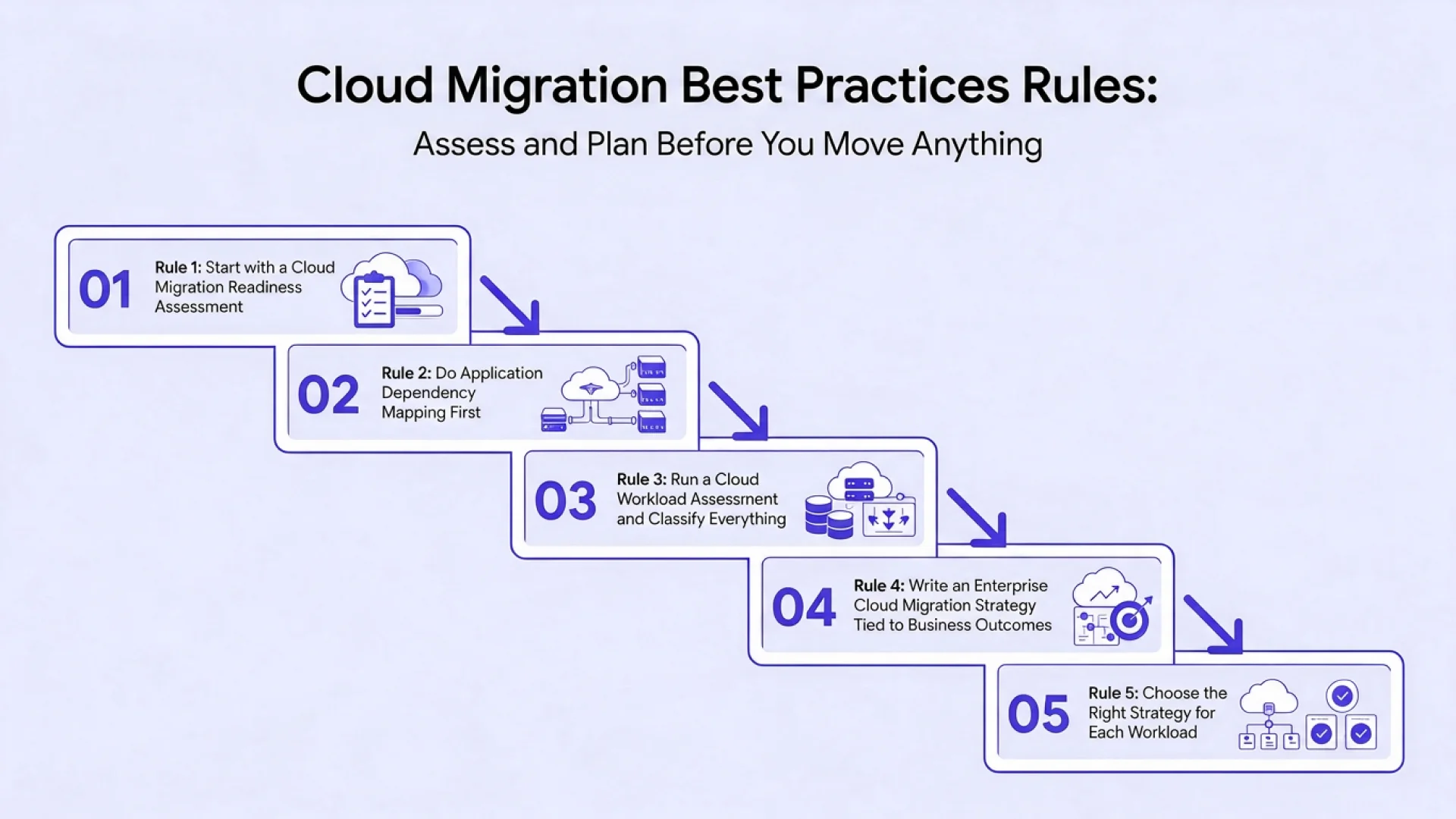
Rules 1 to 5: Assess and Plan Before You Move Anything
In cloud migration services, most migration damage is done before the first server moves, in the planning decisions that were skipped, rushed, or based on assumptions. These five rules form the foundation. Each one ends with a "done when" test so you can tell whether you've really finished it.
Rule 1: Start with a Cloud Migration Readiness Assessment
A cloud migration readiness assessment evaluates whether your organization, not just your technology, is ready to move. It answers practical questions: which applications are ready, which need remediation first, who owns each one, and whether your team can operate what you are about to build.
What to assess
- Applications and infrastructure: supported versions, hosting, licensing, performance profile, and technical debt
- Data: volume, sensitivity, quality, and residency obligations
- Security and compliance: current controls, audit findings, and regulatory requirements per workload
- People and skills: cloud engineering, security, networking, and FinOps capability, and where you need training or external help
- Process and governance: change management, ownership, funding model, and decision rights
- Business constraints: freeze periods, contract end dates, hardware refresh deadlines, and downtime tolerance
Common mistake: treating readiness as a technical scan only. Organizational gaps, such as no named application owner or no funding for post-migration operations, derail programs as often as technical ones do.
Done when: every in-scope application has an owner, a readiness rating, a list of blockers, and an agreed remediation plan, and leadership has seen the gaps in skills and governance.
Rule 2: Do Application Dependency Mapping First
Application dependency mapping identifies how applications talk to each other, databases, shared services, batch schedulers, and external partners. It is the single most reliable way to avoid the classic failure: a system moves, and something nobody knew about stops working.
How to do it well
- Run automated discovery to capture network flows, processes, and configuration over a long enough window, ideally a full business cycle including month-end, to catch periodic jobs.
- Validate with owners. Tools miss manual processes, file drops, and integrations that run once a quarter.
- Map to the data layer, including shared databases, reports, and ETL pipelines, since these create the tightest coupling.
- Record non-functional dependencies such as latency sensitivity, licensing servers, DNS, certificates, and authentication.
- Visualize and review the map with architects and application teams, then use it to define migration waves.
Common mistake: relying on a configuration database or old architecture diagrams that were last accurate years ago.
Done when: you can state, for any application, what it depends on and what depends on it, and your wave plan keeps tightly coupled systems together or provides tested connectivity between them.
Rule 3: Run a Cloud Workload Assessment and Classify Everything
A cloud workload assessment turns the inventory into decisions. For each workload, record criticality, size, technology stack, licensing, compliance needs, performance and availability requirements, current run cost, and business owner. Then classify it using the 6 Rs (or 7 Rs): retire, retain, rehost, replatform, refactor, rearchitect, or replace.
Useful classification questions
- Is anyone still using this? (Retire candidates are often 10 to 20 percent of a portfolio.)
- Can it legally and practically move? (Retain or repatriate candidates.)
- What does the business gain from changing it? (Refactor or rearchitect only where there is a clear answer.)
- Is a commercial or SaaS product a better fit? (Replace candidates.)
Common mistake: applying a single pattern, usually rehost, to everything because it is fastest, then paying cloud prices for on-premises inefficiency.
Done when: every workload has a recorded pattern, a rationale, and a first-pass cost and effort estimate.
Rule 4: Write an Enterprise Cloud Migration Strategy Tied to Business Outcomes
An enterprise cloud migration strategy states why you are migrating, what success looks like, what constraints apply, and how work will be governed and funded. Typical drivers include data center exit, resilience, speed of delivery, cost, security, and modernization. Different drivers lead to different strategies: a deadline-driven exit favors rehosting at pace, while an agility goal justifies more refactoring.
What a strong strategy document contains
- Business objectives with measurable targets, such as run-cost reduction, release frequency, or recovery time
- Scope and exclusions, including what will not move and why
- Target architecture principles and standards
- Sequencing logic and major milestones
- Funding model, governance structure, and decision rights
- Risk appetite and compliance posture
- Operating model after migration
For more on turning objectives into a plan, see our Cloud Migration strategy guide.
Common mistake: setting a date before setting a goal. A deadline without an outcome produces fast, shallow migrations that need to be redone.
Done when: an executive sponsor has signed a strategy that links each migration objective to a metric and a budget line.
Rule 5: Choose the Right Strategy for Each Workload
Azure migration strategies and their equivalents on other platforms differ in effort, benefit, and risk, and the right choice depends on each workload's value and condition.
Pattern | Best For | Watch For |
| Retire | Unused or duplicated applications | Data retention and archiving needs |
| Rehost | Stable systems, hard deadlines, data center exits | Carrying over oversized servers and technical debt |
| Replatform | Valuable systems that benefit from managed services | Scope creep into a rewrite |
| Refactor | Applications that are sound but costly or fragile to run | Underestimated testing effort |
| Rearchitect | Differentiating systems that need scale or agility | Big-bang rewrites; prefer incremental delivery |
| Replace | Commodity functions with strong SaaS options | Data migration and process change |
Typical enterprise portfolios mix all of them, and the best Azure migration strategies are chosen workload by workload. A useful rule of thumb: pick the lightest pattern that meets the business goal, then optimize later.
Common mistake: over-investing in rearchitecting systems that are not strategic, while under-investing in the few that are.
Done when: the pattern for each workload has been reviewed by the application owner and an architect, and the pilot workloads represent each pattern you plan to use.
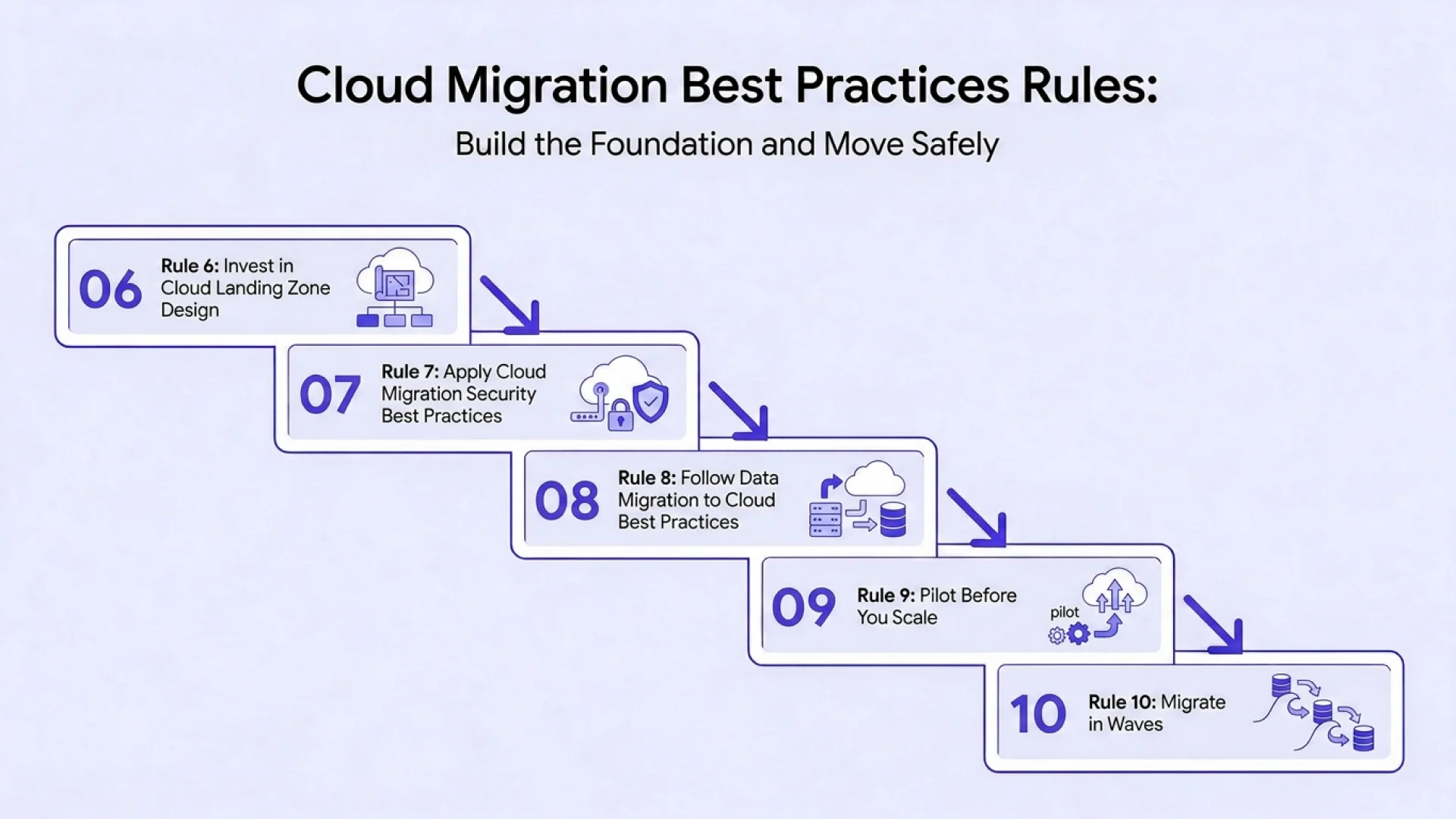
Rules 6 to 10: Build the Foundation and Move Safely
With the plan in place, these rules cover the environment you are moving into and the way workloads travel there.
Rule 6: Invest in Cloud Landing Zone Design
Cloud landing zone design creates the governed, secure environment that every workload will inherit. It defines identity, network topology, account or subscription structure, policy, logging, monitoring, and security baselines before the first application arrives. On Azure, Azure Landing Zones aligned to the Cloud Adoption Framework provide a tested reference architecture.
Core design areas
- Identity and access: single sign-on, role-based access, privileged access management, and break-glass procedures
- Network: hub-and-spoke or virtual WAN topology, connectivity to on-premises, DNS, firewalls, and segmentation
- Resource organization: management groups, subscriptions, naming, and tagging standards
- Policy and compliance: guardrails that enforce encryption, approved regions, and allowed services
- Observability: central logging, monitoring, and alerting
- Cost governance: budgets, alerts, and cost allocation by tag
- Automation: the entire landing zone defined as code, so environments are repeatable and changes are reviewed
Common mistake: building the landing zone incrementally while migrating, then discovering that networking and identity decisions made under time pressure are expensive to reverse.
Done when: a test workload can be deployed through your standard pipeline into an environment that already enforces your security, networking, and tagging policies.
Rule 7: Apply Cloud Migration Security Best Practices from Day One
Cloud migration security best practices are most effective when treated as design requirements, not final checks. Security issues found at cutover are expensive; found in design, they are cheap.
Key practices
- Least privilege for human and machine identities, with multi-factor authentication for all privileged access
- Network segmentation and private connectivity for sensitive services
- Encryption in transit and at rest, with managed key practices
- Centralized logging and threat detection feeding your security operations
- Vulnerability and configuration management before and after migration
- Secrets management instead of credentials in code or configuration files
- Compliance mapping for each workload, including data residency requirements in the US, Canada, and India
- Shared responsibility clarity, so everyone knows what the provider secures and what you must
Common mistake: assuming the cloud provider's certifications make your workloads compliant. Providers secure the platform; configuration, identity, and data protection remain your responsibility.
Done when: security has signed off on the landing zone and the pilot, and every workload has a documented control mapping.
Rule 8: Follow Data Migration to Cloud Best Practices
Data is usually the riskiest and slowest part of migration, because errors are hard to detect and hard to reverse. Data migration to cloud best practices focus on classification, method, validation, and reversibility.
Steps to follow
- Classify and clean data before moving it. Remove duplicates, archive what you do not need, and identify regulated data.
- Choose the right method: online replication for most databases, incremental sync to shorten the final cutover window, and offline transfer devices such as Azure Data Box when volumes or bandwidth make online transfer impractical.
- Plan for consistency: decide how you will handle writes during migration, replication lag, and final synchronization.
- Validate thoroughly with row counts, checksums, referential integrity checks, and business reconciliation by data owners.
- Protect the source: keep it intact and recoverable until the target has been proven in production.
- Performance plan: test queries and batch jobs against the target, since latency and throughput differ.
Common mistake: declaring success when the transfer job completes, rather than when the business confirms the data is correct and usable.
Done when: data owners have signed off on reconciliation results, and performance tests meet agreed thresholds.
Rule 9: Pilot Before You Scale
A pilot migrates two or three representative, lower-risk applications end to end, using the real tooling, landing zone, runbooks, and teams. It is the cheapest way to find out what your plan got wrong. This matters most in a Microsoft cloud migration, where Windows Server, SQL Server, and identity integration add platform-specific variables worth testing early.
Choose pilot candidates that
- Represent different patterns (for example: one rehost, one replatform)
- Have moderate complexity and non-critical business impact
- Have engaged, responsive owners
- Exercise key integration, identity, and data scenarios
What to measure: actual effort versus estimate, defects found, downtime, performance, security findings, and team readiness.
Common mistake: choosing the easiest application, which proves nothing, or the most critical one, which creates unnecessary risk.
Done when: pilot results have been compared with estimates, plans and budgets have been adjusted, and the team has a refined, repeatable runbook.
Rule 10: Migrate in Waves
Wave-based migration limits risk and builds capability. Group workloads by dependency, risk, business timing, and team capacity, then move them in sequence.
Wave planning principles
- Start simple. Early waves build skills, confidence, and tooling maturity.
- Respect dependencies. Move tightly coupled systems together, or ensure tested connectivity between old and new locations.
- Avoid peak periods such as quarter-end, tax deadlines, or seasonal peaks.
- Leave stabilization time between waves to fix issues and capture lessons.
- Keep waves small enough to roll back and large enough to maintain momentum.
- Communicate clearly with business owners, support teams, and end users before each wave.
Common mistake: compressing wave schedules to hit a date, which eliminates the stabilization time that prevents compounding problems.
Done when: each wave has an approved scope, a schedule, an owner, test and rollback plans, and communication ready.
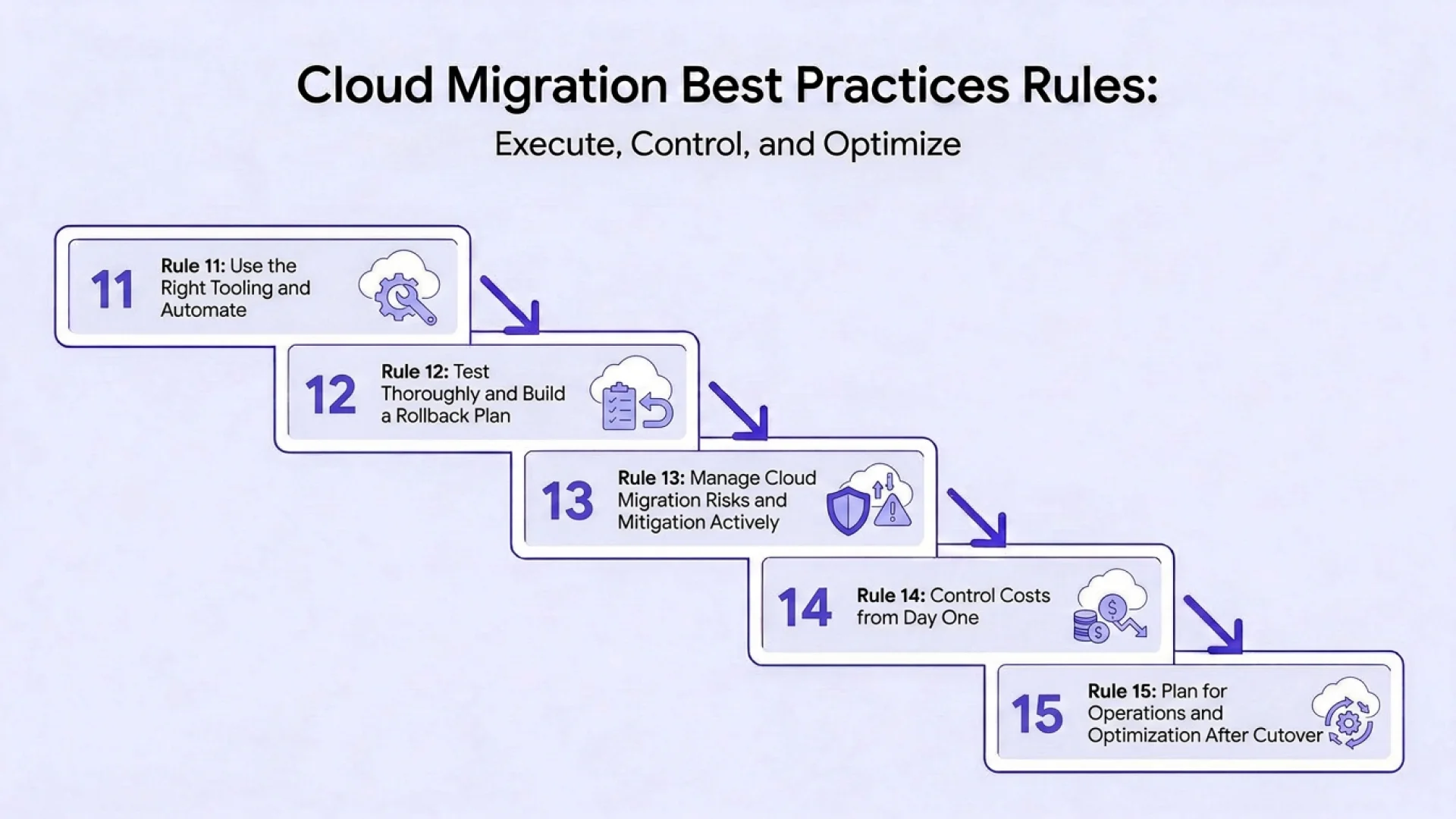
Rules 11 to 15: Execute, Control, and Optimize
The final five rules cover moving, testing, protecting the business, controlling spend, and getting value after cutover.
Rule 11: Use the Right Tooling and Automate
Automation reduces errors, speeds repeatable steps, and creates an audit trail. Choose tooling to fit your environment rather than adopting every tool on offer.
Tool categories
- Discovery and assessment: Azure Migrate, AWS Migration Evaluator, and similar platforms
- Server replication and cutover: Azure Site Recovery and equivalent replication tools
- Database migration: Azure Database Migration Service and native database tooling
- Infrastructure as code: Terraform, Bicep, or CloudFormation for repeatable environments
- CI/CD pipelines: standardized deployment, testing, and promotion
- Monitoring and observability: consistent telemetry from day one
Navigating your migration toolset can be complex. Our comprehensive Azure Migration Tool Guide breaks down every major option in detail, comparing feature sets, architectural fit, licensing costs, and performance benchmarks to help you select the exact right tooling for your enterprise workloads.
Common mistake: automating a poor process. Define the manual runbook first, prove it in the pilot, then automate it.
Done when: repeatable migration steps run through versioned, reviewed automation, and operators can see status and exceptions in one place.
Rule 12: Test Thoroughly and Build a Rollback Plan
Testing and rollback are the safety net for every migration. Cutover should be a rehearsed, boring event.
Testing layers
- Functional testing of critical business processes
- Integration testing across the dependency map
- Performance and load testing against realistic volumes
- Security testing, including configuration review and vulnerability scanning
- Failover and recovery testing for resilience claims
- User acceptance testing by business owners
A usable rollback plan specifies
- The rollback trigger and who has authority to invoke it
- How traffic and users return to the source
- How data written to the target is reconciled or replayed
- How long the source environment stays available and in sync
- Communication steps for stakeholders
Define go or no-go criteria in advance, and rehearse rollback at least once. A rollback plan you have never tested is not a plan.
Common mistake: decommissioning the source too early, which removes the only safe way back.
Done when: go or no-go criteria are agreed, rollback has been rehearsed, and the source stays recoverable for a defined period after cutover.
Rule 13: Manage Cloud Migration Risks and Mitigation Actively
Cloud migration risks and mitigation belong in a living risk register, not a one-time slide. Each risk should have an owner, likelihood, impact, mitigation, and trigger, reviewed weekly during execution.
Risk | Mitigation |
| Undiscovered dependencies | Automated discovery plus owner validation; pilot to test assumptions |
| Data loss or corruption | Validation, backups, source retention, reconciliation sign-off |
| Security gaps | Landing zone baselines, pre-cutover reviews, continuous monitoring |
| Downtime beyond tolerance | Replication, blue-green or canary cutover, off-peak windows |
| Skills shortage | Training, pairing with experts, targeted external support |
| Compliance violations | Residency mapping, control evidence, early legal review |
| Vendor or licensing surprises | Contract and licensing review before migration |
| Cost overrun | Bottom-up estimates, contingency, monthly forecast reviews |
| Scope creep | Change control and executive sponsor decisions |
| Organizational resistance | Stakeholder engagement, training, visible early wins |
Common mistake: reporting risks without owners or deadlines, so the register records problems instead of preventing them.
Done when: every high-rated risk has a named owner and a mitigation in progress, and the steering group reviews the register regularly.
Rule 14: Control Costs from Day One
Cost control is a design and operating practice, not a post-migration cleanup. Overruns usually come from underestimated one-time costs and unmanaged run costs.
Before and during migration
- Estimate per application, including parallel running, data transfer, testing, training, and a contingency commonly set between 10 and 20 percent
- Retire unused workloads before moving them
- Right-size from real utilization, not on-premises capacity
- Set budgets, alerts, and tagging standards in the landing zone
- Shorten parallel running by switching off old systems promptly
After migration
- Use reservations and savings plans for steady workloads once usage stabilizes
- Apply licensing benefits such as Azure Hybrid Benefit where eligible
- Review spend monthly with engineering and finance together
- Clean up idle and orphaned resources continuously
- Revisit rehosted workloads for refactoring opportunities
Common mistake: buying long-term commitments before usage patterns settle, locking in oversized capacity.
Done when: every workload has a cost owner, a forecast, and an alert threshold, and a monthly review is on the calendar.
Rule 15: Plan for Operations and Optimization After Cutover
Migration ends when systems are running well, not when they have moved. Plan the operating model before cutover so there is no gap between the migration team and operations team.
Operations readiness
- Monitoring, alerting, and incident response with defined owners
- Backup, disaster recovery, and tested restore procedures
- Patch management and vulnerability remediation
- Security operations and compliance reporting
- Cost management and optimization cadence
- Documentation, runbooks, and knowledge transfer
Enterprises without the skills or capacity for round-the-clock operations often use Cloud Managed Services to cover monitoring, security, and optimization while internal teams focus on change.
Optimization after cutover
- Right-size compute and storage
- Evaluate managed services to replace self-managed components
- Refactor high-value rehosted workloads
- Retire old infrastructure and licenses
- Compare outcomes with the original business case and report results
Common mistake: disbanding the migration team and funding before optimization starts, which lets cost and complexity creep back in.
Done when: operations has formally accepted each workload, optimization work is funded, and results are reported against the business case.
Note:- If you are weighing the business case first, read about the benefits of cloud migration, or see how legacy estates make the move in our guide to on-premises to cloud migration.

Azure Cloud Migration Best Practices and Checklist
For Microsoft environments, Azure cloud migration best practices add platform-specific steps to the 15 rules. A Microsoft cloud migration benefits from the Cloud Adoption Framework's guidance on strategy, plan, ready, migrate, govern, and manage, and from licensing advantages such as Azure Hybrid Benefit for Windows Server and SQL Server.
Azure Cloud Migration Checklist for Enterprise
Use this Azure cloud migration checklist for enterprise programs:
- Business case, scope, and success metrics approved
- Readiness assessment and dependency map complete
- Every workload classified with a chosen strategy
- Landing zone deployed as code with policy and logging
- Identity, network, and security baselines tested
- Data migration method chosen and validated in the pilot
- Pilot completed and lessons applied
- Wave plan with owners, windows, and communication
- Test plans, go or no-go criteria, and rollback rehearsed
- Budgets, tagging, and cost alerts active
- Operations model, monitoring, and support ready
- Post-migration optimization scheduled
US enterprises often need alignment with sector frameworks such as HIPAA, PCI DSS, and SOC 2. Canadian organizations typically weigh privacy law and data residency, and Azure's Canadian regions can support residency requirements. In India, data protection rules and sector regulations shape region choice, and large engineering talent pools support follow-the-sun delivery for testing and migration work. Confirm obligations with your legal and compliance teams before finalizing regions.
Azure migration consulting can compress planning and reduce risk, especially for first-time enterprise migrations. Our Azure migration consulting practice, delivered through Azure Consulting services, covers architecture, strategy, and governance, while our Azure Cloud Migration services handle execution.
Leverage Our Expertise for Your Enterprise Migration
Mastering cloud architecture requires more than high-level principles; it demands deep hands-on expertise across diverse enterprise environments. Across global markets and heavily regulated industries, our dedicated migration teams translate these exact blueprints into resilient, modern architectures.
We support your journey across every milestone:
- Comprehensive readiness assessments and workload prioritization
- Hardened landing zone deployments and infrastructure-as-code setup
- Phased migration execution with minimal business disruption
- Post-migration optimization and proactive managed operations
See How We Deliver: Discover how we helped a global enterprise modernize its stack seamlessly in our Migration Case Study, or learn how our Cloud Migration Services can be tailored to your enterprise roadmap.
Conclusion
Successful enterprise cloud migration comes down to disciplined preparation and honest execution: assessing readiness, mapping dependencies, building a secure landing zone, migrating in structured waves, and continually optimizing post-cutover. By following these 15 core rules, migration transforms from a high-risk gamble into a predictable, managed program.
Start with your readiness assessment and dependency map; these two foundational artifacts will shape every architectural decision that follows.
Ready to Build Your Cloud Roadmap?
Don't navigate the complexities of enterprise migration alone. Whether you need an initial readiness assessment or full end-to-end delivery, our cloud architecture team is here to help you de-risk your strategy and accelerate execution. Contact our experts today to discuss your migration goals.

Vice President, Strategy – VLink Inc.
Sambhavi Gopalakrishnan is the Vice President of Strategy at VLink Inc., bringing over a decade of experience in IT leadership, project implementation, and strategic growth. She possesses a strong foundation in technical project management and pre-sales, driving innovation and business transformation at VLink.

 Shivisha Patel