





Moving to the cloud sounds simple until you're staring at a portfolio of forty, sixty, or two hundred applications, each with different age, complexity, and business criticality. Some were built ten years ago on infrastructure nobody fully documents anymore. Some are mission-critical and can't tolerate downtime. A few probably shouldn't exist anymore. Treating all of them the same way- lift, shift, done; is exactly how cloud migrations run over budget and over schedule.
This is why a real cloud migration strategy isn't a single decision. It's a framework for making seven different decisions, application by application, based on what each workload actually needs. That framework is widely known as the 7 Rs of cloud migration, and it's become the standard reference point for enterprise cloud migration planning because it forces teams to be deliberate instead of defaulting to the fastest option for everything.
In this blog, we'll break down each of the 7 Rs with real-world scenarios, walk through the cloud migration process end to end, cover the planning and assessment work that has to happen first, and outline what to look for in a cloud migration consulting partner if you're not planning to run this in-house.
We'll also look at what changes when migration happens at enterprise scale, the challenges that tend to slow projects down, and the practices that consistently separate smooth migrations from the ones that drag on for years. Let’s start!
What Is a Cloud Migration Strategy?
A cloud migration strategy is a structured plan for moving an organization's applications, data, and IT infrastructure from on-premises systems (or one cloud environment) to a cloud platform, in a way that matches business priorities, budget, and risk tolerance. It's not just a technical migration plan; it's a decision-making framework that determines which applications move, how they move, in what order, and what happens to the ones that don't move at all.
A well-built cloud migration services framework typically answers:
- Which applications should move to the cloud, and which shouldn't?
- What's the right migration approach for each application: a simple lift-and-shift, or a deeper re-architecture?
- What's the sequence and timeline that minimizes business disruption?
- How will cost, security, and compliance be managed throughout the move?
Without this structure, migrations tend to become reactive; moving whatever's easiest first, discovering dependencies mid-project, and ending up with a cloud environment that's just as messy as the on-premises one it replaced.
Why Businesses Need a Structured Cloud Migration Framework
A structured approach prevents these costly missteps through several critical mechanisms:
- Not every application benefits equally from the cloud. A legacy internal tool used by three people doesn't need the same treatment as a customer-facing platform handling millions of transactions. A framework like the 7 Rs forces that distinction early.
- Dependencies get missed without proper assessment. Applications rarely operate in isolation; they connect to databases, internal APIs, and other systems. A Cloud Migration Assessment maps these dependencies before migration starts, avoiding mid-project surprises.
- Cost overruns are common without planning. Cloud costs can spiral when workloads are moved without considering how they'll actually run in the cloud. A clear Cloud Migration Roadmap helps forecast and control costs from the start.
- Downtime tolerance varies by application. Some systems can handle a maintenance window; others can't go down at all. Sequencing migration around business criticality, not convenience, is a core part of any solid Cloud Migration Strategy Guide.
The 7 Rs of Cloud Migration Explained (With Real Scenarios)
The 7 Rs Cloud Migration framework gives teams seven distinct paths for moving (or not moving) each application. Here's what each one means in practice.
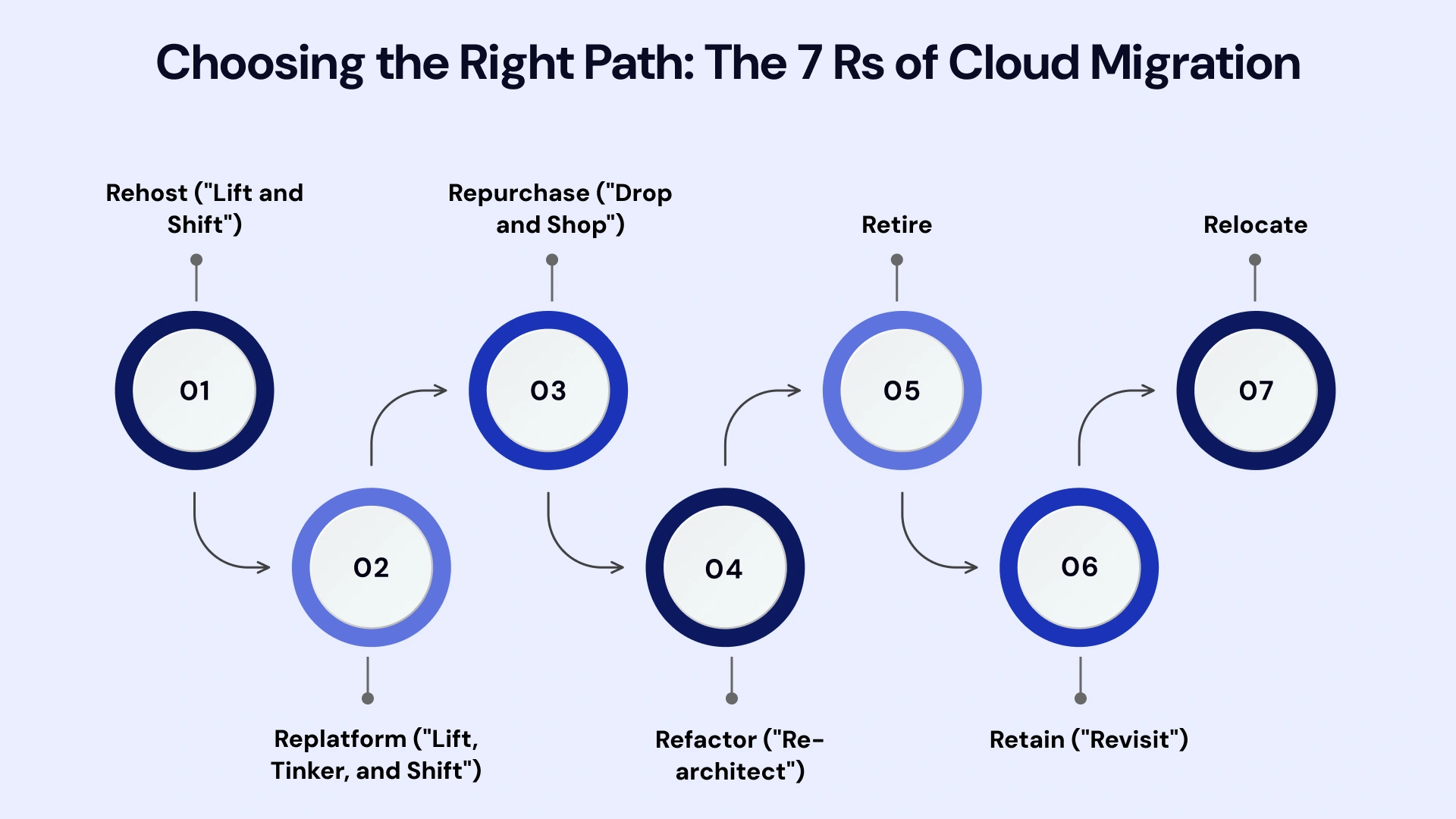
1. Rehost ("Lift and Shift")
Rehosting means moving an application to the cloud with minimal to no changes to its architecture. It's the fastest of the 7 Rs and often the starting point for organizations with tight migration deadlines.
- Real scenario: A retail company running its inventory management system on aging on-premises servers needs to exit a data center lease within six months. Rehosting the application onto cloud virtual machines, with no code changes, lets them meet the deadline and revisit optimization later.
2. Replatform ("Lift, Tinker, and Shift")
Replatforming involves making a few targeted optimizations during the move, like switching to a managed database service- without a full re-architecture.
- Real scenario: A logistics company migrates its order-processing application to the cloud and, during the move, switches its self-managed database to a managed cloud database service, reducing maintenance overhead without rewriting the application itself.
3. Repurchase ("Drop and Shop")
Repurchasing means replacing an existing application with a cloud-native SaaS alternative instead of migrating the original system at all.
- Real scenario: A mid-size company running an outdated, self-hosted CRM decides it's cheaper and more effective to switch to a cloud-based CRM platform entirely, retiring the old system rather than migrating it.
4. Refactor ("Re-architect")
Refactoring means redesigning and rebuilding an application to be cloud-native, often breaking a monolithic system into microservices to take full advantage of cloud scalability.
- Real scenario: A SaaS company's core product was built as a single monolithic application that struggles under peak traffic. Refactoring it into cloud-native microservices lets each component scale independently, improving performance during high-demand periods.
5. Retire
Retiring means identifying applications that are no longer needed and decommissioning them instead of migrating them at all.
- Real scenario: During a Cloud Migration Assessment, an enterprise discovers several internal reporting tools that have been replaced by newer systems but were never formally shut down. Retiring them before migration reduces cost and complexity immediately.
6. Retain ("Revisit")
Retaining means keeping certain applications on-premises for now, either due to compliance requirements, recent investment, or because migration isn't yet worth the cost or risk.
- Real scenario: A healthcare provider keeps a specific patient records system on-premises due to strict data residency regulations, while migrating less sensitive administrative systems to the cloud in the same project.
7. Relocate
Relocating involves moving infrastructure, often virtualized workloads, to the cloud without changing the underlying architecture, commonly used for large-scale infrastructure shifts like moving an entire VMware environment to a cloud-hosted version of the same platform.
- Real scenario: A manufacturing company running a large VMware-based data center relocates its entire virtualized environment to a cloud-hosted VMware platform, preserving existing operations while eliminating physical data center costs.
Cloud Migration Process Explained
Once the right "R" is chosen for each application, the actual Cloud Migration Process follows a fairly consistent structure across most enterprise projects.
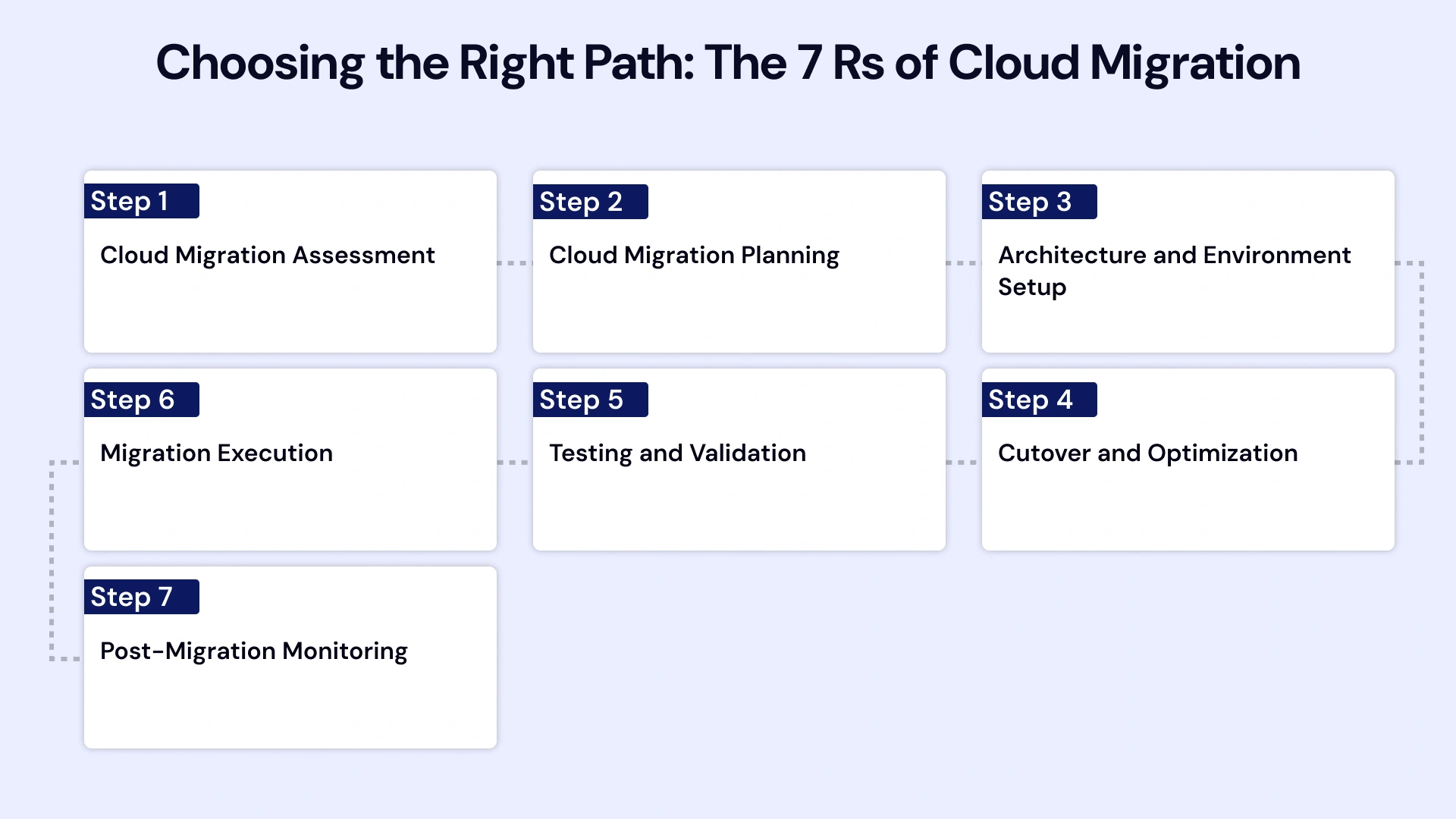
Step 1: Cloud Migration Assessment
Before anything moves, a thorough assessment catalogs every application, its dependencies, performance requirements, and compliance constraints. This step determines which of the 7 Rs applies to each workload.
Step 2: Cloud Migration Planning
With the assessment complete, the team builds a Cloud Migration Roadmap, sequencing which applications move first, estimating timelines, and identifying risk points.
Step 3: Architecture and Environment Setup
The target cloud environment is configured, including networking, security controls, identity management, and any managed services the migration will rely on.
Step 4: Migration Execution
Applications are migrated according to their assigned strategy: rehosted, replatformed, refactored, or otherwise, typically starting with lower-risk workloads before moving to business-critical systems.
Step 5: Testing and Validation
Each migrated application is tested for performance, security, and functionality before being considered production-ready in its new environment.
Step 6: Cutover and Optimization
Traffic is fully shifted to the cloud environment, followed by an optimization phase focused on cost management, performance tuning, and closing any gaps identified during testing.
Step 7: Post-Migration Monitoring
Ongoing monitoring ensures the migrated environment continues performing as expected, with cost and security reviews built into a regular cadence.
Enterprise Cloud Migration: What's Different at Scale
Enterprise Cloud Migration introduces complexity that smaller migrations don't face. Application portfolios are larger, dependencies are deeper, and compliance requirements are often stricter. A few things that typically change at enterprise scale:
- Migration waves become necessary. Instead of migrating everything at once, enterprises typically move applications in planned waves, grouped by dependency and business priority.
- Governance becomes a bigger factor. Enterprise Cloud Transformation projects usually require dedicated governance around cost allocation, security policy, and access control across multiple teams.
- Legacy Application Migration needs extra care. Older, undocumented systems often require deeper discovery work before a migration path can even be chosen.
- Change management matters as much as technical execution. Large migrations affect many teams simultaneously, making communication and training part of the actual project plan, not an afterthought.
Cloud Migration Lifecycle: From Planning to Optimization
It helps to think of cloud migration less as a single project and more as a lifecycle that continues well after cutover. The Cloud Migration Lifecycle typically moves through four broad phases: assessment and planning, migration execution, validation and optimization, and ongoing governance.
Businesses that treat migration as "done" once applications are running in the cloud often miss the biggest gains: cost optimization, performance tuning, and security hardening usually happen in the months after go-live, not during the move itself.
This lifecycle view matters most for organizations planning more than one migration wave. Lessons learned from an early, lower-risk wave- which dependencies were missed, which applications took longer than expected, which team needed more training, should directly shape how later waves are planned.
Skipping this feedback loop is a common reason later migration phases end up repeating the same mistakes as the first.
Common Cloud Migration Challenges (And How to Avoid Them)
Even with a clear framework, a few recurring challenges tend to slow down cloud migration projects:

- Underestimated dependencies. Applications that seem standalone often turn out to be connected to other systems in ways that only surface during migration. A thorough Cloud Migration Assessment catches most of these early, but some only appear during testing, which is why a validation phase matters as much as the migration itself.
- Skills gaps on the internal team. Cloud-native architecture, security configuration, and cost management require different skills from maintaining on-premises infrastructure. This is often the real reason companies bring in a Cloud Migration Consulting Company rather than attempting a large migration entirely in-house.
- Cost surprises after go-live. Cloud spend can climb quickly if resources aren't right-sized or if legacy inefficiencies are carried over during a rehost. Building cost monitoring into the plan from day one, not adding it after the first unexpected bill, keeps this in check.
- Resistance to change from internal teams. Migrations affect how people work day to day, and pushback is common when communication is an afterthought. Framing migration around what improves for end users, not just infrastructure, tends to ease adoption.
Cloud Migration Best Practices
A few Cloud Migration Best Practices show up consistently across successful projects, regardless of company size:
- Start with a full application inventory before deciding on any migration approach; you can't strategize what you haven't assessed.
- Prioritize by business impact and complexity, not by what's easiest to move first.
- Avoid rehosting everything by default. It's fast, but skipping optimization opportunities can mean paying cloud costs for on-premises inefficiencies.
- Build in rollback plans for critical applications in case a migrated workload doesn't perform as expected.
- Treat cost monitoring as ongoing, not a one-time check after migration completes.
How to Choose a Cloud Migration Consulting Partner
For most mid-size and enterprise businesses, cloud migration isn't a project to run entirely in-house, especially when legacy systems, compliance requirements, or a large application portfolio are involved. Here's what to look for in a Cloud Migration Consulting Services provider:
- Assessment-first approach. A trustworthy partner starts with a genuine Cloud Migration Assessment rather than pushing straight into execution.
- Experience across all 7 Rs, not just rehosting. Some providers default to lift-and-shift because it's faster to deliver; ask specifically about their experience with refactoring and replatforming.
- Industry and compliance familiarity. If you're in healthcare, finance, or another regulated industry, confirm the provider understands the relevant data residency and compliance requirements.
- Clear cost forecasting. A capable partner should help forecast cloud costs before migration, not just after the bill arrives.
- Post-migration support. Migration doesn't end at cutover; ongoing optimization and monitoring should be part of the engagement, not a separate negotiation later.
Leverage VLink's Expertise for a Smooth Cloud Migration
Planning a cloud migration around the 7 Rs framework is one thing; executing it without disrupting daily operations is another. VLink’s cloud migration team works through a structured, assessment-first process: mapping your full application portfolio, identifying the right migration path for each workload, and sequencing the move to minimize downtime and risk.
Whether you're rehosting a handful of applications to exit a data center lease or planning a full Enterprise Cloud Transformation across a complex application portfolio, VLink's approach combines technical migration work with practical cost forecasting and post-migration optimization.
For businesses that need Cloud Migration Consulting Services grounded in real assessment rather than a one-size-fits-all playbook, explore VLink's cloud consulting services and cloud infrastructure services to see how this framework applies to your specific environment.
In Summary
Cloud migration works best when it's treated as a set of deliberate decisions, not a single technical move. The 7 Rs framework (Rehost, Replatform, Repurchase, Refactor, Retire, Retain, and Relocate) gives teams a practical way to match each application to the right migration path based on its actual needs, rather than defaulting to whatever's fastest.
Getting there starts with a proper Cloud Migration Assessment, followed by a roadmap that sequences work around business priority and risk. Whether you're managing a handful of applications or planning an Enterprise Cloud Migration across hundreds of systems, the businesses that succeed are the ones that plan first and migrate second; with a partner who understands that not every application needs the same solution.
Reach out to our cloud experts to start mapping your migration strategy today.

Vice President, Strategy – VLink Inc.
Sambhavi Gopalakrishnan is the Vice President of Strategy at VLink Inc., bringing over a decade of experience in IT leadership, project implementation, and strategic growth. She possesses a strong foundation in technical project management and pre-sales, driving innovation and business transformation at VLink.

 Shivisha Patel