

Your WebSphere environment is running. Your business depends on it. And yet, every day it stays untouched, the risk quietly compounds.
IBM WebSphere applications migration is no longer a "someday" project. It is a present-day boardroom conversation—especially for Indian enterprises in BFSI, telecom, insurance, and government services, where a single unplanned outage can wipe out millions in revenue and erode customer trust built over decades.
Here is what the data says:
- Businesses that moved from WebSphere Traditional to Liberty reported 30–40% lower memory consumption and 50% faster startup times. (IBM Lab Benchmarks)
The challenge is not whether to migrate. It is how to do it without disrupting the systems that keep your enterprise running 24/7. This guide gives Indian enterprise leaders a clear, strategic answer to that question. Let’s start!
Why Legacy WebSphere Applications Are Holding Enterprises Back
As organizations move toward cloud-native architectures, legacy WebSphere environments are becoming one of the most significant bottlenecks to digital transformation. Here is why legacy WebSphere applications are holding enterprises back:
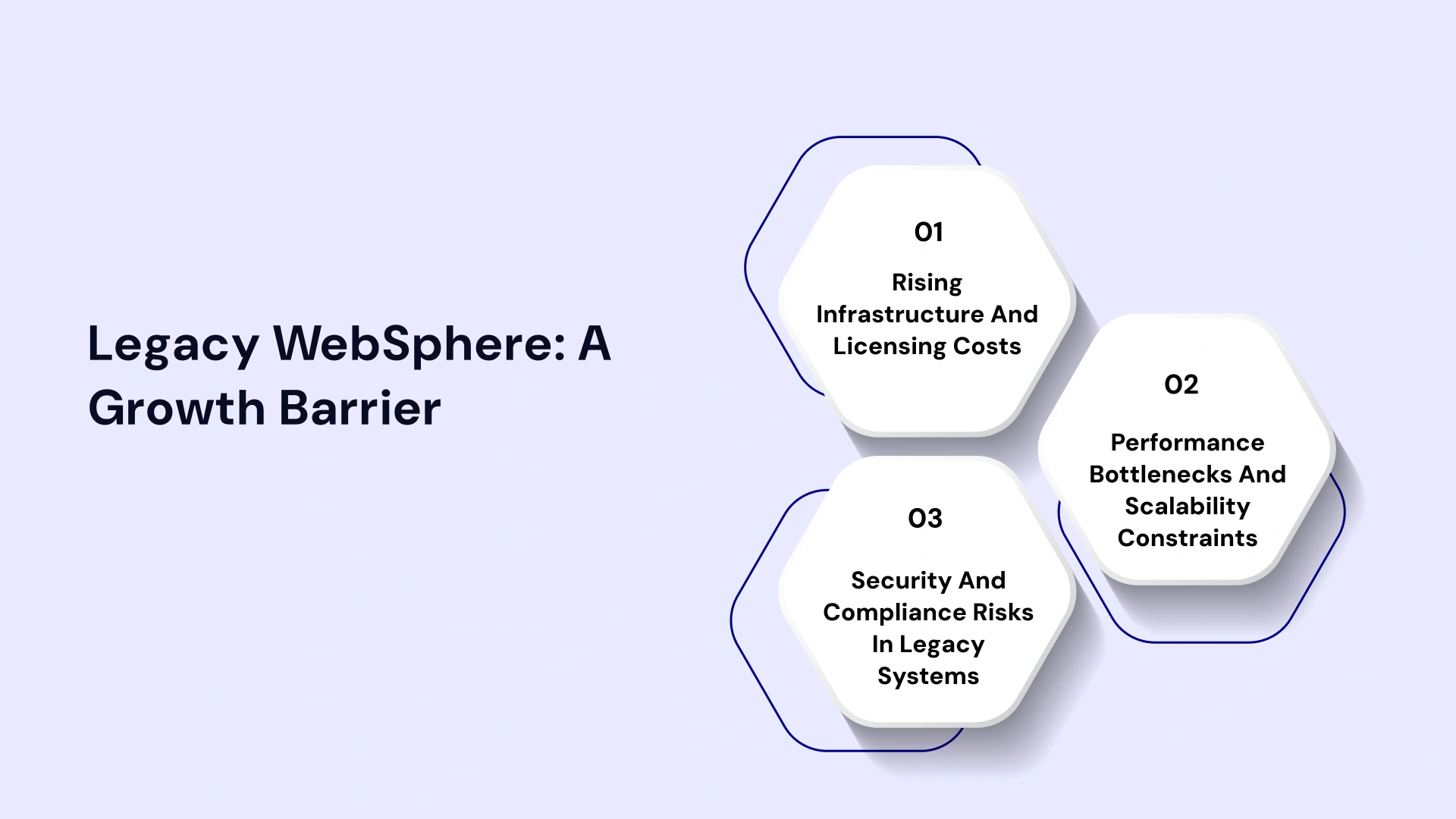
Rising Infrastructure and Licensing Costs
Running older versions of IBM WebSphere Application Server is expensive. Licensing fees, extended support contracts, and the hardware required to maintain aging infrastructure add up fast. For large Indian banks and insurers running WebSphere ND clusters across multiple data centres, the annual cost of inaction often exceeds the cost of a well-planned migration.
IBM WebSphere end-of-support timelines are tightening. WebSphere Traditional 8.5.5 support has a defined sunset. After that date, your team owns every vulnerability, every patch, and every compliance risk—alone.
Performance Bottlenecks and Scalability Constraints
Legacy IBM WebSphere application server architectures were built for a different era. They were designed for predictable, single-tenant workloads—not for the kind of burst-and-scale reality Indian digital platforms face today. When UPI transaction volumes spike during Diwali or IPL season, monolithic WebSphere deployments struggle to respond. Autoscaling in a containerized environment is simply not possible in traditional cell-and-node topologies.
Security and Compliance Risks in Legacy Systems
The RBI's IT Framework for Banks, IRDAI regulations, and SEBI's cybersecurity circulars all demand current, patched, and auditable infrastructure. Legacy WebSphere environments with outdated JDKs and unsupported third-party libraries are audit liabilities. For Indian enterprises managing customer financial data, this is not just a technical debt problem—it is a regulatory risk.
What Does "Zero-Downtime WebSphere Migration" Really Mean?
Before diving into strategy, let us align on the definition. Not every migration delivers the same level of continuity.
Downtime vs Near-Zero Downtime vs Continuous Availability
Category | Definition | Typical Use Case |
| Full Downtime | The system is offline during migration window | Low-traffic internal apps |
| Near-Zero Downtime | Sub-30-minute maintenance window, planned | Mid-tier enterprise apps |
| Zero Downtime | No user-visible interruption at any point | Banking portals, payments, e-commerce |
| Continuous Availability | Active-active across environments with live failover | Tier-1 mission-critical systems |
For most Indian enterprise CIOs managing BFSI or telecom platforms, the target is zero downtime or continuous availability. Anything less is unacceptable to regulators and customers alike.
Key Technical Considerations
Achieving zero downtime in WebSphere applications migration requires solving three hard problems simultaneously:
- Session persistence — users must not be logged out or lose transaction state during the switchover.
- Data synchronisation — both old and new environments must read and write to a consistent data layer during the transition period.
- Traffic routing — intelligent load balancing must shift traffic gradually and reversibly between the legacy and modern environments.
Common Challenges in WebSphere Applications Migration
Here are the most common challenges encountered during WebSphere migrations:
Monolithic Architectures and Tight Coupling
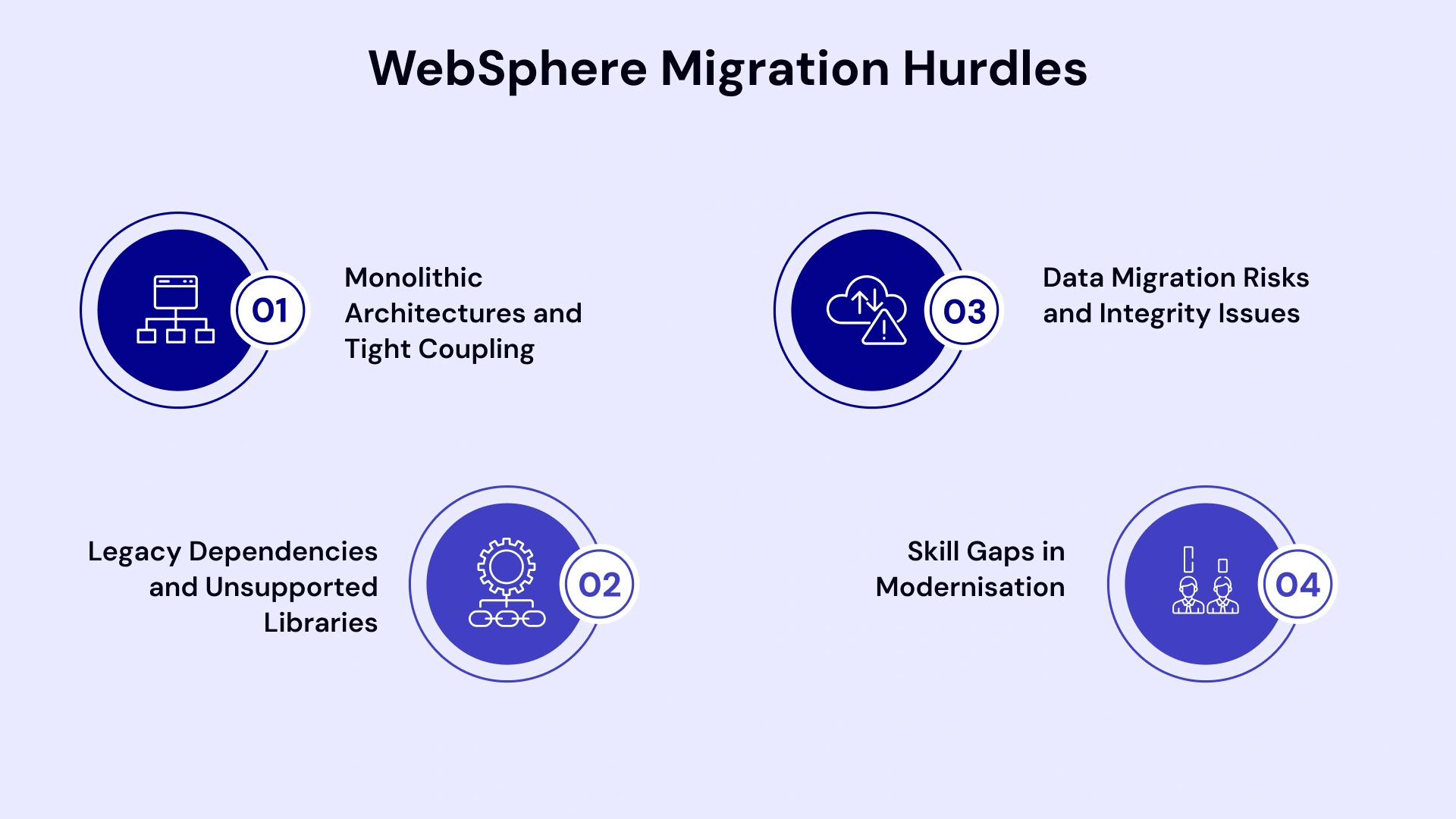
Most legacy IBM WebSphere applications were not designed for modularity. Business logic, UI layers, integration connectors, and database access are often tightly interwoven across hundreds of EAR and WAR files. Pulling one thread risks unravelling the entire fabric.
This is why IBM Transformation Advisor exists—to scan your deployable artefacts and produce a complexity score before you commit a single line of migration work.
Legacy Dependencies and Unsupported Libraries
Many Indian enterprise WebSphere environments have been running for 10–15 years. They carry proprietary IBM APIs that do not exist in Liberty, old JDK 6 or 7 dependencies, ESB integrations, MQ configurations, and CICS connections for mainframe-linked banking systems. These are not documented in any standard IBM migration guide. They require experienced IBM WebSphere expert engineers who have seen these environments before.
Data Migration Risks and Integrity Issues
Moving your application is only half the problem. If your database layer is not migrated or synchronised correctly, you face data integrity failures that are nearly impossible to detect until a customer's transaction is lost or duplicated.
Skill Gaps in Modernisation
Finding engineers who understand both legacy J2EE programming models and modern Kubernetes-based container orchestration is genuinely difficult. A WebSphere application developer who also knows OpenShift is rare. This is precisely why many Indian enterprises use IT staff augmentation services to bridge the talent gap during migration projects rather than trying to reskill existing teams alone.
Decision Framework: Choosing the Right WebSphere Migration Strategy
Not every enterprise needs the same approach. Your WebSphere migration strategy should be determined by the complexity of your estate, your risk tolerance, your target architecture, and your timeline.
The Four Migration Paths
Strategy | What It Means | Best For | Downtime Risk | ROI Speed |
| Rehost (Lift & Shift) | Move WebSphere to cloud VMs as-is | Fast migration, lower ROI | Medium | 6–12 months |
| Replatform | Move to Liberty or containers without code changes | Best balance of speed and value | Low | 12–18 months |
| Refactor | Redesign apps for cloud-native/microservices | Highest long-term value | Very Low | 18–36 months |
| Rebuild | Rewrite in a modern stack | Greenfield or EOL apps | Near Zero | 36+ months |
For most Indian enterprise environments, Replatform to Liberty or Containers is the sweet spot. It gives you the benefits of modern infrastructure—autoscaling, DevOps pipelines, containerisation—without the cost and risk of a full rewrite.
When evaluating whether to migrate from WebSphere to Tomcat or migrate from WebSphere to JBoss, consider Java EE compliance requirements. Liberty supports full Jakarta EE and MicroProfile, which means you can modernise without abandoning your existing investment in Java EE APIs.
Migration Readiness Matrix
Before choosing a path, assess readiness across these five dimensions:
- Application complexity — How many EAR/WAR files? Any proprietary IBM APIs?
- Data volume and type — Transactional databases, message queues, file stores?
- Integration dependencies — MQ, ESB, CICS, SAP, third-party APIs?
- Team capability — Do you have Liberty, container, and cloud migration services expertise in-house?
- Compliance requirements — RBI, IRDAI, SEBI data residency and audit requirements?
Step-by-Step Approach to Migrate WebSphere Applications Without Downtime
This is the core of the playbook. Follow these six phases in order. Skipping steps is how migrations fail.
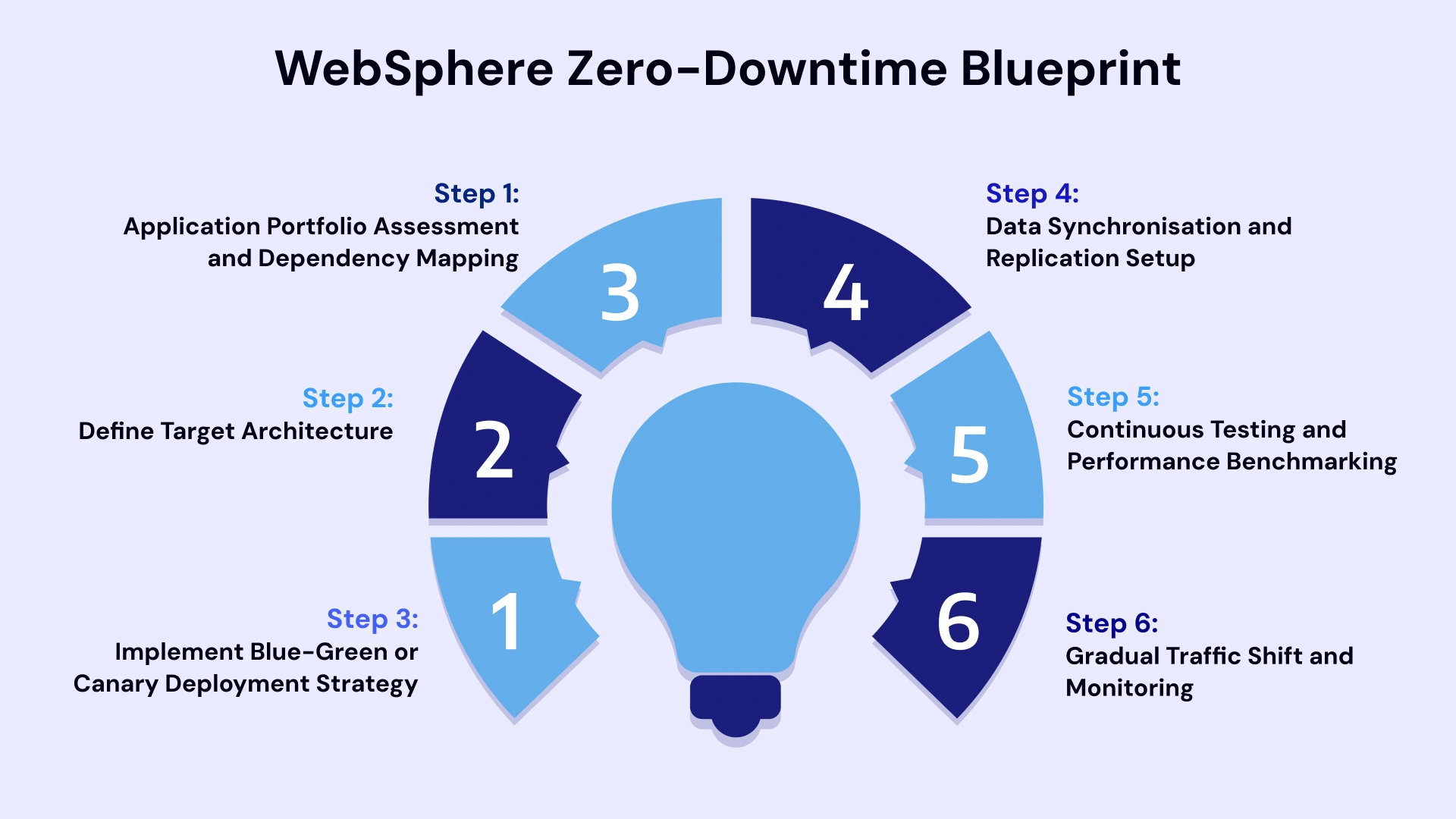
Step 1: Application Portfolio Assessment and Dependency Mapping
Start here—before any infrastructure decisions. Use the IBM WebSphere Application Server Migration Toolkit (also called the IBM WebSphere Migration Toolkit) to scan your source code and binaries. It identifies deprecated APIs, non-portable constructs, and migration complexity scores per application.
Simultaneously, document every integration point: MQ queues, JNDI data sources, security configurations, web service endpoints, and LDAP connections. Build a dependency map. This is your migration blueprint.
Deliverable: A prioritised application portfolio with complexity ratings—High, Medium, Low. Begin with Low-complexity apps to build team confidence and refine the process.
Step 2: Define Target Architecture
Based on your migration path decision, define the target state clearly:
- Liberty on-premises — best for regulated industries with data residency requirements
- Liberty on OpenShift/Kubernetes — best for teams ready for cloud-native operations
- Migrate WebSphere to Azure VMs — best for enterprises already in the Microsoft cloud
- Hybrid — legacy apps stay on-prem; new services deploy to cloud
This is also the stage to design your high availability migration architecture. Define your load balancer strategy, session replication configuration, and database connection pool settings for the new environment.
Step 3: Implement Blue-Green or Canary Deployment Strategy
This is the mechanism that gives you zero downtime.
- Blue-Green Deployment runs two identical environments simultaneously. Blue is your current live production WebSphere environment. Green is the new Liberty or containerised environment. A load balancer (F5, NGINX, or a cloud-native Ingress controller) routes traffic. You switch 100% of traffic to Green only after full validation. If anything fails, one command reverts to Blue.
- Canary Deployment is more gradual. Start by routing 5% of traffic to the new environment. Monitor error rates, response times, and transaction success rates. If metrics are healthy, increase to 10%, then 25%, then 50%, then 100%. This approach is ideal for transaction-heavy banking and payments platforms where even a 1% error rate is unacceptable.
Step 4: Data Synchronisation and Replication Setup
While your two environments are running in parallel, data must stay consistent. Use Change Data Capture (CDC) tools to replicate database writes from the new Green environment back to the Blue environment in real time. This ensures that if a rollback is needed, no customer data is lost.
For session state, implement a distributed cache layer using Redis or Infinispan. Decouple session data from the application server entirely. Both Blue and Green environments read from the same session store. Users never experience a logout during the switchover.
Step 5: Continuous Testing and Performance Benchmarking
Do not migrate without testing under load. Run your regression suite, functional tests, and performance benchmarks against the Green environment before routing any production traffic.
Key metrics to validate:
- Response times at P95 and P99 under production-equivalent load
- Transaction throughput (TPS)
- JVM heap utilisation and garbage collection behaviour
- Error rates on all API endpoints
For Indian banking platforms, include tests that simulate UPI spike scenarios—transactions-per-second rates 5–10x normal load.
Step 6: Gradual Traffic Shift and Monitoring
Execute your Canary or Blue-Green cutover during a low-risk window. Monitor dashboards for the first 24–48 hours after reaching 100% on the new environment. Keep the Blue environment on standby for a minimum of 72 hours before decommissioning it.
Define rollback triggers clearly before you start. If error rates exceed a threshold or if a critical transaction type fails, the team must execute a rollback without a leadership approval chain, slowing the process down.
Proven Zero-Downtime Migration Strategies for WebSphere
The most effective Zero-Downtime Migration strategies for 2026 are as follows:-
Blue-Green Deployment
As described above, Blue-Green is the simplest zero-downtime deployment pattern. It requires duplicating your infrastructure temporarily, which increases cost for 2–4 weeks. For mission-critical systems, this cost is well justified.
Canary Releases
Canary is better suited for complex applications where full validation before cutover is not possible. It manages risk by limiting the blast radius. If the new environment has a defect, only 5% of users experience it while you fix and redeploy.
Strangler Fig Pattern for Incremental Modernisation
The Strangler Fig is the gold standard for legacy IBM WebSphere modernisation when a full migration in one shot is too risky. Instead of migrating the entire application at once, you build new microservices around the edges of the legacy system. Over 12–24 months, new functionality is built in Liberty or containers. Old WebSphere modules are decommissioned module by module. Eventually, the legacy system is "strangled" and retired.
This pattern works exceptionally well for Indian banks migrating their retail banking platforms. The core banking system stays untouched while peripheral services—mobile banking APIs, notification services, UPI integrations—are gradually containerised.
WebSphere Containerisation with Kubernetes
WebSphere containerisation involves packaging Liberty applications as Docker images and deploying them on Kubernetes or Red Hat OpenShift. IBM provides official Liberty container images optimised for Kubernetes. This approach delivers autoscaling, self-healing deployments, and infrastructure-agnostic portability—critical capabilities for Indian enterprises managing variable traffic loads.
WebSphere to Liberty migration is IBM's officially recommended modernisation path. Liberty supports the full MicroProfile specification, which is a cloud-native evolution of Java EE that allows IBM integration developers to use modern tooling and CI/CD pipelines while running the same Java EE business logic.
Real-World Case Study: Modernizing a Legacy Banking Portal
Scenario: A major private Indian bank is migrating a high-volume retail banking portal.
1. The High-Stakes Challenge
The bank's portal ran on WebSphere Network Deployment (ND) 8.5.5, processing over 2 million UPI transactions daily.
- The Trigger: A combination of "End of Support" timelines and a critical security audit.
- The Constraint: 24/7 availability was non-negotiable. Any downtime would trigger RBI regulatory scrutiny, customer backlash, and immediate revenue loss.
2. The Strategy: Hybrid Cloud & Incremental Refactoring
Instead of a single "cut-over," the bank adopted a phased migration to WebSphere Liberty on OpenShift within its RBI-compliant, on-premises data center.
- Discovery & Analysis: The team used IBM Transformation Advisor to scan 47 EAR files. By categorizing them by complexity, they prioritized 12 "low-complexity" apps for the first wave of migration.
- Solving Session Persistence: To move users between the legacy WAS cluster and the new Liberty containers without logging them out, they implemented Distributed Redis Caching. This allowed the session state to live outside the application server.
- Data Integrity: They used Change Data Capture (CDC) replication. This ensured that the legacy database and the modernized cloud database remained in perfect sync during the weeks both systems were running in parallel.
3. The Execution: The Canary Rollout
The bank utilized a "Canary" deployment model to mitigate risk:
- Initial Wave: Diverted only 5% of traffic to the new Liberty environment.
- Validation: Monitored performance and error rates for a 48-hour soak period.
- Expansion: Gradually incremented traffic in stages (10%, 25%, 50%) over three weeks until 100% was reached.
4. The Business & Technical Outcome
The migration was completed with zero dropped transactions. By the end of the project, the bank achieved:
- Infrastructure Efficiency: A 40% reduction in costs after decommissioning the bulky legacy WAS cluster.
- Agility: Deployment cycles for new features became 60% faster due to the containerized CI/CD pipeline.
- Compliance: Maintained full alignment with the RBI IT framework throughout the transition.
Tools and Technologies That Simplify WebSphere Migration
Modernizing WebSphere applications in 2026 is no longer a manual "guess-and-check" process. IBM and the broader ecosystem have released highly automated tools that can reduce migration time by up to 80%.
Here are the essential tools and technologies categorized by their role in the migration lifecycle.
IBM WebSphere Application Server Migration Toolkit
The WebSphere Application Server Migration Toolkit is a free Eclipse-based tool from IBM. It has two core components:
- Migration Toolkit for Application Binaries — scans compiled EAR/WAR files without needing source code. Produces a report of migration issues and their severity.
- WebSphere Application Migration Tool (source) — scans source code and flags deprecated IBM APIs, proprietary constructs, and migration tasks with fix suggestions inline in the IDE.
This toolkit supports all major migration paths: version-to-version WAS upgrades, WebSphere to Liberty, and third-party server to WebSphere migrations (including migrating from WebSphere to JBoss and migrating from WebSphere to Tomcat paths).
IBM Transformation Advisor
Part of IBM Cloud Pak for Applications, Transformation Advisor connects directly to a running WebSphere environment, analyses deployed applications in production and produces a migration plan with effort estimates. It is the recommended starting point for any IBM WebSphere banking platform migration or large enterprise modernisation programme. IBM WebSphere migration is complex—IBM solutions for enterprise modernization include Liberty and cloud options.
Container Platforms
Red Hat OpenShift (on-prem or cloud), AWS EKS, and Azure Kubernetes Service (AKS) are the three most common target platforms for WebSphere containerisation in Indian enterprises. Choose based on your existing cloud vendor relationships and data residency requirements.
Automation and DevOps Tools
Jenkins, GitLab CI, and Tekton pipelines integrate natively with Liberty deployments on Kubernetes. Introducing CI/CD pipelines as part of the migration—not as a separate initiative—dramatically improves post-migration velocity.
Cost Considerations for WebSphere Migration in India
Transparency on cost is rare in migration discussions. Here is an honest breakdown.
Factors That Affect IBM WebSphere Migration Cost
Factor | Impact on Cost |
| Number of applications | Linear cost driver — more apps, more assessment and testing effort |
| Code complexity | Proprietary IBM APIs and mainframe integrations are expensive to untangle |
| Infrastructure target | On-prem Liberty is cheaper upfront; cloud has higher OPEX but lower CAPEX |
| Team composition | Staff augmentation reduces ramp-up cost vs hiring permanent WebSphere experts |
| Timeline | Compressed timelines require larger parallel teams and drive costs up |
| Testing automation | Higher upfront investment in automated regression testing reduces risk and cost significantly |
Hidden Costs of Doing Nothing
Organisations often compare migration costs to the cost of maintaining the status quo. But the status quo is not static. Extended support contracts, security patching overhead, and the productivity cost of developers working in a legacy environment all compound annually.
The Forrester Total Economic Impact study on IBM WebSphere Hybrid Edition found a 188% ROI over three years, driven primarily by infrastructure cost reduction and developer productivity gains.
Rough Timeline Expectations for Indian Enterprises
- Small estate (under 20 apps, low complexity): 4–8 months
- Mid-size estate (20–60 apps, mixed complexity): 10–18 months
- Large enterprise (60+ apps, high complexity, banking/insurance): 18–36 months with phased delivery
Internal Readiness Checklist Before You Start Migration
Use this checklist to assess whether your organisation is ready to begin. Gaps should be closed before the migration programme launches.
Technology Readiness
- IBM Transformation Advisor scan completed on all production WAS environments
- Application dependency map documented (MQ, JNDI, LDAP, ESBs, databases)
- Target architecture designed (Liberty, containers, cloud, hybrid)
- Load balancer strategy defined for Blue-Green or Canary deployment
- Database CDC tooling evaluated and licensed
- Distributed caching solution selected (Redis, Infinispan)
Team and Skill Readiness
- Certified IBM WebSphere experts assigned to the programme
- Liberty and container skills available in-house or via staff augmentation
- DevOps/CI-CD pipeline capability in place or planned
- Test automation coverage above 60% for critical applications
Business Continuity Planning
- Rollback procedures documented and tested
- RTO and RPO targets defined for migration windows
- Stakeholder communication plan in place
- Regulatory notification requirements understood (RBI, IRDAI as applicable)
- Go/No-Go decision criteria and rollback triggers defined
Mastering WebSphere Migration with VLink's Expertise
Migrating legacy IBM WebSphere environments is not a commodity service. It requires deep hands-on experience with IBM WebSphere application server architecture, Liberty, container platforms, and the regulatory context of Indian enterprise IT.
VLink brings certified IBM WebSphere expert engineers who have executed WebSphere applications migration programmes for Indian banks, insurance companies, and large-scale e-commerce platforms. Our teams operate as an extension of your enterprise—combining deep legacy expertise with modern cloud-native skills.
Whether you need to hire IBM WebSphere developers for a short-term migration sprint, build a dedicated team for a 24-month modernisation programme, or augment your existing team with Liberty and Kubernetes skills, VLink's IT staff augmentation services in India give you the talent precision that generic staffing firms cannot match.
Our structured WebSphere migration framework covers the full lifecycle:
- Discovery and Assessment using IBM Transformation Advisor and the WebSphere Application Server Migration Toolkit
- Architecture Design for zero downtime deployment using Blue-Green, Canary, and Strangler Fig patterns
- Execution with dedicated teams or staff augmentation models
- Post-Migration Optimisation including DevOps pipeline setup, observability tooling, and performance tuning
For Indian BFSI enterprises navigating RBI compliance alongside IBM WebSphere banking platform migration, our IBM BPM for Indian banks guide provides additional regulatory and architectural context.
We also support enterprises migrating to Azure, AWS, and on-premises OpenShift through our Cloud Migration Services. And for organisations needing specialised integration talent, our Hire IBM Integration Developers capability covers IBM Integration Bus, MQ, and DataPower environments that are commonly coupled with legacy WebSphere deployments.
Conclusion: Future-Proof Your Enterprise Without Disruption
Legacy IBM WebSphere applications migration is not a project to defer. IBM WebSphere end-of-support timelines, escalating maintenance costs, and the competitive pressure to deliver digital services at the speed your customers expect have converged into a single, urgent mandate: modernise now, but do it right.
The good news is that zero downtime is achievable. With the right WebSphere migration strategy—whether Blue-Green, Canary, Strangler Fig, or a combination of all three—Indian enterprises can move off legacy WebSphere without disrupting the systems that generate revenue and serve customers.
The organisations that will win in India's next wave of digital growth are the ones that stop spending 80% of their IT budget on legacy maintenance and start investing in the velocity, scalability, and resilience of cloud-native platforms.
Migration is a complex journey, but it doesn't have to be a leap of faith. Eliminate the uncertainty of downtime and regulatory risk with a proven transition framework. Connect with a VLink WebSphere Expert for a complimentary 30-minute strategy session.

Global Delivery Manager, VLink Inc.
Shivisha Patel serves as the Global Delivery Manager at VLink Inc., bringing a wealth of experience in program delivery and management, particularly in the insurance and banking sectors. She has a robust technical background with deep expertise in WebSphere MQ, WTX, IIB, middleware, and enterprise system integration.

 Shivisha Patel