


Cloud migration is often sold as a straightforward upgrade — pack up your workloads, ship them to AWS, Azure, or Google Cloud, and watch your infrastructure bills shrink. In reality, it rarely works that way. Every year, thousands of mid-market and enterprise organizations discover that a rushed or poorly planned migration can quietly inflate costs, break compliance postures, and stall the very digital transformation it was meant to accelerate.
After more than a decade of guiding CTOs, CFOs, and IT operations leaders through cloud strategy engagements across the US, Canada, and India, one pattern shows up again and again: the technology rarely fails — the planning does. Businesses that treat migration as a "lift-and-shift copy-paste job" instead of an operational transformation end up paying for it in surprise egress charges, idle compute, security gaps, and missed deadlines.
This guide breaks down the ten most common — and most expensive — cloud migration mistakes businesses make, why they happen, and exactly how to avoid them, along with the warning signs that tell you a migration is already going off track. Whether you're a CTO worried about unpredictable AWS bills, a CFO trying to reconcile CapEx-to-OpEx confusion, or a CISO concerned about data egress and compliance pitfalls, this post is built for you.
Why Cloud Migration Projects Go Off the Rails
Search interest around terms like "cloud migration mistakes," "cloud migration failures," and "cloud migration risk management" has surged over the past few years — and for good reason. Gartner and multiple industry surveys consistently point to the same finding: a large share of cloud migrations exceed their original budget, and a significant portion fail to deliver the promised ROI within the expected timeframe.
The pattern is predictable. Leadership approves a migration budget based on vendor pricing calculators. Engineering teams begin moving workloads as fast as possible to hit a deadline. Six months later, the CFO is staring at a cloud bill that's 30-40% higher than projected, the CISO is fielding questions about a compliance gap nobody flagged, and the CTO is explaining why "cheaper cloud infrastructure" somehow became more expensive than the legacy data center it replaced.
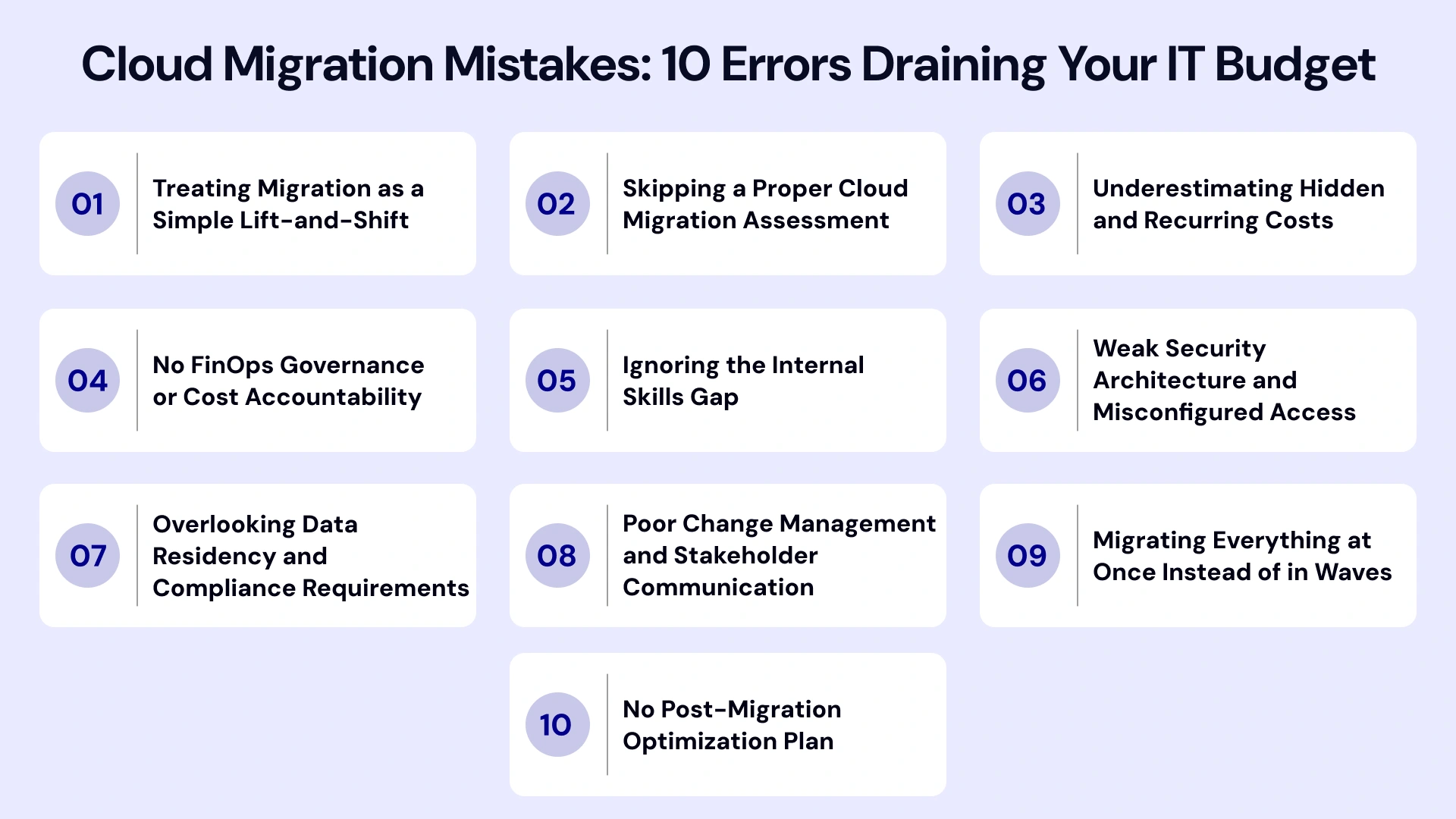
None of this is inevitable. It's the result of specific, well-documented mistakes that repeat across industries and company sizes — from Series B startups migrating off a single VPS provider to enterprise organizations decommissioning decades-old data centers. Below, we break down the 10 most costly ones in depth — the root cause, the financial and operational impacts.
10 Critical Cloud Migration Mistakes to Avoid
Migrating to the cloud promises unparalleled scalability, enhanced agility, and long-term operational efficiency. However, treating cloud migration services as a simple lift-and-shift IT task rather than a strategic business transformation often leads to budget overruns, security vulnerabilities, and unexpected downtime.
To help you protect your bottom line and ensure a seamless transformation, we have broken down the ten most common and costly cloud migration mistakes businesses make—and how your team can avoid them.
1. Treating Migration as a Simple Lift-and-Shift
The single most expensive cloud migration mistake is assuming that moving a workload "as-is" from on-premises to the cloud is a finished migration. Lift-and-shift — technically called "rehosting" — can be a valid starting phase when speed matters more than optimization, such as during a data center lease expiration or an urgent hardware end-of-life deadline. The problem arises when businesses treat it as the entire strategy instead of phase one of a longer roadmap.
Why it happens:
Lift-and-shift is the fastest, lowest-risk way to demonstrate migration progress to leadership. Engineering teams under deadline pressure default to it because it requires the least amount of re-engineering. Vendor sales teams also tend to emphasize migration speed over long-term architecture fit, since a fast "yes" closes the deal.
The real cost:
When a virtual machine that was over-provisioned on-premises gets rehosted as-is in the cloud, you're now paying elastic, metered pricing for static, oversized infrastructure. A server sized for a hypothetical peak load that occurs twice a year still runs — and bills — at that size 24/7/365. Multiply this across dozens or hundreds of workloads, and the "cloud savings" leadership was promised evaporate into a bill that's often higher than the legacy data center cost.
How to avoid this mistake:
- Classify every workload using the "6 R's" framework (Rehost, Replatform, Repurchase, Refactor, Retain, Retire) before migration, not after.
- Set a hard internal rule: any workload rehosted "as-is" gets a re-architecture review scheduled within 90 days of migration, not left indefinitely.
- Right-size instances using actual historical utilization data, not on-premises capacity assumptions inherited from a decade-old procurement decision.
- Prioritize containerization and managed services (databases, queues, caching layers) for workloads with long-term strategic value, since these unlock auto-scaling and reduce operational overhead.
This is precisely why "cloud migration strategy" and "cloud migration planning" rank among the highest-intent search terms in this space — businesses are actively searching for a smarter path than the one they were sold.
2. Skipping a Proper Cloud Migration Assessment
Many teams jump straight into migration execution without a structured discovery and assessment phase. This means nobody has mapped application dependencies, data flows, licensing constraints, or compliance requirements before workloads start moving — and that gap doesn't surface until something breaks mid-migration.
Why it happens:
Assessment feels like "overhead" to stakeholders eager to see progress. It's common for leadership to greenlight a target go-live date before the assessment phase is even scoped, which then compresses discovery into a rushed, incomplete exercise.
The real cost:
Undiscovered dependencies are the number one cause of mid-migration outages. An application that quietly depends on a legacy on-premises authentication server, an undocumented cron job, or a hardcoded IP address will fail the moment its environment changes — and the team won't know why until customers start reporting errors. Licensing is another blind spot: many enterprise software licenses (databases, ERPs, security tools) have cloud-specific terms, and moving without reviewing them can trigger unplanned re-licensing costs or compliance violations.
How to avoid this mistake:
- Run automated dependency mapping using tools like AWS Application Discovery Service, Azure Migrate, or Google Cloud Migration Center before finalizing any migration wave sequencing.
- Interview application owners directly — automated discovery tools miss undocumented manual processes and tribal knowledge that only long-tenured staff remember.
- Audit software licensing agreements for cloud-specific clauses (BYOL vs. cloud-native licensing) well before migration to avoid last-minute compliance surprises.
- Build a dependency map that visually shows which applications talk to which — this becomes your wave-sequencing blueprint.
3. Underestimating Hidden and Recurring Costs
This is where CFOs get blindsided. The base subscription or compute pricing on a vendor's calculator rarely reflects the real bill. Data egress fees, cross-region transfer charges, premium support tiers, snapshot storage, and idle reserved instances can quietly add up to a significant percentage of total spend — often catching finance teams completely off guard when the first full billing cycle lands.
Why it happens:
Cloud pricing calculators are designed to showcase best-case compute costs, not the full operational picture. Egress fees in particular are asymmetric — cloud providers make it cheap (often free) to move data in, but charge meaningfully to move data out or across regions, which most teams don't model until they're already locked in.
The real cost breakdown:
- Data egress and cross-region transfer: Moving large datasets between regions or out to end users/other clouds can become one of the largest unplanned line items, especially for media-heavy or data-intensive applications.
- Idle and orphaned resources: Unattached storage volumes, unused snapshots, forgotten test environments, and idle load balancers accumulate silently and rarely get cleaned up without active governance.
- Premium support and managed service tiers: Many teams underestimate the cost of enterprise support plans, which can run into thousands of dollars per month depending on usage tier.
- Reserved capacity mismatches: Committing to reserved instances or savings plans based on early estimates, then over- or under-provisioning as actual usage patterns emerge.
How to avoid this mistake:
- Build a total cost of ownership (TCO) model that explicitly includes egress, storage tiering, licensing, and support costs — not just compute.
- Establish monthly cost reviews using tools like AWS Cost Explorer or Azure Cost Management from day one, not after the first shocking invoice arrives.
- Set up automated alerts for orphaned resources (unattached volumes, idle load balancers) using native cloud governance tools or third-party platforms like CloudHealth.
- Model egress costs specifically for any workload involving large-scale data transfer, backup replication, or multi-cloud/hybrid architecture.
4. No FinOps Governance or Cost Accountability
A recurring theme among mid-market CTOs and VPs of Engineering is the fear of unpredictable cloud bills. This almost always traces back to one root cause: nobody owns cloud spend accountability. Without tagging standards, budget alerts, or a defined FinOps practice, cost visibility disappears the moment migration is "complete," and spend drifts upward with no one accountable for catching it.
Why it happens:
FinOps is a relatively new discipline, and many organizations still treat cloud spend as an IT line item rather than a cross-functional responsibility shared by engineering, finance, and product teams. Without a dedicated owner, cost optimization becomes "everyone's job," which in practice means it's no one's job.
The real cost:
Without accountability, engineering teams have no incentive to right-size resources, decommission unused environments, or evaluate reserved capacity — because nobody is measuring or reporting on it. Finance teams, meanwhile, are stuck reconciling a variable monthly bill against a fixed budget with no way to explain fluctuations to leadership.
How to avoid this mistake:
- Stand up a lightweight FinOps function — even a single dedicated owner — before migration begins, following the FinOps Foundation's Inform-Optimize-Operate lifecycle.
- Enforce mandatory resource tagging (by team, project, or cost center) from the very first workload migrated, since retrofitting tags across an existing environment is far more painful.
- Set automated budget alerts and anomaly detection thresholds so cost spikes are caught within days, not at the end of a billing cycle.
- Review unit economics (cost per customer, per transaction, or per workload) monthly to connect cloud spend directly to business value, not just raw dollar totals.
5. Ignoring the Internal Skills Gap
Cloud-native architecture, containerization, Infrastructure as Code, and managed service configuration require different skill sets than traditional on-premises IT administration. When IT Operations teams are expected to manage a cloud environment using legacy playbooks, the result is misconfiguration, extended downtime, and cloud migration security vulnerabilities that often aren't discovered until an incident forces the issue.
Why it happens:
Organizations frequently assume that experienced infrastructure teams can "figure out" cloud platforms on the job, without dedicated training time or budget. This assumption underestimates how different cloud-native operations are — concepts like immutable infrastructure, auto-scaling groups, and Infrastructure as Code represent a genuine paradigm shift, not just a new set of tools layered on old processes.
The real cost:
Teams without cloud-native fluency tend to over-provision (out of caution), misconfigure security groups (out of unfamiliarity), and struggle to troubleshoot cloud-specific incidents efficiently — all of which extend downtime windows and increase both direct costs and reputational risk.
How to avoid this mistake:
- Invest in structured upskilling well ahead of migration — vendor certifications (AWS Certified Solutions Architect, Azure Administrator, Google Cloud Professional), hands-on labs, and internal sandbox environments.
- Identify and close specific skill gaps early: Infrastructure as Code (Terraform, CloudFormation), container orchestration (Kubernetes), and cloud security configuration are the three most commonly underestimated areas.
- Where internal upskilling can't move fast enough, bring in a managed services or migration partner to bridge the gap during the transition, with a clear knowledge-transfer plan built into the engagement.
- Run tabletop incident-response exercises specific to cloud scenarios (e.g., a misconfigured IAM role, a runaway auto-scaling event) before go-live, not after the first real incident.
6. Weak Security Architecture and Misconfigured Access
Public cloud environments are only as secure as their configuration. Overly permissive Identity and Access Management (IAM) roles, publicly exposed storage buckets, and unencrypted data in transit are among the most common — and most damaging — cloud migration errors. For a CISO or Chief Risk Officer, this is the pain point that keeps them up at night, because a single misconfiguration can lead to a public data breach within hours of go-live.
Why it happens:
Under migration deadline pressure, teams frequently grant broad permissions "temporarily" to get workloads functioning, intending to tighten access later. That "later" often never arrives once the team moves on to the next migration wave. Default configurations on many cloud services also favor accessibility over restrictive security, which means insecure defaults persist unless someone actively hardens them.
The real cost:
Publicly exposed storage buckets and overly permissive IAM roles are consistently cited across industry breach reports as leading causes of cloud data exposure incidents. Beyond the direct cost of a breach (remediation, legal, notification requirements), the reputational damage and loss of customer trust can far exceed the immediate financial hit.
How to avoid this mistake:
- Apply the principle of least privilege from day one — grant only the specific permissions a role needs, and review/revoke temporary elevated access on a strict schedule.
- Run automated configuration audits using tools like AWS Well-Architected Tool, Azure Security Center, or Prisma Cloud before and after every migration wave, not just at project close.
- Encrypt data both at rest and in transit by default, and enforce this as a non-negotiable architecture standard rather than an opt-in setting.
- Bake security reviews into every migration wave as a required sign-off gate — not a final checklist item squeezed in before go-live.
7. Overlooking Data Residency and Compliance Requirements
Enterprise cloud migration mistakes frequently involve regulatory blind spots — moving regulated data (financial, healthcare, or personal data under GDPR, HIPAA, or similar frameworks) across regions without verifying residency requirements. This isn't just a compliance risk; it's a potential legal and financial liability that can dwarf the cost of the migration itself, including regulatory fines and mandatory breach notifications.
Why it happens:
Cloud region selection is frequently driven by cost or latency considerations alone, with compliance and data residency treated as a downstream legal review rather than an upfront architectural constraint. By the time legal or compliance teams get involved, infrastructure decisions are often already locked in.
The real cost:
Regulatory frameworks like GDPR impose strict rules on where personal data of EU citizens can be stored and processed; HIPAA imposes similar constraints on healthcare data in the US. Violating these requirements — even unintentionally, through a misconfigured backup replication job that copies data to the wrong region — can trigger significant fines and mandatory disclosure obligations.
How to avoid this mistake:
- Map data classification (public, internal, confidential, regulated) and residency requirements before selecting your target regions and availability zones — not after infrastructure is provisioned.
- Involve legal and compliance stakeholders in architecture decisions from the assessment phase, not just as a final audit checkpoint.
- Audit backup, disaster recovery, and replication configurations specifically, since these are the most common source of accidental cross-region data movement.
- Maintain a documented data residency map as a living artifact that's updated whenever new regions or services are added to the environment.
8. Poor Change Management and Stakeholder Communication
Even a technically flawless migration can fail organizationally if end users, department heads, and executive sponsors aren't prepared for the transition. Common cloud migration mistakes businesses make at this stage include inadequate testing windows, no rollback plan, and insufficient communication about downtime or workflow changes — leading to a technically successful migration that still feels like a failure to the people who depend on the systems.
Why it happens:
Migration projects are frequently run as purely technical initiatives, owned entirely by IT or engineering, with minimal involvement from the business units whose daily workflows will be affected. Change management is treated as a "nice to have" communication task rather than a core project workstream with its own budget and timeline.
The real cost:
When end users encounter unexpected changes without warning — a different login flow, a slower application during cutover, a feature that behaves differently — support tickets spike, productivity drops, and trust in the IT organization erodes, regardless of how sound the underlying technical migration was.
How to avoid this mistake:
- Build a formal change management plan alongside your technical migration plan, with its own timeline, owner, and budget — not as an afterthought bolted onto the IT project plan.
- Communicate timelines, expected impacts, and support channels to affected teams well in advance, using multiple channels (email, town halls, team-specific briefings) rather than a single announcement.
- Run parallel environments during cutover wherever feasible, so critical business functions have a fallback if the new environment encounters issues.
- Always maintain a tested, documented rollback path for critical systems — and actually rehearse it before go-live, not just document it on paper.
9. Migrating Everything at Once Instead of in Waves
Attempting a "big bang" migration — moving all workloads simultaneously — dramatically increases risk. If something breaks, it's difficult to isolate the cause, and the blast radius of downtime spreads across the entire business rather than being contained to a single, manageable wave.
Why it happens:
Big-bang migrations are sometimes chosen because they appear faster on paper, or because a hard deadline (like a data center lease expiration) forces everything to move by a fixed date without enough runway for a phased approach.
The real cost:
When dozens of interdependent applications move simultaneously, and something fails, troubleshooting becomes exponentially harder — teams can't easily tell whether an issue originated from networking, a specific application dependency, a misconfigured security group, or a scaling limit, because too many variables changed at once. This extends downtime and erodes confidence in the migration itself.
How to avoid this mistake:
- Migrate in prioritized waves, starting with lower-risk, non-critical workloads to validate your process, tooling, and team readiness before touching mission-critical systems.
- Sequence waves based on the dependency map built during assessment (see Mistake #2), moving foundational services (authentication, networking, shared databases) before the applications that depend on them.
- Use each wave's learnings — what broke, what took longer than expected, what documentation was missing — to refine the runbook before the next wave.
- Build in deliberate stabilization periods between waves rather than immediately chaining the next migration, so issues from the current wave don't compound with new ones.
10. No Post-Migration Optimization Plan
Perhaps the most overlooked mistake: businesses treat "migration complete" as the finish line, when it's actually the starting point for optimization. Without ongoing right-sizing, reserved instance planning, and architecture reviews, cloud environments drift back into the same inefficiency and cost sprawl the migration was meant to solve in the first place.
Why it happens:
Migration projects are typically funded and staffed as a fixed-scope initiative with a defined end date. Once the last workload moves and the project is declared "done," the dedicated team disbands, and ongoing optimization loses its budget and owner — even though cloud environments require continuous tuning to stay cost-efficient.
The real cost:
Cloud usage patterns shift constantly as the business grows, features launch, and traffic patterns change. Without a standing optimization cadence, instances that were right-sized at go-live become over-provisioned within months, reserved capacity commitments fall out of alignment with actual usage, and the "cloud savings" narrative quietly reverses within a year or two.
How to avoid this mistake:
- Schedule quarterly cloud optimization reviews covering compute right-sizing, storage tiering, reserved/savings plan coverage, and architecture modernization opportunities.
- Assign explicit, ongoing ownership of cloud cost and performance optimization — this shouldn't dissolve when the migration project team disbands.
- Continuously monitor for architecture modernization opportunities (e.g., moving from self-managed databases to managed services) as usage patterns mature.
- Treat cloud cost and performance management as a continuous discipline embedded in normal operations, not a one-time project with a defined end date.
Hence, a successful cloud migration is not defined by how quickly you exit your physical data center, but by how effectively your business leverages the cloud to innovate, scale, and deliver value once you arrive. By proactively identifying these 10 common pitfalls—and embedding security, financial control, and dependency planning into your core roadmap—your organization can minimize operational friction, avoid expensive re-architecture, and maximize the return on your cloud investment
Real-World Warning Signs Your Migration Is Already Off Track
Even with the best intentions, migrations can start to drift. Recognizing the early warning signs lets leadership intervene before a manageable issue becomes a full-blown cost or security incident.
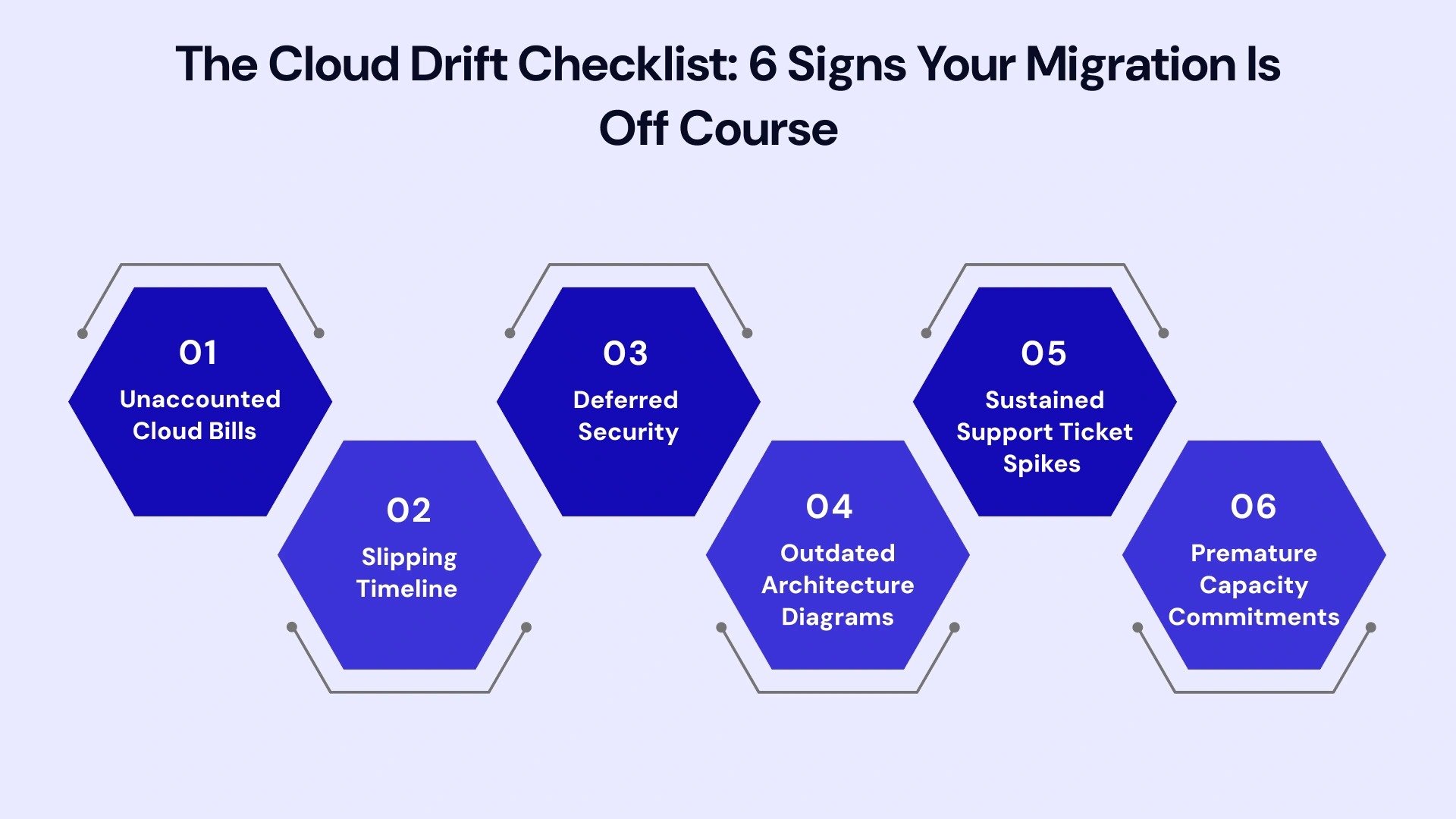
- The monthly cloud bill has no clear owner or explanation. If finance can't get a straight answer on why costs moved month over month, cost governance has already broken down.
- Migration waves keep slipping without a documented reason. Repeated schedule slippage without root-cause documentation usually signals an incomplete assessment phase, not just "bad luck."
- Security reviews are being scheduled "after go-live." Any plan that treats security sign-off as optional or deferrable is setting up a preventable incident.
- Nobody can produce an updated architecture diagram. If documentation isn't being maintained in real time, tribal knowledge is quietly becoming the only source of truth — a serious operational risk if key staff leave.
- Support tickets from end users spike after a wave and stay elevated. This usually points to inadequate change management or testing, not a one-off adjustment period.
- Reserved capacity purchases were made before usage patterns stabilized. Locking in long-term commitments too early is a common source of wasted spend once actual workload patterns become clear.
If two or more of these signs are present, it's worth pausing the next migration wave for a targeted review rather than pushing forward on the original timeline.
Cloud Migration vs. Staying On-Premises: A Realistic Comparison
Business leaders often frame the migration decision as "cloud is cheaper" versus "on-premises is predictable" — but a more accurate comparison requires looking past sticker price to operational and strategic factors.
- Cost structure: On-premises infrastructure carries predictable, depreciating CapEx; cloud infrastructure carries variable OpEx that scales with usage but is far more volatile without active governance. Neither is inherently cheaper — the outcome depends entirely on how disciplined the organization is about managing consumption.
- Scalability: Cloud infrastructure can scale up or down within minutes to match demand, while on-premises capacity requires lead time for procurement and installation. This advantage is real, but only businesses with genuinely variable workloads (seasonal traffic, rapid growth, unpredictable demand) fully capture its value.
- Maintenance burden: Cloud providers handle physical infrastructure maintenance, reducing the operational burden on internal IT teams, but this shifts responsibility toward configuration management, security hardening, and cost governance — different work, not necessarily less work.
- Disaster recovery and resilience: Cloud platforms offer built-in multi-region redundancy options that are prohibitively expensive to replicate on-premises for most mid-market businesses, making this one of the clearest wins for cloud migration when regulated or mission-critical workloads are involved.
- Talent and skills availability: Cloud-native talent is generally more available in today's job market than specialized legacy on-premises infrastructure expertise, which is a long-term strategic consideration as experienced on-prem staff retire or move on.
The honest takeaway: cloud migration delivers genuine long-term advantages in scalability, resilience, and operational flexibility — but only when the ten mistakes above are actively avoided. Absent that discipline, businesses simply trade one set of operational costs and risks for another.
A Quick Cloud Migration Risk Checklist
Before cutting over to production, run your plan against this high-impact checklist to ensure technical, operational, and financial alignment across all teams.
- Dependency Mapping: Full application, API, and database dependency assessment complete?
- Total Cost of Ownership (TCO): Financial model includes egress fees, licensing, and operational overhead?
- FinOps Ownership: Cost governance leads and automated budget alerts assigned before go-live?
- Team Upskilling: Internal technical skills and cloud operational training addressed?
- Security Architecture: Identity & Access Management (IAM) audited for strict least-privilege access?
- Regulatory Compliance: Data residency constraints mapped directly to target cloud regions?
- Change Management: Internal communications, training, and operational workflows ready?
- Phased Execution: Migration split into structured waves with tested, actionable rollback plans?
- Continuous Optimization: Post-go-live cadence scheduled for performance and cost right-sizing?
Leverage Our Expertise for a Predictable, Cost-Controlled Cloud Migration
Avoiding these ten mistakes on paper is one thing — executing a migration that stays on budget, on schedule, and audit-ready is another. VLink’s dedicated team has guided organizations across the US, Canada, and India through complex migration and modernization projects, combining hands-on FinOps governance, security-first architecture, and phased execution to prevent the exact pitfalls outlined above.
If you're evaluating a cloud migration or auditing a recent one that's already run over budget, our cloud migration services and case studies show how a structured, risk-aware approach translates into real savings and faster time-to-value. We offer migration audits, managed migration execution, and ongoing FinOps consultation designed specifically for mid-market and enterprise teams who can't afford another costly misstep.
Conclusion
Cloud migration isn't inherently risky — poorly planned cloud migration is. The businesses that get burned by surprise bills, downtime, or compliance gaps almost always skipped one of the fundamentals covered here: proper assessment, FinOps governance, security-first design, or a phased rollout with a real optimization plan behind it. The businesses that get it right treat migration as an ongoing operational transformation, not a one-time technical task.
If your organization is planning a migration — or trying to recover from one that's already gone sideways — the mistakes above are the landmines to map out first. Address them proactively, and cloud infrastructure delivers exactly what it promised: flexibility, scalability, and long-term cost efficiency.
Need a trusted partner to navigate your migration? Whether you are drafting your initial roadmap or optimizing an existing cloud footprint, our engineering team is here to help you bypass these common pitfalls. Reach out to our team to schedule a strategy session and ensure your cloud journey is built for performance, security, and cost efficiency.

Vice President, Strategy – VLink Inc.
Sambhavi Gopalakrishnan is the Vice President of Strategy at VLink Inc., bringing over a decade of experience in IT leadership, project implementation, and strategic growth. She possesses a strong foundation in technical project management and pre-sales, driving innovation and business transformation at VLink.

 Shivisha Patel