

Mid-market companies across the US and Canada face a pivotal decision. Legacy on-premise infrastructure is draining capital while limiting business velocity. Yet cloud migration for mid-sized businesses isn't simply about moving servers—it's about orchestrating a business transformation with constrained budgets and lean IT teams.
CT businesses have unique needs—cloud migration for Connecticut businesses includes compliance, local talent, and industry focus.
This guide provides a decision-ready cloud migration services strategy explicitly built for mid-market constraints—limited IT headcount, Microsoft-centric technology stacks, and CFO scrutiny on every dollar. You'll find the roadmap, frameworks, and risk controls you need to execute a successful on-premises-to-Azure migration.
To accelerate transformation without adding complexity, you can fast-track your AWS cloud migration using a phased, workload-first approach that reduces downtime, controls cost, and speeds up time-to-value.
Why Mid-Market Companies Are Accelerating Azure Migration Now
The migration imperative stems from converging business and technical pressures that mid-market organizations can no longer defer.
The mid-market Reality:-
Mid-market firms operate under distinct constraints. A typical 500-employee manufacturing company maintains 3-5 infrastructure engineers managing aging VMware estates. Data center costs increase by 8-12% annually due to power, cooling, and hardware refresh cycles. Meanwhile, cyber insurance premiums have risen 50% since 2023, with carriers demanding documented security controls that on-premise environments struggle to demonstrate.
End-of-support deadlines compound the pressure. Windows Server 2012 reached extended support end in October 2023. SQL Server 2014 support ended in July 2024. Extended Security Updates provide temporary relief but at 75% of the original license costs annually—a stopgap, not a solution.
The financial equation has shifted decisively. A 700-employee professional services firm recently avoided a $1.2M data center refresh by migrating to Azure. Their three-year TCO dropped 34% while gaining disaster recovery capabilities that were previously cost-prohibitive on-premises.
Security considerations drive urgency. Azure provides 3,500+ security experts, threat intelligence from 65 trillion daily signals, and compliance certifications (SOC 2, HIPAA, PIPEDA) that would otherwise require dedicated internal teams to maintain. For mid-market companies, this represents capabilities impossible to replicate in-house.
Cloud Migration Strategy Essentials (Azure-First, Mid-Market Framed)
Microsoft's Cloud Adoption Framework defines five core migration strategies. However, mid-market selection differs from enterprise approaches—resource constraints and business continuity requirements narrow viable options.
The 5 migration strategies—and when they actually make sense for mid-market
Here are the 5 core migration strategies (the "5 Rs") and the specific triggers that make them the right choice for mid-market firms.
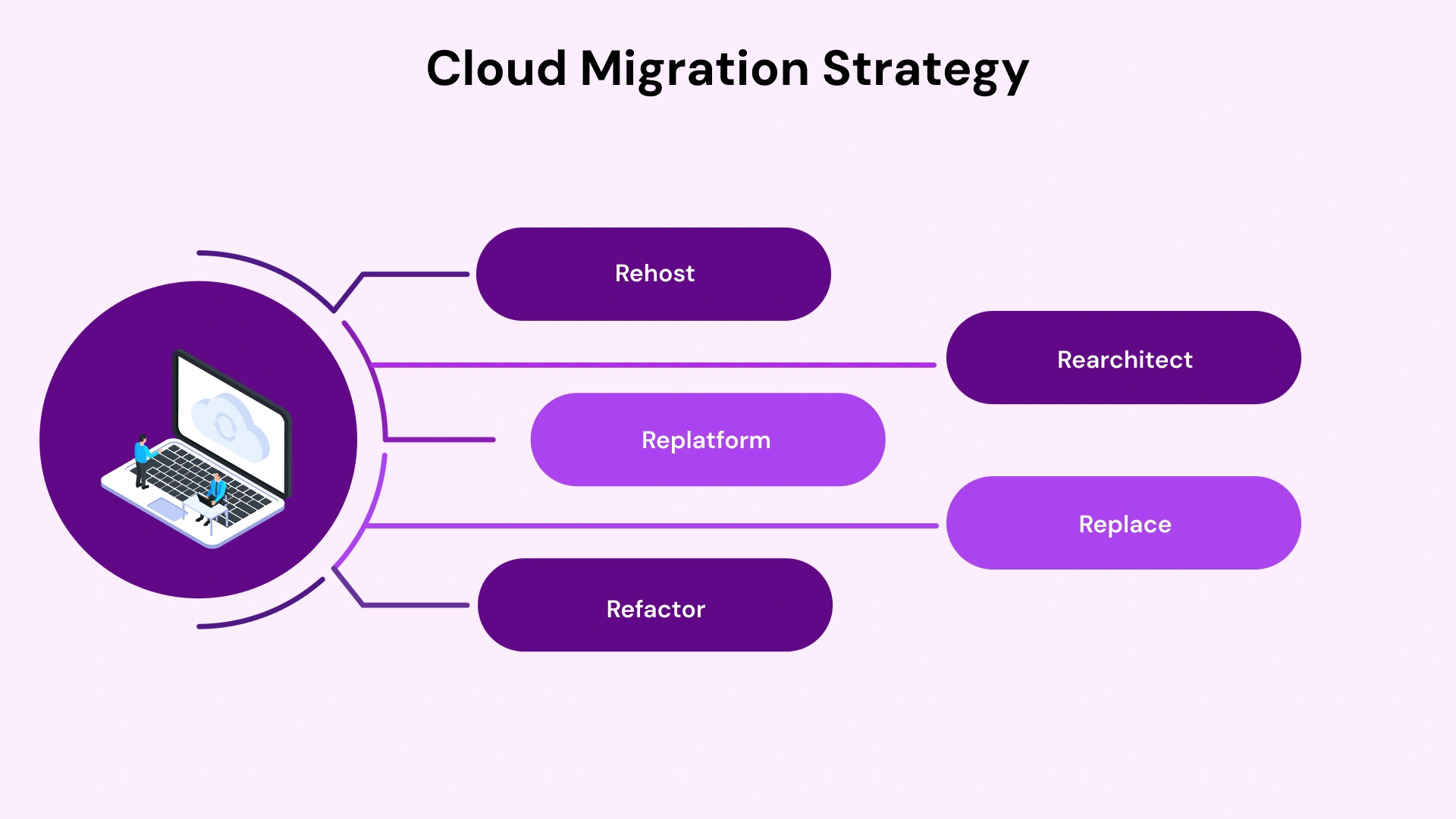
- Rehost (Lift & Shift): Move VMs to Azure unchanged. Best for rapid migrations with <6-month timelines. A regional credit union rehosted 40 Windows VMs in 90 days, immediately gaining Azure Site Recovery for disaster recovery. Migration cost: $85K. Previous DR solution quote: $240K annually.
- Replatform: Minimal application changes to leverage Azure platform services. A distribution company moved SQL databases to Azure SQL Managed Instance without application rewrites. Result: 40% reduction in database management overhead, automated patching, and point-in-time restore capabilities.
- Refactor: Modify applications for cloud-native services. Suitable when technical debt is costing velocity. A manufacturing ERP system refactored to Azure App Services reduced infrastructure management from 20 hours weekly to 2 hours.
- Rearchitect: Complete redesign using microservices and containers. Rarely appropriate for mid-market unless the application is already failing business requirements. Requires significant development capacity.
- Replace: Swap legacy applications for SaaS alternatives. Common for email (Exchange to Microsoft 365), file services (on-premise shares to SharePoint/OneDrive), or legacy CRM to Dynamics 365.
Strategy selection matrix: cost, speed, risk, and internal capability
Decision frameworks must account for mid-market realities. This matrix maps organizational constraints to optimal strategies:
Constraint | Recommended Strategy |
< 6-month timeline | Rehost (Lift & Shift) |
Limited development resources | Replatform (move databases to managed services) |
Long-term cost reduction priority | Refactor (containerization, PaaS adoption) |
Regulatory complexity (HIPAA, SOC 2) | Hybrid + Azure Arc (maintain on-premise for specific workloads) |
A Practical On-Premise to Azure Migration Roadmap for Mid-Market IT Teams
This phased approach balances speed with risk management. Each phase builds on the previous, creating checkpoints for CFO review and technical validation.
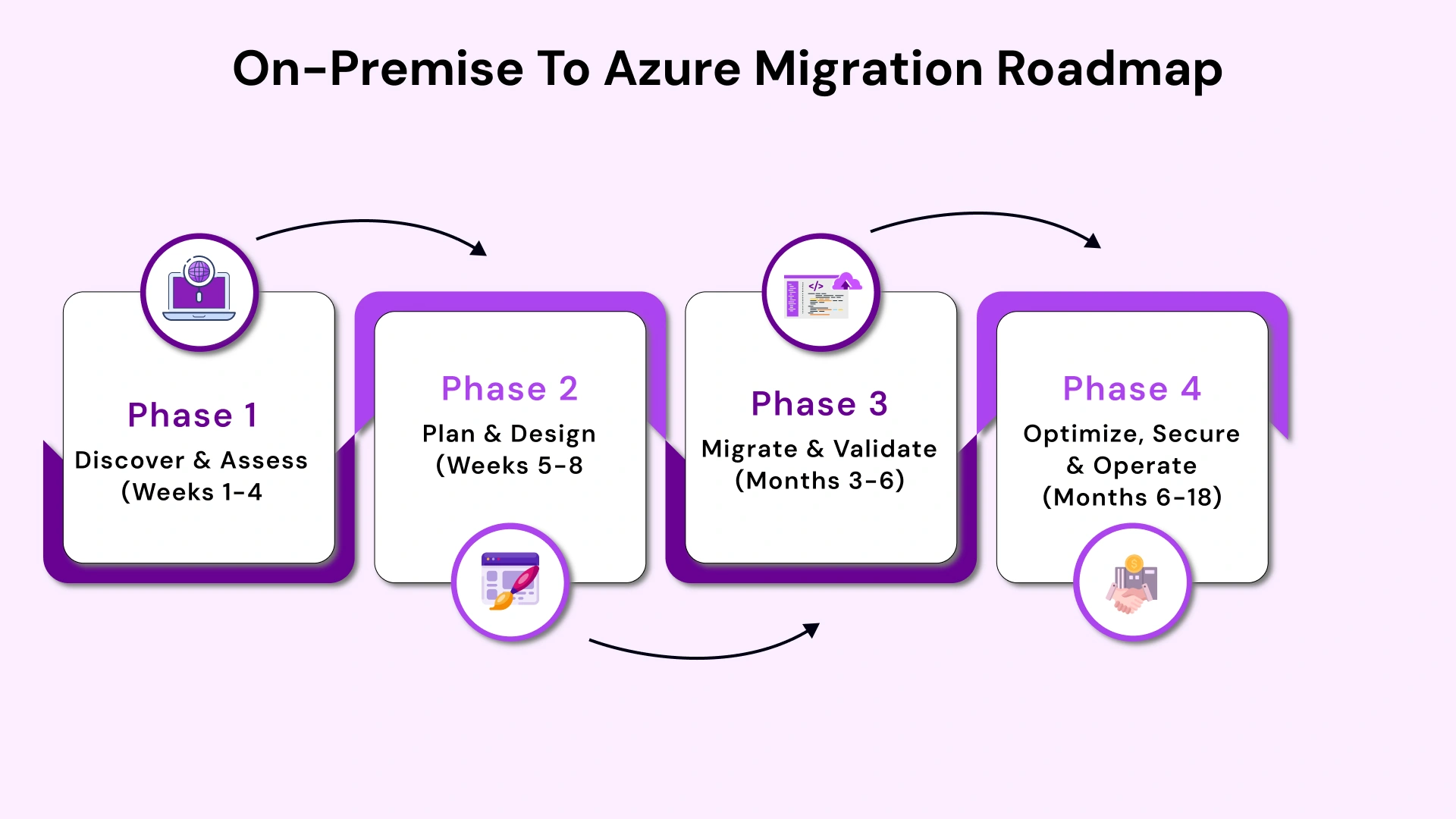
Phase 1: Discover & Assess (Weeks 1-4)
Discovery establishes migration baseline. Azure Migrate provides agentless assessment of VMware, Hyper-V, and physical servers. The tool maps dependencies, identifies unsupported configurations, and generates TCO comparisons.
Critical Activities:
- Deploy Azure Migrate appliance (2-hour setup, no production impact)
- Run discovery for a minimum of 7 days to capture performance patterns
- Document application dependencies using the Service Map visualization
- Score applications by business criticality (use 3-tier model: Tier 1 mission-critical, Tier 2 important, Tier 3 low-risk)
- Flag regulatory requirements (HIPAA workloads, financial data, PII)
A mid-sized financial services firm discovered 12 undocumented server dependencies during assessment. Had they proceeded without this visibility, their core banking application would have failed during cutover.
Phase 2: Plan & Design (Weeks 5-8)
Planning translates discovery data into executable architecture. This phase delivers the Azure landing zone blueprint, migration wave plan, and governance framework.
Key Outputs:
- Azure subscription and resource group topology (recommended: separate subscriptions for production, UAT, and development)
- Network architecture, including ExpressRoute or Site-to-Site VPN for hybrid connectivity
- Identity integration strategy (Azure AD Connect sync schedule, authentication methods)
- Migration wave sequencing (Wave 0: pilot, Wave 1-3: production)
- Azure Policy baseline (enforce tagging, restrict regions, mandate encryption)
Wave planning prevents organizational overwhelm. Start with 5-10 low-risk workloads in Wave 0 (pilot). A common mistake: attempting to migrate everything simultaneously, overwhelming the IT team and creating excessive business risk.
Tips:- Decision Framework: If governance isn't ready—Azure Policies defined, RBAC configured, logging established—do not migrate revenue-critical applications. One healthcare provider ignored this principle and migrated their patient management system before implementing audit logging. Their subsequent HIPAA audit identified this gap, which required a system rollback and remediation.
Phase 3: Migrate & Validate (Months 3-6)
The execution phase applies replication, cutover, and validation processes. Azure Site Recovery handles lift-and-shift migrations with minimal downtime. The Database Migration Service manages SQL Server migrations to Azure SQL or Managed Instance.
Best Practices:
- Always pilot first (Wave 0 with non-critical workloads validates tooling, runbooks, and team readiness)
- Maintain parallel operations during validation (keep on-premise systems running until the Azure environment proves stable)
- Document rollback procedures before every cutover (define trigger points and rollback steps)
- Schedule cutovers during maintenance windows with stakeholder notification
- Validate application functionality post-migration (performance testing, user acceptance testing)
A mid-market financial services firm completed Wave 1 migration with under 30 minutes of downtime using staged cutovers. They replicated the data continuously, validated it in test mode, and then switched DNS entries during a maintenance window. After migrating your website, it is essential to confirm your DNS properties are correctly propagated, and a DNS checker can help provide accurate information about your domain’s current DNS status across global servers.
Phase 4: Optimize, Secure & Operate (Months 6-18)
Post-migration optimization typically delivers 20-40% additional cost savings. This phase transforms a functional migration into an optimized Azure environment.
Focus Areas:
- Right-sizing VMs based on actual usage (Azure Advisor provides specific recommendations)
- Implementing Reserved Instances for steady-state workloads (1-year or 3-year commitments reduce costs 40-72%)
- Enabling auto-scaling for variable workloads (development environments shut down nights/weekends)
- Activating Azure Security Center recommendations (remediate high-severity findings first)
- Establishing FinOps practices (monthly cost reviews, chargeback models, budget alerts)
A professional services firm reduced its Azure spend 31% in month 7 post-migration. They discovered development VMs running 24/7 unnecessarily, production databases over-provisioned by 50%, and opportunities to shift predictable workloads to Reserved Instances.
Azure Landing Zones, Governance & Security
Landing zones prevent the chaos that derails migrations. Without a solid foundation, Azure environments devolve into shadow IT, cost overruns, and security gaps.
What an Azure landing zone really is (and why mid-market teams need one)
An Azure landing zone is pre-configured infrastructure for production workloads. Think of it as your cloud foundation—networking, identity, policies, and monitoring configured before first workload deployment.
Microsoft provides reference architectures, but mid-market implementations should prioritize simplicity over enterprise complexity. A 500-employee company doesn't need the same landing zone as a Fortune 500 enterprise.
Essential Components for Mid-Market:
- Hub-spoke network topology (central hub for shared services, spokes for workloads)
- Azure AD integration with on-premise Active Directory (hybrid identity)
- Baseline Azure Policy assignments (tagging enforcement, geographic restrictions, required encryption)
- Centralized Log Analytics workspace (security logs, performance metrics, audit trails)
- Azure Backup configuration (default policies applied to all VMs)
Practical guardrails that prevent cost overruns and security gaps
Guardrails are automated controls that prevent common mistakes. Azure Policy enforces standards without requiring constant IT oversight.
Recommended Policy Set:
- Require specific tags (Owner, CostCenter, Environment) on all resources—enforce at creation
- Restrict allowed Azure regions to US/Canada only (prevents accidental deployments in non-approved geographies)
- Deny public IPs on production VMs unless explicitly approved
- Enforce encryption at rest for all storage accounts and databases
- Limit VM SKUs to approved sizes (prevents provisioning of oversized instances)
A distribution company's developer accidentally deployed a GPU-optimized VM ($20,000/month) for a test workload. Azure Policy restrictions would have prevented this—they didn't have policies configured. The VM ran 3 weeks before detection, costing $15,000.
Cost, ROI & the CFO View of Azure Migration
Financial services face unique migration risks—reduce cloud migration risk for financial services includes compliance, data sovereignty, and business continuity.
Migration decisions ultimately require CFO approval. Technical excellence means nothing without demonstrated financial return. This section translates Azure architecture into a language that finance executives understand.
Translating Azure architecture decisions into financial outcomes
Every technical choice carries financial implications. CFOs evaluate migrations through specific lenses: capital expenditure elimination, operational expenditure predictability, risk reduction, and strategic optionality.
Key Metrics for CFO Presentation:
- CapEx → OpEx shift (quantify avoided hardware refresh, data center infrastructure)
- Payback period (typically 18-36 months for mid-market migrations)
- 3-year TCO comparison (on-premise vs. Azure, including hidden costs like power, cooling, facilities)
- Risk-adjusted ROI (value of improved disaster recovery, enhanced security posture)
- Business agility metrics (time to provision new environments: weeks → hours)
Example ROI narrative: A 600-employee manufacturing company avoided $800K in planned data center upgrades. Their 3-year Azure spend is projected at $1.2M, versus $1.8M for on-premises TCO (including deferred CapEx). Net savings: $600K.
Additionally, they valued disaster recovery capabilities at $200K annually (based on previous DR quotes), resulting in a total 3-year value of $1.2M on a $1.2M investment—100% ROI before factoring in operational improvements.
Where mid-market Azure savings actually come from
Savings emerge from specific levers, not vague promises of 'cloud efficiency.' Understanding these mechanisms enables accurate TCO modeling.
Primary Cost Reduction Sources:
- Azure Hybrid Benefit (use existing Windows Server and SQL licenses in Azure, saving 40-85% on compute costs)
- Right-sizing post-migration (on-premise VMs are commonly over-provisioned 30-60%; Azure metrics enable precise sizing)
- PaaS vs IaaS economics (Azure SQL Managed Instance eliminates OS patching, backup management, HA configuration)
- Reserved Instance commitments (1-year or 3-year reservations provide 40-72% discounts vs. pay-as-you-go)
- Elimination of redundant licensing (consolidate monitoring tools, backup solutions into Azure-native services)
Tips: Framework: Lift-and-shift delivers speed and reduces risk. Optimization delivers ongoing ROI. Modernization delivers competitive margin improvement. Each phase builds value sequentially.
Managing Risk, Downtime & Compliance During Azure Migration
Risk management differentiates successful migrations from failed attempts. Mid-market organizations cannot absorb multi-day outages or regulatory violations.
Quantifying downtime vs cost trade-offs
Downtime tolerance directly impacts migration cost and complexity. Organizations must make explicit trade-offs between risk, cost, and speed.
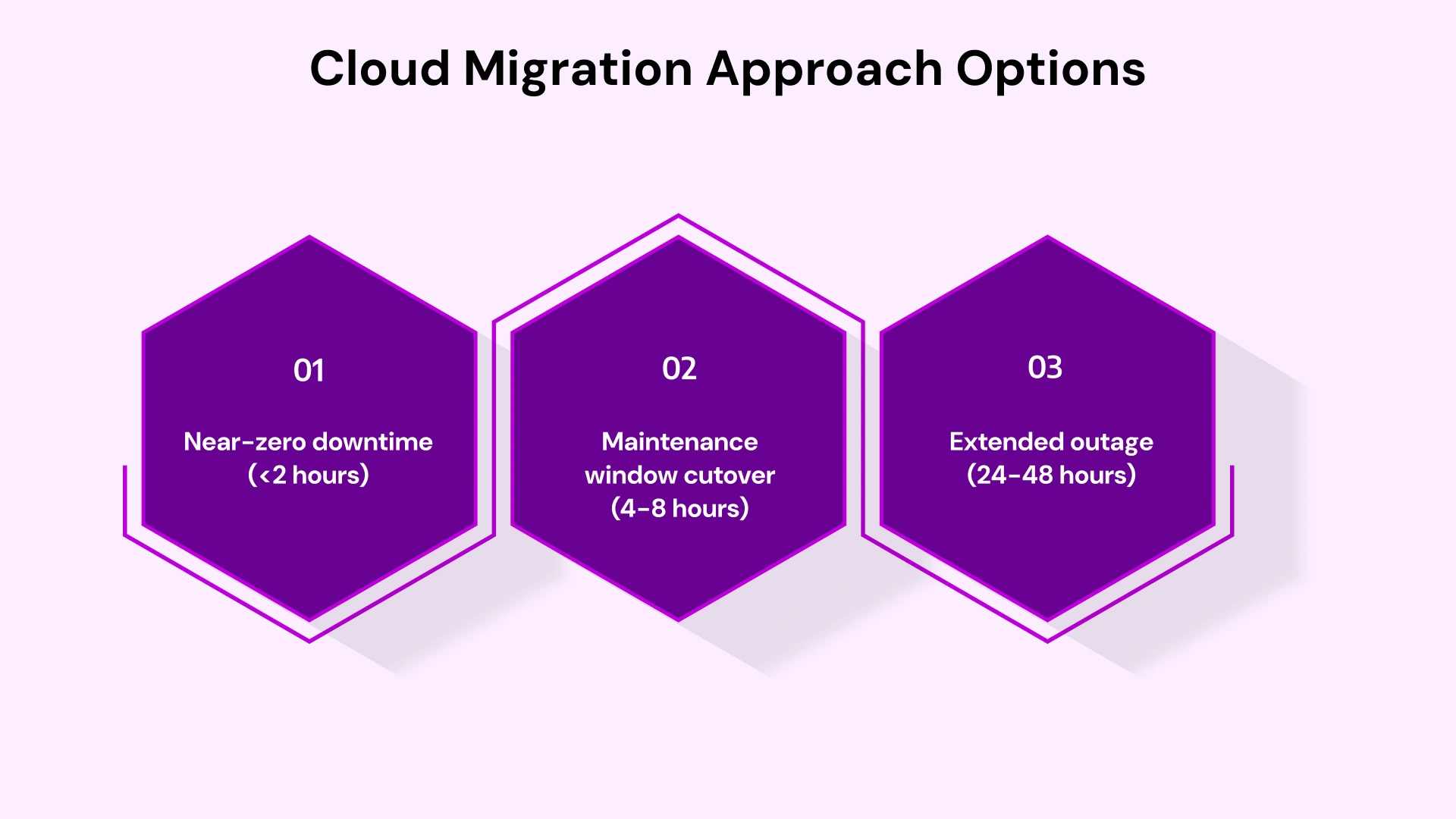
Migration Approach Options:
- Near-zero downtime (<2 hours): Requires parallel run, data synchronization, and DNS cutover. Adds 30-50% to project cost but minimizes business disruption. Appropriate for customer-facing or revenue-critical systems.
- Maintenance window cutover (4-8 hours): Standard approach for most workloads. Schedule during low-usage periods (nights, weekends). Lower cost than the near-zero approach.
- Extended outage (24-48 hours): Only acceptable for non-critical systems or planned business closures. Significantly lower migration cost, but creates business risk.
A healthcare provider chose near-zero downtime for their patient management system (4 hours maximum), a maintenance window for administrative systems (an 8-hour window is acceptable), and an extended outage for their training environment (business impact is minimal). This tiered approach optimized both risk and cost.
Security & compliance for regulated mid-market industries
Regulated industries face heightened migration requirements. Healthcare (HIPAA), financial services (SOC 2), and Canadian firms (PIPEDA) must demonstrate specific controls.
Compliance Requirements Checklist:
- Audit logging enabled on all resources (Azure Monitor, Log Analytics retention ≥1 year)
- Encryption at rest (Azure Storage, SQL databases) and in transit (TLS 1.2+)
- Access controls documented (RBAC assignments, privileged identity management)
- Data residency controls (Azure Policy restricting resources to compliant regions)
- Incident response procedures (Security Center integration, alert routing)
Azure provides compliance certifications, but organizations remain responsible for implementation. A regional bank passed a SOC 2 Type II audit post-migration by documenting its Azure Policy enforcement, RBAC model, and audit log retention. Their auditor specifically confirmed that controls existed before migration, not that they were retrofitted afterward.
Role-Based Guidance: Who Owns What in a Mid-Market Migration
Successful migrations require clear accountability across technical and business leadership. Role confusion creates delays, scope creep, and finger-pointing when issues arise.
CTO / VP IT priorities
Strategic Decisions:
- Migration strategy selection (rehost vs. replatform vs. hybrid)
- Architecture approvals (landing zone design, network topology, identity model)
- Partner governance (if engaging an external Microsoft partner, define scope and oversight)
- Risk acceptance (document downtime tolerances, rollback triggers)
- Business alignment (coordinate with CFO on budget, with operations on timing)
IT Manager / SysAdmin priorities
Execution Responsibilities:
- Tool deployment (Azure Migrate appliance, Site Recovery configuration)
- Runbook development (step-by-step migration procedures, validation checklists)
- Cutover execution (coordinate maintenance windows, execute migrations, validate results)
- Documentation (network diagrams, configuration standards, operational procedures)
- Post-migration support (troubleshoot issues, optimize configurations)
CFO priorities
Financial Governance:
- Budget approval and monitoring (monthly spend tracking vs. forecast)
- ROI validation (track against business case assumptions)
- Cost allocation models (chargeback or showback by department/business unit)
- Risk mitigation (requires formal rollback procedures, insurance reviews)
- Contract oversight (Azure EA terms, partner agreements, licensing compliance)
Azure Migration: Partner vs DIY Decision Framework
The partner-versus-internal decision should follow objective criteria, not emotion or assumptions. Both approaches work under specific circumstances.
When in-house migration makes sense
Internal execution succeeds when organizations possess specific characteristics: Azure expertise on staff, capacity beyond operational workload, tolerance for extended timelines, and simple environments. Follow proven methods—healthcare cloud migration best practices include data classification and phased approaches.
In-House Viability Indicators:
- Team includes Azure-certified engineers (minimum AZ-104 Azure Administrator)
- Fewer than 30 workloads to migrate (manageable scope)
- Timeline flexibility (12-18 months acceptable)
- Low regulatory complexity (no HIPAA, SOC 2, or similar requirements)
- IT team capacity available (not consumed by operational firefighting)
When a specialized Azure partner is the safer bet
Partner engagement reduces risk during complex migrations, tight timelines, or when organizations lack internal Azure expertise. The cost premium (typically 15-25% of migration budget) buys de-risking, acceleration, and knowledge transfer.
Partner Engagement Decision Checklist:
- More than 50 workloads? (Scale creates complexity requiring specialized project management)
- Regulatory requirements? (HIPAA, SOC 2, PIPEDA compliance demands proven methodologies)
- Fewer than 5 dedicated infrastructure engineers? (Insufficient capacity for parallel migration work)
- Aggressive timeline? (Business driver requiring completion in 3-6 months)
- Complex environment? (Multiple datacenters, legacy applications, intricate dependencies)
- Limited Azure experience? (No Azure-certified staff or prior cloud projects)
Decision Rule: If you score 2+ factors above, guided migration typically delivers lower total risk and cost than internal execution. The partner prevents costly mistakes (misconfigured security, inadequate governance, failed cutovers) that would otherwise require remediation.
VLink: Your Strategic Partner for Seamless Cloud Transformation
Executing an Azure migration strategy requires specialized expertise that most mid-market IT teams don't maintain in-house. VLink has guided 100+ mid-market organizations through successful cloud transformations, with 94% of migrations completed on-time and within budget.
Our specialization in Microsoft business solutions means we understand your constraints. We've architected solutions for 300-person companies with 2-person IT teams and 2,000-person enterprises with dedicated infrastructure groups. Every engagement follows proven methodologies while adapting to your organization's specific risk tolerance, budget parameters, and business continuity requirements.
VLink Azure Migration Capabilities:
- Cloud readiness assessments (2-week discovery delivers migration roadmap, TCO analysis, risk assessment)
- Fixed-scope pilot migrations (prove methodology with low-risk workloads before production commitment)
- Landing zone implementation (governance frameworks configured before first workload migration)
- Full migration execution (planning through cutover, with your team or as a full managed service)
- Post-migration optimization (cost reduction, performance tuning, security hardening)
We measure success by your business outcomes, not technical deliverables. A recent manufacturing client reduced their IT infrastructure costs by 38% in year one while improving disaster recovery from a 72-hour RTO to a 4-hour RTO. Another professional services firm accelerated new environment provisioning from 6 weeks to 2 days, directly enabling a major client acquisition.
Ready to build your migration roadmap? Connect with VLink’s dedicated team for a complimentary Azure readiness assessment. We'll analyze your current environment, map optimal migration paths, and deliver a detailed TCO comparison—no obligation, no sales pressure.
Conclusion: From Strategy to Execution
A mid-market cloud migration strategy requires balancing ambition with pragmatism. The organizations achieving sustainable Azure success share common attributes: clear migration strategies aligned with business constraints, well-implemented landing zones before workload migration, phased execution with pilot validation, and explicit governance from day one.
Your next steps depend on current readiness. If you've completed infrastructure discovery, proceed to landing zone design and wave planning. If you're earlier in the journey, start with the Azure Migrate assessment to establish a baseline. If your team lacks Azure expertise or you're dealing with regulatory complexity, engage a qualified partner for a guided implementation.
The migration window is narrowing. Extended support for legacy systems costs more annually while providing less protection. Meanwhile, competitors leveraging cloud agility are gaining ground. The question isn't whether to migrate—it's whether you'll execute strategically or reactively.
Schedule your Azure readiness assessment today. We'll map your optimal migration path, quantify TCO, and deliver a risk-adjusted implementation roadmap.

Vice President, Strategy – VLink Inc.
Sambhavi Gopalakrishnan is the Vice President of Strategy at VLink Inc., bringing over a decade of experience in IT leadership, project implementation, and strategic growth. She possesses a strong foundation in technical project management and pre-sales, driving innovation and business transformation at VLink.

 Shivisha Patel