



Every On-Premise to Azure migration eventually comes down to three questions from the business: What will you use? How long will it take? And will anything go offline? Vendors tend to answer all three with "it depends."
This blog gives you the dependencies spelled out: which tools fit which job, how to estimate a realistic timeline with simple math, and how to plan cutovers that keep downtime minimal or close to zero.
It is written for startup founders and enterprise leaders in the US who are weighing an in-house effort against a partner, and who want to understand what on-premises data migration to Azure really involves before they commit budget.
On-Premise to Azure Migration: What Moves and What Changes
Moving from an on-premise environment to Microsoft Azure is rarely a simple "lift and shift" of raw data. To build an accurate timeline and avoid unexpected bottlenecks, you need to account for every workload making the journey—and how your IT team’s daily operations will evolve once you arrive.
What Moves: Defining Your Migration Scope
Depending on your business goals, an on-premises data migration to Azure typically brings several interconnected components into scope:
- Databases & Data Warehouses: Relational databases (SQL Server, Oracle, MySQL, PostgreSQL) and analytical workloads moving to Azure SQL, Azure Database services, or Microsoft Fabric.
- Servers & Virtual Machines: Physical servers, VMware vSphere instances, and Hyper-V virtual machines transitioning to Azure Virtual Machines or Azure VMware Solution.
- Unstructured Data & File Shares: Local NAS/SAN storage, departmental file shares, and archival data migrating to Azure Files or Azure Blob Storage.
- Applications & Middleware: Custom line-of-business apps, web servers, and legacy dependencies that require either rehosting (IaaS) or refactoring for Platform-as-a-Service (PaaS).
- Identity & Access Management: On-premise Active Directory domains synchronizing with or transitioning to Microsoft Entra ID (formerly Azure AD) for single sign-on and conditional access.
- Network & Security Perimeters: Local firewalls, VPNs, and routing configurations evolving into Azure Virtual Networks (VNets), ExpressRoute circuits, and Network Security Groups.
- Backup & Disaster Recovery: Legacy tape or local disk backup routines shifting to cloud-native redundancy via Azure Backup and Azure Site Recovery.
What Changes: The Shift in Cloud Operations
Transitioning to Azure fundamentally changes how your infrastructure is managed. If you only plan for the data transfer and ignore the target operating model, post-migration friction is inevitable.
Operational Area | On-Premise Model | Azure Cloud Model |
Patching & Maintenance | Manual scheduling, hardware firmware updates, and OS patching windows. | Automated OS patching via Azure Update Manager, or zero-maintenance patching with PaaS databases. |
Monitoring & Observability | Siloed infrastructure tools focused on server uptime and hardware health. | Unified, full-stack telemetry using Azure Monitor, Log Analytics, and Application Insights. |
Security & Governance | Perimeter-based security relying on physical firewalls and network isolation. | Identity-first Zero Trust security, automated policy enforcement (Azure Policy), and Microsoft Defender for Cloud. |
Cost Management | Capital Expenditure (CapEx) with fixed, upfront hardware investments every 3–5 years. | Operational Expenditure (OpEx) requiring FinOps discipline, resource tagging, and auto-scaling to prevent bill shock. |
Backup & Resilience | Physical off-site storage, secondary cold sites, and manual failover drills. | Built-in geo-redundancy (GRS/ZRS) and automated, software-defined disaster recovery testing. |
Scoping Your Approach Before You Begin
Before selecting migration tools or engaging a cloud partner, clearly define where your project sits on the complexity spectrum:
- Targeted Data/Database Migration: Moving specific databases or file shares to support cloud analytics or a hybrid app. This carries lower architectural risk and focuses heavily on schema conversion, data validation, and cutover syncs.
- Application & Workload Modernization: Moving applications alongside their underlying data while upgrading them to cloud-native services (e.g., moving from a local SQL VM to Azure SQL Managed Instance).
- Full Data Center Exit: Decommissioning physical facilities entirely. This requires strict dependency mapping, network re-architecture, identity federation, and phased cutover waves to keep business operations running uninterrupted.
Planning Tip: Treat the migration and the target operating model as parallel workstreams. Training your dedicated team on cloud FinOps, governance, and monitoring before the final cutover ensures your new Azure environment stays secure and cost-effective from day one.
Azure Migration Strategy and Planning
An Azure migration strategy assigns each workload a path: retire, rehost, replatform, refactor, rearchitect, or replace. Rehosting servers moves quickly; moving a database to a managed service such as Azure SQL Managed Instance takes more work but removes operational burden. Strategy also sets sequencing, success metrics, and risk tolerance. Strategy should sit inside a broader cloud migration program, with funding, governance, and sequencing agreed up front.
Azure Migration Assessment and Planning
Azure migration assessment and planning produces the facts that drive everything else:
- Inventory: servers, databases, file shares, versions, sizes, and owners
- Dependencies: which applications talk to which, and over what ports
- Performance baselines: CPU, memory, IOPS, and network use for right-sizing
- Compatibility: database features, drivers, and OS versions that need remediation
- Compliance and security: data classification, residency, and controls
- Downtime tolerance: per application, set by the business, not guessed by IT
Azure Migration Assessment Tools
Azure migration assessment tools discover and analyze your environment. Azure Migrate is the central hub for discovery, dependency analysis, right-sizing, and cost estimates for servers and databases, with assessment capabilities for SQL Server. Microsoft periodically retires and replaces individual tools, so confirm the current lineup in Microsoft's documentation before standardizing on one.
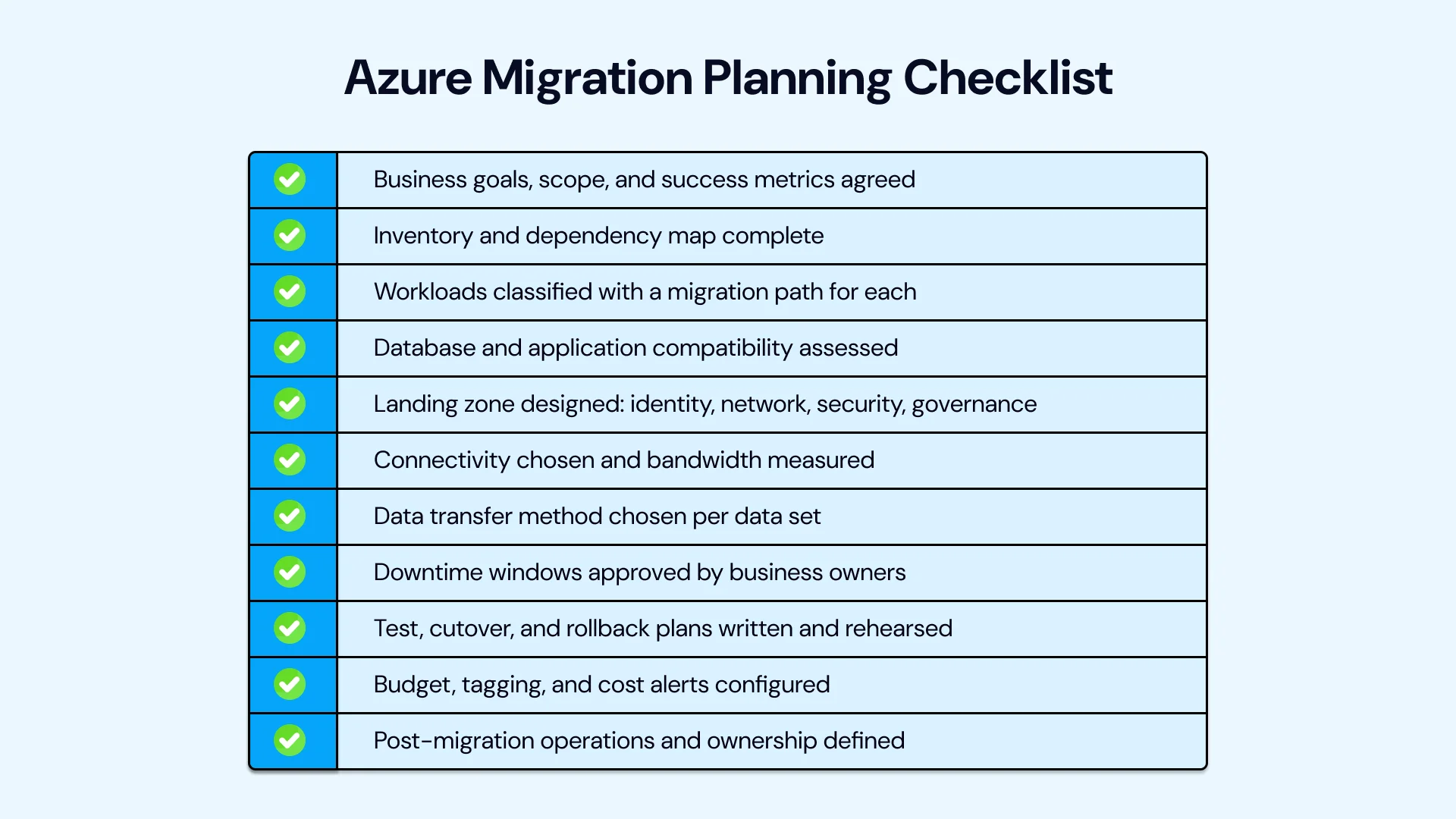
Azure Migration Planning Checklist
Use the below-mentioned Azure migration planning checklist before you start:
On-Premise to Azure Migration Tools: What to Use for What
The right on-premise to Azure migration tools depend on what you're moving. Here is a practical map.
What Tools Are Used for Azure Data Migration?
Data or Workload | Typical Azure Tool | Notes |
Discovery and assessment | Azure Migrate | Inventory, dependencies, sizing, cost |
Virtual and physical servers | Azure Migrate server migration | Replication and cutover for VMs |
SQL Server and other databases | Azure Database Migration Service | Offline and online options |
Large file sets | AzCopy, Azure Storage Mover | Scripted or managed transfer over network |
Very large or bandwidth-limited data | Azure Data Box family | Ship encrypted devices to Azure |
Hybrid file access | Azure File Sync | Sync on-premises file servers to Azure Files |
Data pipelines and ETL | Azure Data Factory | Orchestrated, scheduled movement |
Connectivity | Site-to-site VPN, ExpressRoute | Private, predictable transfer paths |
The question of what tools are used for Azure data migration has a layered answer: a few core Azure migration tools cover most scenarios, and native database tooling covers the rest.
Azure Data Migration Tools and Azure Workload Migration Tools
Azure data migration tools focus on moving information: Azure Database Migration Service for databases, AzCopy and Storage Mover for files, and Data Box for bulk transfer. Azure workload migration tools focus on moving running systems: Azure Migrate server migration replicates VMs and lets you test before cutover. Most projects use both categories side by side.
Azure Data Transfer Tools: Network vs Offline
Azure data transfer tools fall into two groups. Online options move data over VPN or ExpressRoute, which suits moderate volumes and ongoing sync. Offline options such as Azure Data Box ship physical devices to a Microsoft data center, which suits very large datasets or constrained bandwidth. Choose based on the timeline math in the next section, not on habit; on-premise to Azure migration tools work best when matched to measured bandwidth.
People often ask about the best tool for on-premise to Azure migration. There is no single winner, because the best tool depends on the workload: Azure Migrate for servers, Azure Database Migration Service for databases, AzCopy or Data Box for files, and Azure File Sync for hybrid file access. Choose by data type, volume, downtime tolerance, and your team's skills. If you want a vendor-neutral view of the options, a specialist migration team can help you build a tool plan for your environment.
How to Migrate Data from On-Premise to Azure: Step by Step
Follow this repeatable 11-step workflow to plan, transfer, and validate your data migration to Microsoft Azure without disrupting daily operations:
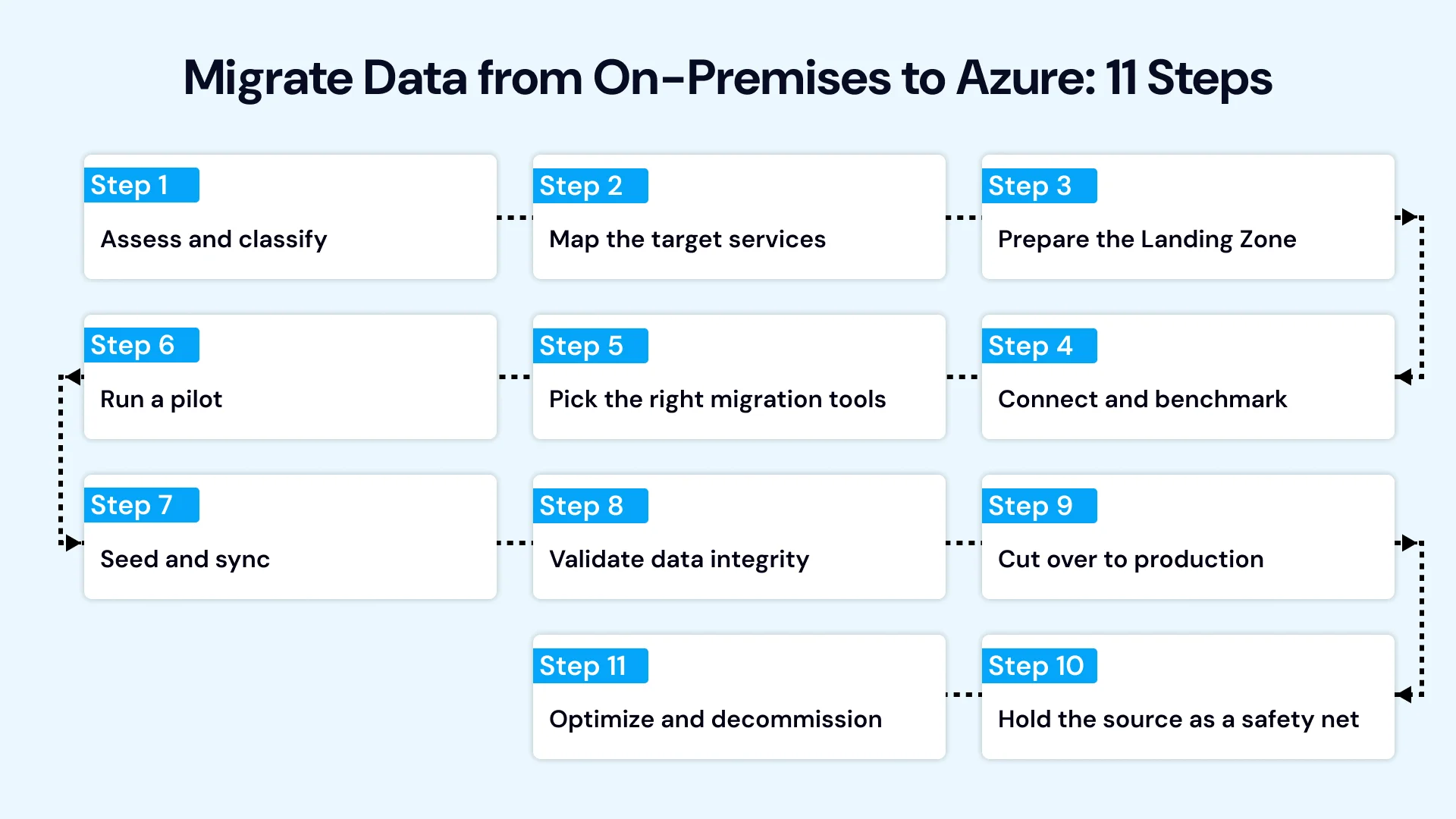
- Assess and classify: Inventory your databases and file shares, verify Azure compatibility, and classify data by sensitivity and residency rules.
- Map the target services: Match each workload to its ideal Azure home—managed databases, VMs, Blob Storage, Azure Files, or analytics platforms.
- Prepare the Landing Zone: Set up identity, role-based access, networking, and security guardrails before transferring any data.
- Connect and benchmark: Configure Azure VPN or ExpressRoute and test real-world bandwidth to calculate realistic transfer windows.
- Pick the right migration tools: Decide between online transfers (Azure DMS, Storage Mover), physical offline appliances (Azure Data Box), or a hybrid of both.
- Run a pilot: Execute an end-to-end test migration with a non-critical dataset to validate your runbook.
- Seed and sync: Transfer the baseline bulk data, then enable ongoing synchronization to capture changes until cutover.
- Validate data integrity: Confirm row counts, checksums, permissions, application latency, and end-user reconciliation.
- Cut over to production: Switch connection strings and route live traffic to Azure during an agreed maintenance window.
- Hold the source as a safety net: Keep the on-premises environment intact and recoverable until production stability is confirmed.
- Optimize and decommission: Tune database tiers, eliminate unused storage, and decommission legacy on-premises servers.
Migrate Data from On-Premise to Azure: Practical Tips
When you migrate data from on-premise to Azure, clean and archive first, since moving data you do not need costs time and money. Encrypt in transit and at rest, preserve permissions and metadata, and test restores from the target. Data owners, not only engineers, should sign off on validation.
Azure Database Migration
Azure database migration is usually the most sensitive part of a project because errors are hard to detect and costly to reverse.
Azure Database Migration Service
Azure Database Migration Service supports moving databases such as SQL Server to Azure targets, with offline migration (simpler, requires a downtime window) and online migration (continuous sync, short cutover) for supported scenarios. It handles much of the orchestration and monitoring, but you still need assessment, schema and compatibility work, and validation.
SQL Server to Azure Migration Tools
SQL Server to Azure migration tools include Azure Database Migration Service, native backup and restore, log shipping, and replication-based options, plus Azure Migrate assessments for readiness and sizing. Choose based on database size, version, feature use, and downtime tolerance.
How to Migrate On-Premise SQL Server to Azure
To migrate on-premise SQL Server to Azure, follow this pattern:
- Assess compatibility, features, and performance baselines.
- Pick the target: Azure SQL Database for modern apps, Azure SQL Managed Instance for high compatibility with managed operations, or SQL Server on Azure VMs when you need full control.
- Remediate blocking issues such as unsupported features or deprecated syntax.
- Choose offline or online migration based on your downtime window.
- Migrate and sync, then validate data and application behavior.
- Cut over with connection string changes and monitored traffic.
- Tune performance and retire the source after a hold period.

Timeline: How Long Does an Azure Migration Take?
How long does it take to migrate data to Azure comes down to simple arithmetic: time equals data volume divided by effective throughput. As an illustration, assuming roughly 70 percent usable bandwidth:
Data Volume | 1 Gbps Link | 10 Gbps Link |
10 TB | about 1.3 days | about 3 hours |
50 TB | about 6.6 days | about 16 hours |
100 TB | about 13 days | about 1.3 days |
500 TB | about 66 days | about 6.6 days |
These figures cover raw transfer only, and they assume the link is dedicated to the job. In practice, shared links, throttling, and retries lengthen them. When the math gives you weeks, an offline device such as Data Box often wins.
How Long Does an Azure Migration Take Overall?
How long does an Azure migration take for the whole project? Raw transfer is usually the smallest part. As a rough planning guide (illustrative, not a commitment):
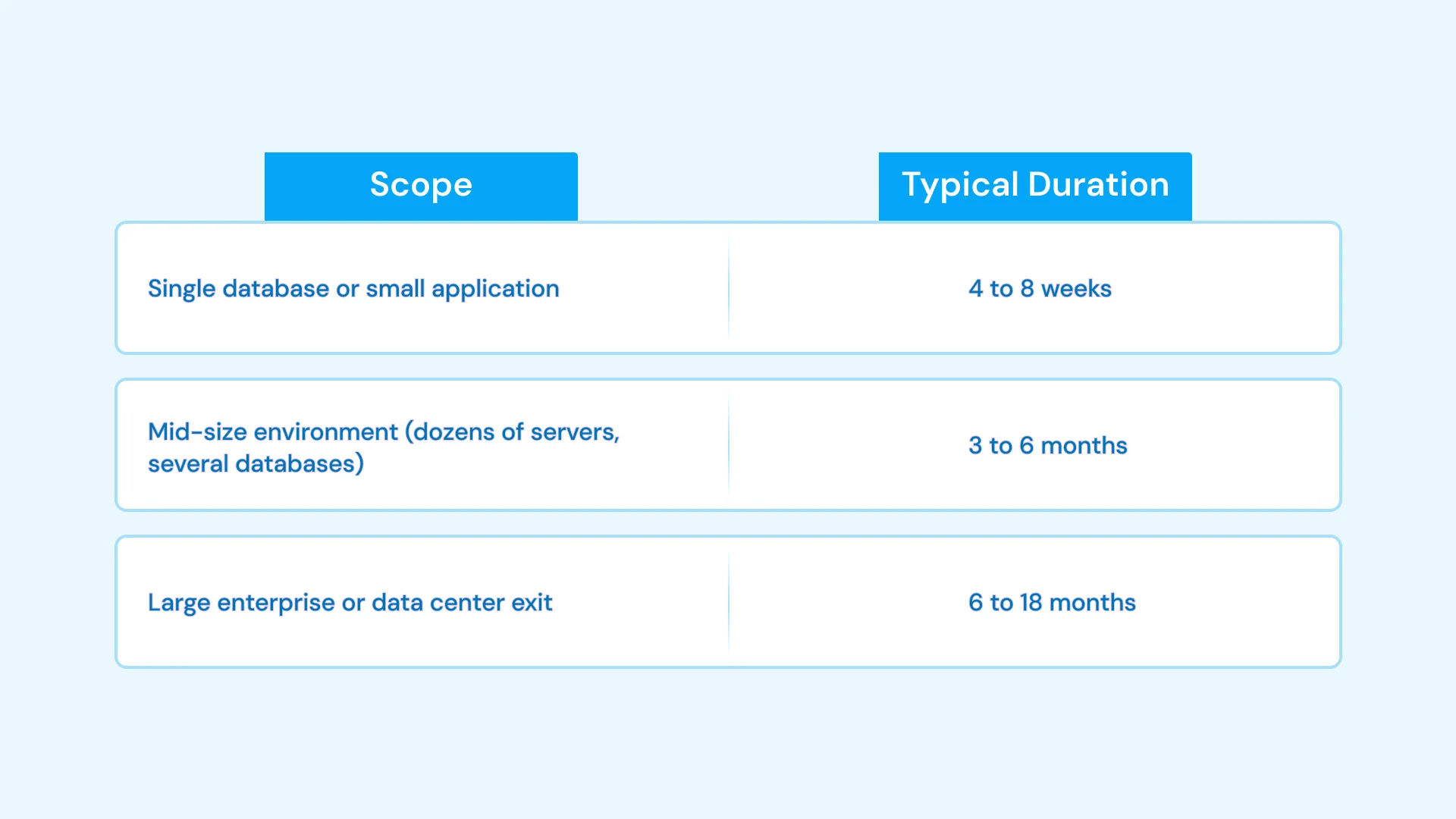
Most time goes to assessment, remediation, landing zone build, testing, wave planning, and cutover rehearsal. Compressing those phases is the most common cause of failed cutovers.
Downtime Planning: Minimal and Zero Downtime Approaches
Azure migration with minimal downtime relies on separating the long copy from the short switch. The core pattern:
- Seed the bulk data while the source stays live.
- Replicate continuously so changes flow to Azure.
- Rehearse cutover in a test environment, timing every step.
- Lower DNS TTLs and prepare connection changes ahead of time.
- Freeze writes briefly, apply the final sync, validate, and switch traffic.
- Keep rollback ready until the target is stable.
Zero Downtime Azure Migration: Is It Possible?
Can you migrate to Azure with zero downtime? For some architectures, such as stateless web tiers behind a load balancer, yes: you run old and new side by side and shift traffic gradually. For stateful systems, especially databases, true zero downtime is difficult; the realistic goal is a cutover measured in minutes. A zero-downtime Azure migration is easier when the application tolerates two active environments, supports read-only modes, or can queue writes briefly.
How to Minimize Downtime During Azure Migration
How to minimize downtime during Azure migration, in practice:
- Use online migration and continuous replication for databases
- Schedule cutovers in low-traffic windows
- Pre-stage networking, identity, certificates, and DNS
- Automate cutover steps and time each one in rehearsals
- Use blue-green or canary routing where possible
- Define go or no-go criteria and a rollback trigger in advance
Azure Data Migration Services: Doing It Yourself vs Hiring a Partner
Azure data migration services from a partner make sense for on-premises data migration to Azure when you lack in-house cloud skills, face a hard deadline, or are moving business-critical databases. Evaluate providers on assessment rigor, relevant database and compliance experience, a pilot-first approach, transparent itemized pricing, clear rollback planning, and knowledge transfer.
Ask what is included in the quote: parallel running, validation, and post-cutover support are often where costs surprise buyers.
US organizations should map data to the right controls before any on-premises data migration to Azure begins. Common considerations include HIPAA for healthcare data, financial-sector requirements, state privacy laws, and customer SOC 2 expectations. Choose Azure regions deliberately, consider Azure Government for qualifying public-sector workloads, and use private connectivity and encryption throughout. These are starting points; confirm requirements with your compliance and legal teams.
Accelerate Your Azure Migration—With Zero Disruption
Migrating complex, business-critical data doesn't have to mean extended downtime or budget surprises. Our team plans and executes end-to-end on-premises to Azure migrations for US businesses—handling everything from initial estate assessments and Landing Zone architecture to seamless data cutover and post-migration cost optimization.
- Planning a targeted move? Explore our dedicated Azure Cloud Migration Services to see how we build secure, repeatable migration runbooks.
- Evaluating a multi-cloud or hybrid roadmap? Discover our broader Cloud Migration Services for tailored infrastructure modernization.
- Integrating with your daily workflows? Learn how our Microsoft Business Solutions connect your new Azure environment directly to the Microsoft 365, Dynamics, and Power Platform tools your teams already rely on.
Conclusion
A well-run on-premises to Azure migration, including on-premises data migration to Azure for databases and files, is a series of small, predictable decisions: assess thoroughly, choose the right tool for each data type, size the timeline from real throughput, rehearse the cutover, and keep a way back. Do that, pick on-premises to Azure migration tools by workload, and downtime shrinks from days to hours or minutes, and the schedule stops being a surprise.
Start with discovery and a bandwidth test. Those two exercises will tell you more about your real timeline and tool mix than any estimate made from a distance. If you want an experienced partner to help plan, validate, and execute your move without disrupting daily operations, contact us today to schedule a consultation with our Azure migration specialists.

Vice President, Strategy – VLink Inc.
Sambhavi Gopalakrishnan is the Vice President of Strategy at VLink Inc., bringing over a decade of experience in IT leadership, project implementation, and strategic growth. She possesses a strong foundation in technical project management and pre-sales, driving innovation and business transformation at VLink.

 Shivisha Patel


