

The SIEM landscape has fundamentally transformed. What began as log aggregation has evolved into AI-powered threat detection platforms that reshape how enterprises defend themselves.
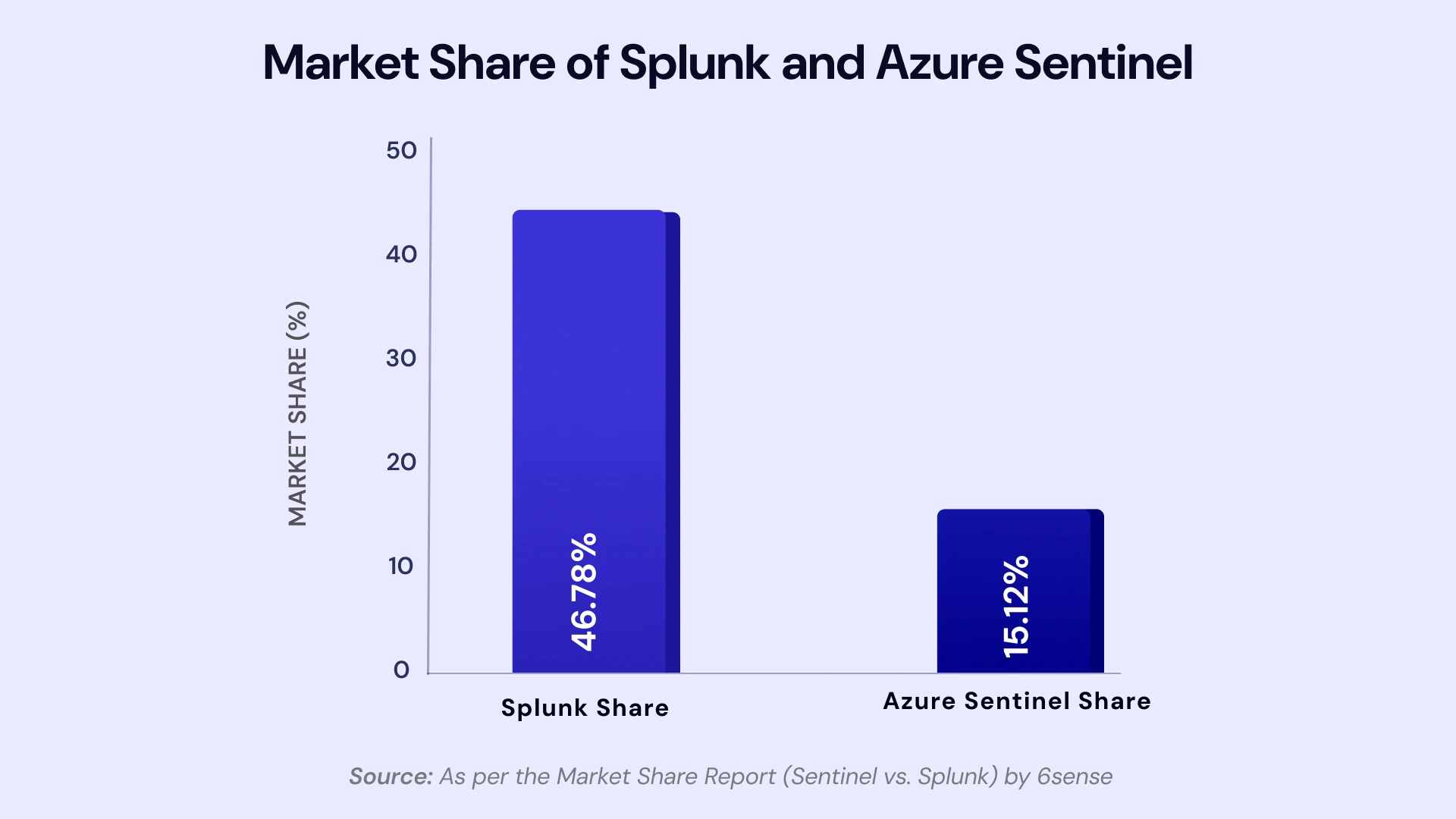
Cloud-native SIEM is essential for modern security- why Microsoft Sentinel SIEM matters includes AI-driven threat detection and automated response.
In 2026, choosing between Microsoft Sentinel and Splunk Enterprise Security has become less about comparing feature checklists and more about answering strategic questions: Can your SIEM scale with cloud-native architectures? Will it leverage GenAI to reduce analyst burnout? How predictable are your long-term costs? And critically, does it align with your broader security and infrastructure strategy?
This isn’t a simple “Sentinel wins” or “Splunk wins” declaration. Both platforms serve distinct enterprise needs. This blog provides CISOs, SOC leaders, and cloud architects with the clarity needed to make informed, board-ready decisions — including cost modeling, migration blueprints, and role-specific evaluation frameworks.
Executive Snapshot for CISOs (Board-Ready Summary)
For C-suite executives evaluating SIEM platforms, the decision extends beyond technology — it’s about risk posture, cost governance, and strategic alignment. Here’s what decision-makers need to know.
Sentinel vs Splunk at a Glance (2026 Scorecard)
| Dimension | Microsoft Sentinel | Splunk Enterprise Security |
| Risk Posture | Native integration with Microsoft 365, Azure, Entra ID; strong for cloud-first orgs | Mature correlation; best for heterogeneous, multi-vendor environments |
| Cost Predictability | Ingestion-based; can spike with cloud sprawl if not governed | Workload-based pricing; more predictable with committed capacity |
| AI Maturity | Security Copilot integration; natural-language investigation; strong GenAI roadmap | Machine Learning Toolkit; behavioral analytics; catching up on GenAI |
| Time-to-Value | Fast for Microsoft shops; 2–4 weeks for basic deployment | 4–8 weeks; requires infrastructure planning and tuning |
| Vendor Strategy | Single-vendor ecosystem; potential lock-in concern for diversified orgs | Vendor-neutral platform; mitigates concentration risk |
Quick Recommendations by Environment
- Microsoft-Heavy Cloud Enterprise
Choose Sentinel if you’re operating primarily on Microsoft 365, Azure, and Entra ID (formerly Azure AD). Native integrations eliminate the “data-in-motion” tax, reduce integration overhead, and leverage existing Microsoft licensing (E5 Security often includes Sentinel data allowances). You’ll achieve faster time-to-value and benefit from unified console experiences across security tools.
- Hybrid / Regulated Enterprise
Choose Splunk if you operate critical on-premises infrastructure, operational technology (OT), or mainframes that require mature, flexible data pipelines. Regulated industries — financial services, healthcare, energy — often prefer Splunk’s track record for handling complex compliance requirements and multi-region data residency mandates. Splunk’s self-managed deployment options offer greater control over data sovereignty.
- Multi-Vendor, Tool-Agnostic SOC
Choose Splunk if your security strategy deliberately avoids vendor lock-in. Organizations with diverse toolchains — Palo Alto, CrowdStrike, Okta, AWS — benefit from Splunk’s neutrality and mature third-party integrations. This approach mitigates the risk of over-concentration in a single vendor ecosystem.
What Changed in 2026: The AI-Driven SIEM Era
The SIEM market crossed an inflection point. Traditional correlation engines — built on static rules and signature-based detection — no longer scale against adaptive adversaries leveraging AI themselves. The transformation isn’t incremental; it’s architectural.
From Rules-Based SIEM to AI-Assisted SOC
Conventional SIEMs generated alerts based on predefined correlation rules — effective for known attack patterns but blind to novel techniques. Modern adversaries adapt faster than security teams can write rules. The result: alert fatigue. SOC analysts drown in false positives, spending 60–70% of their time triaging noise rather than hunting threats.
AI-driven SIEMs fundamentally change this dynamic. They use machine learning to baseline normal behavior, detect anomalies, and prioritize alerts based on contextual risk — not just signature matches. This reduces alert volume by 40–50% while surfacing genuinely suspicious activity that rule-based systems miss.
The productivity implications are profound. Analysts equipped with AI assistants can investigate incidents in minutes instead of hours, querying systems in natural language rather than mastering complex query syntax. This shift doesn’t just improve efficiency — it makes cybersecurity service providers more sustainable.
Microsoft Security Copilot + Sentinel vs Splunk AI
- Microsoft’s GenAI Advantage
Microsoft Security Copilot transforms how analysts interact with Sentinel. Investigations that once required deep KQL (Kusto Query Language) expertise can now be conducted through conversational prompts: “Show me all lateral movement attempts from compromised accounts in the past 48 hours.” Copilot synthesizes data across Sentinel, Defender, and Entra ID, providing contextualized incident summaries in seconds.
Detection engineering also accelerates. Copilot can draft analytic rules based on MITRE ATT&CK techniques, suggest optimizations to reduce false positives, and even generate playbooks for automated response. Early adopters report 30–40% reductions in mean time to respond (MTTR).
- Splunk’s AI Maturity
Splunk offers machine learning through its ML Toolkit and Splunk AI, focusing on predictive analytics and anomaly detection. These tools excel at behavioral baselining — identifying outliers in user behavior, network traffic, and system logs. However, Splunk’s GenAI capabilities lag behind Microsoft’s integrated Copilot experience. Natural-language investigation remains limited, and most workflows still require SPL (Search Processing Language) proficiency.
That said, Splunk’s AI models are platform-agnostic. They ingest and analyze data from any source without vendor bias — an advantage for enterprises that prioritize tool neutrality.
Core Platform Comparison: Architecture, Data, and AI
Understanding the architectural foundations of each platform clarifies which aligns with your infrastructure strategy.
1. Deployment & Architecture Models
Microsoft Sentinel: Cloud-Native by Design
Sentinel is built entirely on Azure, leveraging Azure Monitor, Log Analytics, and Azure Data Explorer. There is no on-premises version. This cloud-native architecture delivers elastic scalability — ingest spikes during incident response or compliance audits don’t require capacity planning.
For organizations already committed to Azure, Sentinel integrates seamlessly. Data residency requirements are met through Azure’s global regions. However, hybrid enterprises with significant on-premises footprints face challenges. Sentinel requires deploying agents or connectors to forward logs to Azure — introducing latency and complexity for legacy systems.
Splunk: Flexible Deployment Across Environments
Splunk supports self-managed on-premises deployments, Splunk Cloud (fully managed SaaS), and hybrid models. This flexibility suits enterprises with strict data sovereignty mandates or legacy infrastructure that can’t be migrated to the cloud.
Self-managed deployments grant full control over data pipelines, indexing, and retention. However, they introduce operational overhead — capacity planning, hardware refreshes, and patch management fall to internal teams. Splunk Cloud eliminates this burden but costs more per GB ingested.
2. Data Ingestion, Normalization, and Query Engines
KQL vs SPL: The Learning Curve
Kusto Query Language (KQL) powers Sentinel. It’s optimized for large-scale log analytics and shares syntax with Azure Data Explorer. Analysts familiar with Azure Monitor or Application Insights transition easily. However, KQL requires dedicated training for teams accustomed to SQL or Splunk’s SPL.
Splunk’s Search Processing Language (SPL) remains the industry standard. Most SOC analysts already know SPL, reducing ramp-up time. Its pipeline-based syntax is intuitive for complex queries. The downside: SPL performance degrades on extremely large datasets (multi-petabyte scales), whereas KQL handles massive volumes more efficiently.
Data Normalization and Schema Flexibility
Sentinel uses the Common Event Format (CEF) and Advanced Security Information Model (ASIM) to normalize logs from disparate sources. Normalized data simplifies cross-product correlation but requires connector development for niche data sources.
Splunk ingests raw data and normalizes at search time using field extractions. This “schema-on-read” approach offers maximum flexibility — any log format can be ingested without preprocessing. However, poorly configured field extractions degrade query performance.
3. AI, UEBA, and Correlation Capabilities
Both platforms incorporate User and Entity Behavior Analytics (UEBA), but with different maturity levels.
Sentinel’s Built-In UEBA
Sentinel includes UEBA natively, profiling user and entity behavior across Microsoft 365, Azure, and third-party sources. It identifies anomalies — impossible travel, unusual file access, privilege escalation — without additional licenses. Integration with Microsoft Entra ID enriches alerts with identity context.
Splunk’s UEBA as an Add-On
Splunk’s UEBA requires Splunk Enterprise Security and User Behavior Analytics (UBA) add-ons, which increase licensing costs. Once deployed, Splunk UBA delivers sophisticated peer-group analysis and machine-learning-driven risk scoring. It’s particularly strong in detecting insider threats and account compromise across heterogeneous environments.
Feature Comparison Matrix
| Feature | Microsoft Sentinel | Splunk Enterprise Security |
| Deployment Model | Cloud-native SaaS (Azure only) | Self-managed, hybrid, or Splunk Cloud |
| Query Language | KQL (Kusto Query Language) | SPL (Search Processing Language) |
| Native AI Integration | Security Copilot (GenAI), Built-in UEBA | ML Toolkit, UBA (add-on), Splunk AI |
| SOAR Capabilities | Logic Apps (400+ connectors) | Splunk SOAR (350+ apps, separate license) |
| Best For | Microsoft-heavy, cloud-first organizations | Hybrid, multi-vendor, on-prem infrastructure |
| Typical Deployment Time | 2–4 weeks (basic), 6–12 weeks (advanced) | 4–8 weeks (basic), 12+ weeks (complex) |
Detection, Investigation, and Response in Practice
Operational effectiveness ultimately determines SIEM value. How quickly can your team detect, investigate, and respond to threats?
Alert Fidelity and Correlation Depth
High alert volumes bury critical threats. Effective SIEMs reduce noise while preserving the signal.
Sentinel’s Fusion Correlation
Sentinel’s Fusion engine correlates low-confidence signals across multiple data sources to surface high-confidence incidents. For example, a failed login attempt (low severity) combined with impossible travel (medium severity) and unusual file download (medium severity) triggers a high-priority incident. This multi-stage correlation reduces analyst workload.
Splunk’s Correlation Search Maturity
Splunk’s Enterprise Security Content Update (ESCU) delivers pre-built correlation searches mapped to MITRE ATT&CK. These detections are refined through years of field deployment, resulting in fewer false positives. However, they require tuning for each environment — a time investment that Sentinel’s managed rules avoid.
SOAR, Playbooks, and Automation
Security Orchestration, Automation, and Response (SOAR) capabilities determine how much manual work your SOC can eliminate.
Sentinel Playbooks (Logic Apps)
Sentinel playbooks leverage Azure Logic Apps — low-code automation workflows that integrate with 400+ connectors (Microsoft 365, ServiceNow, Slack, Jira, etc.). Common use cases include automatically isolating compromised endpoints, blocking malicious IPs in firewalls, and enriching alerts with threat intelligence.
The downside: Logic Apps consume separate Azure resources, adding cost complexity. Organizations must budget for both Sentinel ingestion and Logic App executions.
Splunk SOAR (Formerly Phantom)
Splunk SOAR is a standalone product requiring separate licensing. It offers mature orchestration capabilities with 350+ pre-built app integrations. SOAR playbooks can execute complex workflows — multi-stage investigations, cross-tool remediation, and evidence collection for forensics.
However, SOAR’s licensing model can be cost-prohibitive for smaller SOCs. Organizations often deploy it selectively for high-value use cases rather than broadly.
Analyst Experience with AI Assistants
The analyst experience determines how quickly your team can upskill and remain productive under pressure.
Sentinel’s Copilot integration shortens investigation timelines. Analysts query incidents conversationally, receive guided remediation steps, and generate executive summaries without manual report writing. This lowers the barrier to entry for junior analysts while accelerating senior analysts’ workflows.
Splunk’s interface remains powerful but complex. Mastery requires training investment. That complexity becomes an asset in the hands of experienced analysts — they can craft highly customized detections and dashboards. However, it also contributes to talent scarcity and burnout.
2026 Pricing and TCO Scenarios (Real-World Models)
Cost predictability often outweighs feature differences in enterprise SIEM selection. Let’s quantify what these platforms actually cost.
Pricing Models Explained
Sentinel: Ingestion-Based Pricing
Sentinel charges per GB ingested into Log Analytics. Pricing tiers include:
- Pay-as-you-go: ~$2.50/GB (varies by region)
- Commitment tiers: Volume discounts starting at 100 GB/day (~$1.75–2.00/GB)
- Basic logs: $0.50/GB for high-volume, low-value data (limited query capabilities)
Critical cost levers include log filtering (pre-ingestion), retention policies (default 90 days; extended retention increases costs), and data tiers (basic vs analytics logs).
Splunk: Workload-Based Pricing
Splunk transitioned from index-volume pricing to workload pricing in recent years. Costs depend on:
- Ingest pricing: Similar to Sentinel, charged per GB indexed
- Compute pricing: Charges for search and indexing compute (CPU/memory)
- Storage pricing: Separate charges for hot (fast queries) and cold (archived) data
Self-managed deployments avoid compute charges but incur infrastructure and staffing costs. Splunk Cloud simplifies operations but increases per-GB costs significantly.
Now, let’s explore this in detail with a few scenarios.
Scenario 1: Regional Bank (500 GB/day, Compliance-Heavy)
Profile
Multi-region operations; PCI-DSS, SOC 2, and GDPR requirements; 500 GB daily ingest (80% Microsoft 365 and Azure, 20% third-party firewalls and endpoints); 12-month retention mandate.
Sentinel TCO (Annual)
- Ingestion: 500 GB/day × $1.80/GB (commitment tier) × 365 days = $328,500
- Retention (90 days included; 270 days additional): ~$75,000
- Logic Apps (automation): ~$12,000
Total: ~$415,000
Splunk TCO (Annual, Splunk Cloud)
- Ingestion: 500 GB/day × $3.50/GB (Cloud pricing) × 365 days = $638,750
- Enterprise Security (ES) add-on: ~$100,000
- SOAR (optional): ~$50,000
Total: ~$788,750
Winner: Sentinel
For Microsoft-centric environments, Sentinel delivers 45–50% cost savings. Native connectors eliminate data egress fees, and Microsoft E5 bundles often include Sentinel allowances.
Scenario 2: Global SaaS Company (2 TB/day, Multi-Cloud)
Profile
AWS, Azure, and GCP workloads; 2 TB daily ingest; diverse toolchain (Okta, CrowdStrike, Palo Alto, Datadog); 60-day retention; high query volume for threat hunting.
Sentinel TCO (Annual)
- Ingestion: 2,000 GB/day × $1.60/GB (high-volume tier) × 365 days = $1,168,000
- Data egress (multi-cloud logs to Azure): ~$120,000
Custom connectors (development and maintenance): ~$50,000
Total: ~$1,338,000
Splunk TCO (Annual, Self-Managed)
- Licensing: 2,000 GB/day × $2.00/GB (negotiated enterprise rate) × 365 days = $1,460,000
- Infrastructure (servers, storage, networking): ~$200,000
Staffing (2 FTEs for platform management): ~$300,000
Total: ~$1,960,000
- Winner: Sentinel
Even accounting for multi-cloud data egress, Sentinel’s managed service model eliminates infrastructure and staffing overhead. Total savings: ~$620,000 annually.
Cost Optimization Levers
For Sentinel
- Pre-ingestion filtering: Use Azure Monitor agent filtering to exclude verbose, low-value logs (e.g., debug logs, non-security application telemetry).
- Basic logs tier: Route high-volume logs (CDN access logs, load balancer logs) to basic logs at $0.50/GB. Accept limited query functionality for cost savings.
- Commitment reservations: Lock in 100+ GB/day commitments for 20–30% discounts.
For Splunk
- Data tier management: Archive cold data to S3-compatible storage. Reduce hot data retention to minimize indexer costs.
- Workload optimization: Rightsize compute resources. Schedule non-critical searches during off-peak hours.
- Enterprise license negotiations: Multi-year commitments unlock volume discounts (up to 40% off list pricing).
Compliance, Data Residency, and Industry Fit
Regulated industries prioritize compliance certifications and data sovereignty. Both platforms support major frameworks, but with nuances.
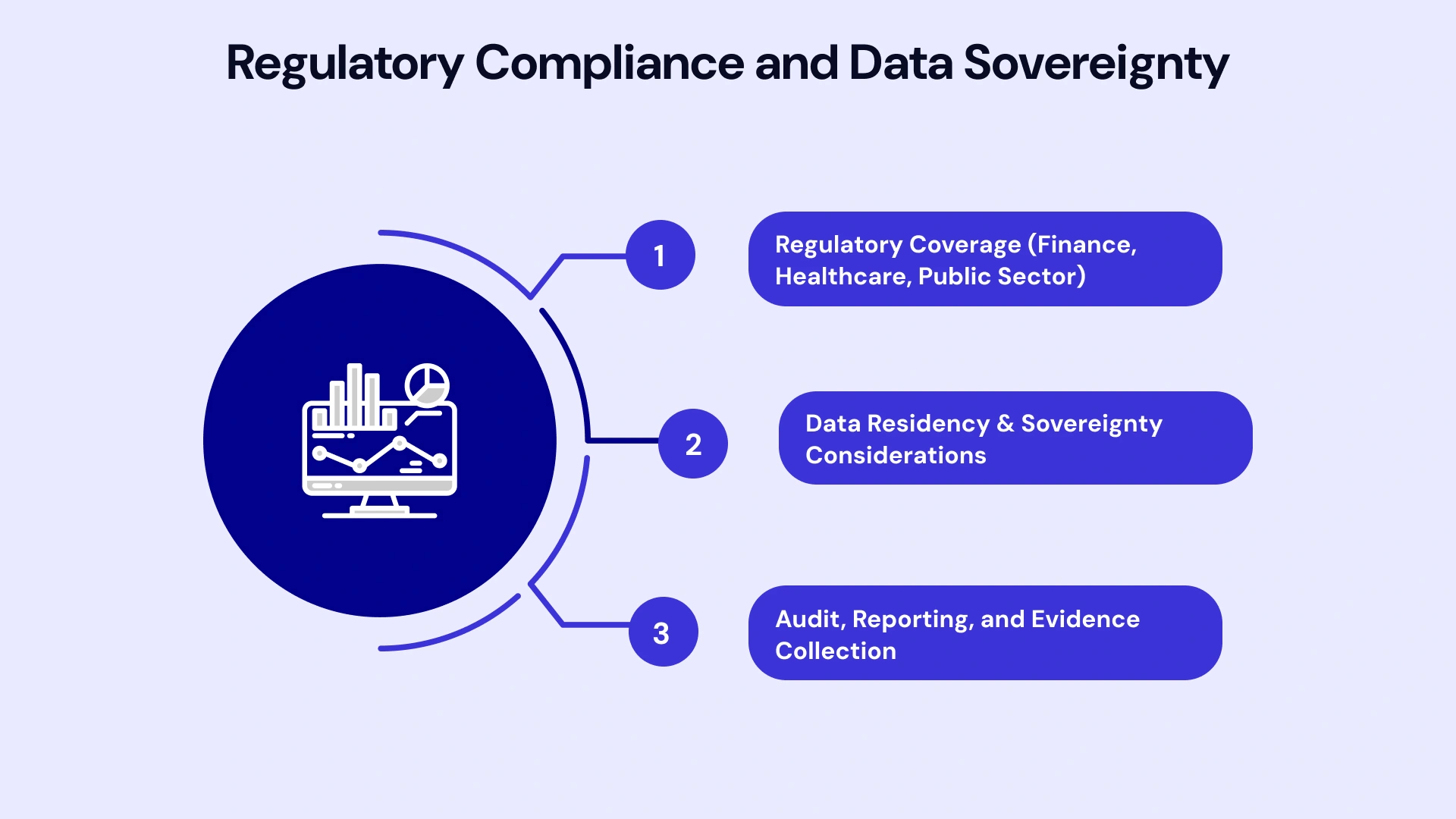
Regulatory Coverage (Finance, Healthcare, Public Sector)
- Sentinel
Inherits Azure’s compliance certifications: PCI-DSS, HIPAA, FedRAMP (High), SOC 2 Type II, GDPR, and ISO 27001. Sentinel workspaces can be configured to meet region-specific requirements (e.g., GDPR data residency in EU regions). However, compliance validation responsibility remains with the customer — Microsoft provides the compliant platform; you must configure it correctly.
- Splunk
Splunk Cloud and self-managed deployments support PCI-DSS, HIPAA, SOC 2, and FedRAMP (Moderate). Self-managed offers greater control for highly regulated sectors (defense, intelligence) requiring air-gapped or on-premises deployments. Splunk’s maturity in financial services and healthcare stems from decades of field-proven implementations.
Data Residency & Sovereignty Considerations
Sentinel relies on Azure’s 60+ global regions. You select a region during workspace creation; data never leaves that geography without explicit configuration. This satisfies most GDPR, CCPA, and regional privacy mandates.
Splunk self-managed deployments grant absolute control — data stays where you deploy indexers. Splunk Cloud offers region selection, but with fewer options than Azure. Organizations with stringent sovereignty requirements (public sector, banking in certain jurisdictions) often prefer self-managed Splunk for this reason.
Audit, Reporting, and Evidence Collection
Both platforms generate audit logs and compliance reports. Sentinel integrates with Azure Policy and Microsoft Purview for unified governance. Splunk’s Enterprise Security app includes pre-built compliance dashboards (PCI-DSS, NIST CSF, CIS Controls).
For forensic investigations, Splunk’s immutable audit trail and timestamping capabilities have courtroom-tested credibility. Sentinel’s audit logs meet similar standards but lack Splunk’s decades-long track record.
CTA IMAGE 2ND HERE
Skills, Operating Model, and Partner Ecosystem
Technology choice is inseparable from talent strategy. Can you hire, retain, and upskill the right people?
Talent Availability: KQL vs SPL
- SPL: The Industry Standard
Splunk’s 20+ year market presence means SPL skills are widespread. Cybersecurity bootcamps, university programs, and certifications (Splunk Certified Power User, Splunk Enterprise Certified Admin) produce a steady talent pipeline. Hiring experienced Splunk analysts is easier than hiring KQL specialists.
- KQL: The Emerging Skill
KQL proficiency is growing but remains niche. Organizations already using Azure services have internal KQL expertise; others must invest in training. Microsoft offers free learning paths, and the syntax is learnable within weeks for SQL-savvy analysts. However, deep KQL mastery — optimizing queries for performance, advanced analytics — takes months.
Sentinel’s Copilot integration reduces this barrier. Junior analysts can investigate incidents without mastering KQL syntax, lowering hiring requirements.
Managed SOC & MSSP Ecosystem
- Splunk MSSP Maturity
Dozens of established MSSPs (Accenture, IBM Security, Trustwave) offer Splunk-based managed detection and response (MDR). These partnerships provide turnkey SOC services for organizations lacking in-house capabilities.
- Sentinel MSSP Growth
Sentinel’s MSSP ecosystem is maturing rapidly. Microsoft partners (Accenture, Deloitte, PwC) now offer Sentinel-based MDR. However, the operational playbooks are less mature than Splunk equivalents. Expect 6–12 months of tuning for optimal results.
Long-Term Operating Cost Implications
Sentinel’s managed nature reduces operational overhead. No infrastructure to maintain; Microsoft handles patching, scaling, and availability. Internal teams focus on detection engineering and threat hunting.
Self-managed Splunk requires dedicated platform engineers (typically 1–2 FTEs per 1,000 GB/day ingested). Factor $150,000–$300,000 annually in staffing costs. Splunk Cloud eliminates this, but at higher per-GB pricing.
Migration and Coexistence Blueprints (12–24 Month View)
Migrating SIEMs is high-risk. Poor planning leads to detection gaps, compliance violations, and analyst confusion. Here’s how to de-risk the transition.
Sentinel-First Strategy
When to Choose This Path
You’re heavily invested in Microsoft 365 and Azure; cloud migration services are accelerating; you want to consolidate security tools under a single vendor.
Migration Blueprint
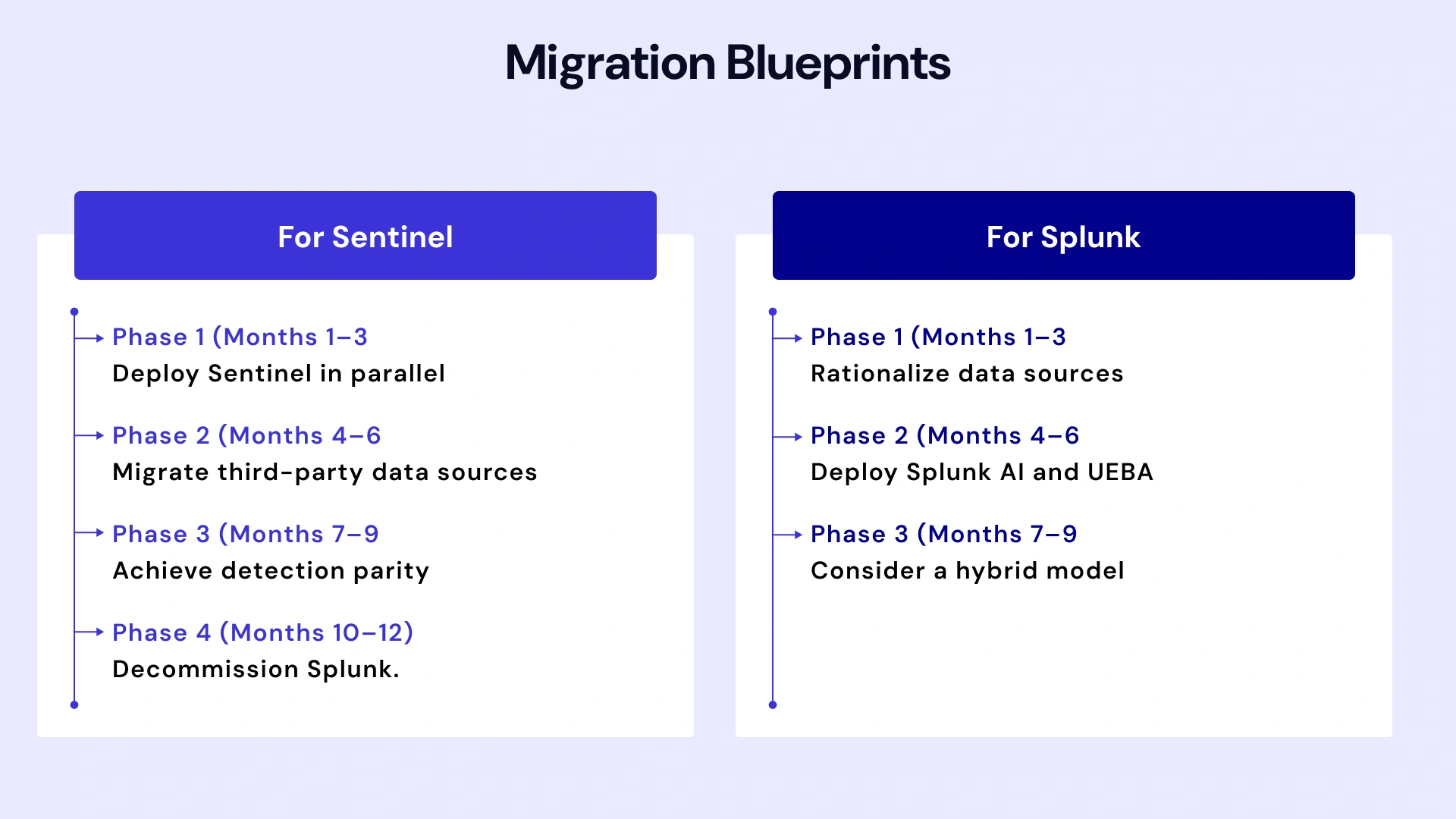
- Phase 1 (Months 1–3): Deploy Sentinel in parallel. Ingest Microsoft 365, Azure, and Entra ID logs. Validate detection coverage against Splunk baselines.
- Phase 2 (Months 4–6): Migrate third-party data sources (firewalls, EDR, SaaS apps). Build custom connectors where necessary. Train SOC analysts on KQL and Sentinel workflows.
- Phase 3 (Months 7–9): Achieve detection parity. Run both SIEMs in parallel; compare alert fidelity and MTTR metrics. Tune Sentinel rules to match Splunk performance.
- Phase 4 (Months 10–12): Decommission Splunk. Migrate playbooks to Logic Apps. Archive historical Splunk data for compliance.
Splunk-First Strategy
When to Choose This Path
You operate critical on-premises infrastructure; regulatory mandates require self-managed deployments; vendor neutrality is a strategic priority.
Optimization Blueprint
- Phase 1 (Months 1–3): Rationalize data sources. Eliminate redundant logging. Implement tiered storage (hot/warm/cold) to reduce costs.
- Phase 2 (Months 4–6): Deploy Splunk AI and UEBA. Automate low-value alerts. Reduce analyst toil through SOAR playbooks.
- Phase 3 (Months 7–12): Consider a hybrid model — Splunk for on-premises; Sentinel for cloud workloads. Federate searches across both platforms using SIEM-to-SIEM integrations.
Hybrid Coexistence Model
Many enterprises run both platforms indefinitely:
- Splunk for on-premises legacy systems: Mainframes, industrial control systems (ICS/OT), air-gapped networks.
- Sentinel for cloud-native workloads: Azure, Microsoft 365, and SaaS applications with ideal cloud infrastructure services.
Cross-platform correlation remains a challenge. Solutions include deploying SIEM-agnostic orchestration layers (e.g., Swimlane, Tines) or building custom APIs to federate alerts.
Migration Phases and Risk Mitigation
Key Risks
- Detection gaps during cutover: Parallel operation minimizes this. Don’t decommission legacy SIEM until detection parity is validated.
- Analyst productivity loss: Budget 3–6 months for team retraining. Expect temporary MTTR increases.
- Cost overruns: Dual licensing during migration inflates budgets. Negotiate transition pricing with vendors.
Board Communication
Present migration as a risk-managed program with clear milestones: proof-of-concept (90 days), pilot deployment (6 months), full migration (12–18 months). Quantify benefits in business terms — reduced MTTR, lower TCO, improved compliance posture.
Decision Framework: How to Choose in 2026
Use this checklist to structure your evaluation and gain organizational alignment.
10-Point Evaluation Checklist
1. Infrastructure Footprint:- Are you cloud-first (Azure/Microsoft 365) or hybrid with significant on-premises infrastructure?
2. Cost Predictability:- Can you forecast log volume growth? Do you have data governance to control ingestion?
3. AI and Automation Maturity:- Do you need GenAI-powered investigations now, or can you wait 12–18 months?
4. Talent Availability:- Do you have existing SPL expertise, or are you willing to invest in KQL training?
5. Vendor Concentration Risk:- Is consolidating on Microsoft strategic, or do you need vendor diversity for negotiating leverage?
6. Compliance and Data Sovereignty:- Do regulations require on-premises data retention or air-gapped deployments?
7. Scale and Performance:- Are you ingesting petabyte-scale data daily? High-performance queries on massive datasets favor KQL.
8. Ecosystem Integration:- Do you use Microsoft security tools primarily, or do you operate a heterogeneous stack?
9. Operational Overhead Tolerance:- Can you staff platform engineering for self-managed SIEM, or do you prefer fully managed SaaS?
10. Migration Timeline and Risk Appetite:- Can you execute an 18-month migration, or do you need continuity?
Role-Based Guidance
- For CISOs
Focus on strategic alignment with broader security and infrastructure roadmaps. If you’re consolidating on Microsoft, Sentinel reduces vendor sprawl and simplifies governance. If vendor neutrality is strategic, Splunk preserves optionality. Quantify risk: What happens if Microsoft raises prices 30%? What’s your mitigation?
- For SOC Managers
Prioritize analyst experience and detection effectiveness. Sentinel’s Copilot reduces training burden and accelerates investigations. Splunk’s mature detection content and SOAR capabilities deliver proven results. Consider your team’s current skill set and hiring challenges.
- For Cloud Security Architects
Evaluate architectural fit. Sentinel’s Azure-native design simplifies managed cloud services security posture management (CSPM) integration and multi-cloud visibility (via connectors). Splunk’s flexibility accommodates complex hybrid environments but requires more engineering effort.
- For IT Ops / Platform Owners
Assess operational burden. Sentinel’s SaaS model eliminates infrastructure management. Splunk self-managed gives you control but demands staffing. Splunk Cloud splits the difference — managed infrastructure at a higher cost.
Driving Business Results Through VLink’s Expertise
Selecting the right SIEM is only the first step. Successful implementation requires deep technical expertise, change management, and a clear migration roadmap. VLink’s Microsoft business solutions have guided Fortune 500 enterprises and high-growth SaaS companies through complex SIEM transformations — from initial architecture design to full operational handoff.
Our SIEM Consulting Services Include:
- Platform Selection and TCO Modeling: We build custom cost models based on your actual log volumes, retention requirements, and compliance mandates — not vendor estimates.
- Migration Planning and Execution: Our phased migration blueprints minimize risk while maintaining detection continuity. We handle everything from data pipeline engineering to SOC analyst training.
- Detection Engineering and Threat Hunting: We develop custom detection rules mapped to your threat model, tune UEBA baselines, and embed threat hunting playbooks into your operations.
- SOAR and Automation: From incident response playbooks to multi-tool orchestration, we automate repetitive SOC workflows to reduce analyst burnout and improve MTTR.
- Compliance and Governance: We configure SIEM platforms to meet PCI-DSS, HIPAA, GDPR, SOC 2, and FedRAMP requirements — with audit-ready evidence collection.
Whether you’re migrating from Splunk to Sentinel, optimizing an existing deployment, or building a hybrid SIEM architecture, VLink’s dedicated team delivers measurable outcomes: reduced security risk, predictable costs, and a resilient SOC built for the AI era.
Final Verdict: Sentinel vs Splunk Is an Operating Model Decision
The Sentinel vs Splunk debate isn’t resolved by declaring a universal winner. It’s resolved by understanding which platform aligns with your strategic priorities.
- When Sentinel Wins
You operate primarily on Microsoft 365 and Azure. You value speed-to-deployment over maximum flexibility. You want AI-powered investigations now. You’re consolidating security tools to reduce vendor sprawl. Your team embraces cloud-native architectures.
- When Splunk Still Makes Sense
You run critical on-premises infrastructure (OT, mainframes, air-gapped networks). Regulatory mandates require self-managed deployments. You operate a heterogeneous security stack (multi-cloud, diverse vendors). You prioritize vendor neutrality and negotiating leverage. Your SOC already has deep SPL expertise.
- When Hybrid Is the Smartest Option
You have both cloud-native workloads and legacy infrastructure. You can’t afford operational disruption from migration. You want to de-risk vendor concentration while leveraging native cloud integrations. Use Splunk for on-premises; Sentinel for Azure/Microsoft 365. Federate investigations across both platforms.
Ultimately, your SIEM choice reflects your broader enterprise strategy — how you balance innovation velocity against operational stability, vendor consolidation against diversification, and immediate needs against long-term resilience.
The right answer isn’t the same for every organization. But with clear evaluation frameworks, realistic cost modeling, and phased migration blueprints, you can make a decision that your board, your SOC, and your business will support for years to come.
Ready to move beyond the comparison and start your implementation? Whether you’re leaning toward Sentinel, Splunk, or a hybrid model, get in touch to design a migration blueprint that works for your SOC.

Account Executive, VLink Inc.
Sandeep Panchal is an experienced Account Executive with a strong background in the information technology and services sector. He has a solid track record in account P&L management, sales strategy execution, CRM, market research, technical recruiting, and IT staffing services.

 Shivisha Patel