


Most enterprise intranets don't fail on launch day. They fail eighteen months later, when search returns five versions of the same policy, nobody knows who owns the HR pages, and employees quietly go back to asking colleagues on chat. The technology was fine. The structure, governance, and adoption plan were missing.
This guide covers what it takes to get SharePoint intranet development right and to choose the right SharePoint intranet solution for your organization: the features that matter, the architecture and information design that keep content findable, the governance framework that keeps it clean, the security controls that keep it compliant, and a practical rollout plan from first workshop to post-launch adoption.
It's written for IT leaders and digital workplace owners in North America, Canada, the UAE, and India, where data residency, regulatory expectations, and distributed workforces shape the design.

Why Enterprises Still Invest in a SharePoint Intranet
Chat tools and wikis have changed how teams talk, but they haven't replaced the intranet's job: a trusted, governed place for company news, policies, forms, people directories, and departmental knowledge. For organizations already on Microsoft 365, a SharePoint intranet is the natural home for that content, because it inherits identity, security, compliance, search, and collaboration from the platform you already license.
A well-built SharePoint intranet solution also does something point tools can't: it gives leadership a single channel to reach every employee, including frontline and distributed teams, with measurable engagement. That is why investment in SharePoint intranet development continues even as other collaboration tools multiply.
What Is an Enterprise SharePoint Intranet?
An enterprise SharePoint intranet is a company-wide digital workplace built on Microsoft SharePoint, typically SharePoint Online, that unifies communications, content, and processes across business units and regions. Unlike a single team site, it is designed for scale: multiple departments, thousands of users, layered permissions, multilingual content, and governance that spans the organization.
The Microsoft SharePoint intranet typically includes:
- A home site that serves as the front door and aggregates news and resources
- Hub sites for departments, regions, or functions
- Team and communication sites for collaboration and publishing
- Integrations with Teams, Viva, Outlook, and Power Platform
- Central search, navigation, and personalization
SharePoint Intranet Features That Matter for Enterprises
Not every feature deserves equal attention. Based on our SharePoint development services experience, these core intranet features drive the vast majority of enterprise value:

- Global Home Site & Hub Navigation: Establishes a unified, multi-departmental architecture with consistent global navigation and corporate branding, ensuring employees find critical assets in seconds.
- Targeted News & Internal Communications: Delivers personalized, audience-targeted corporate announcements backed by executive approval workflows to minimize noise and maintain message integrity.
- Unified Microsoft Search: Leverages AI-driven enterprise search combined with structured metadata to surface documents, sites, and experts instantly across the entire Microsoft 365 ecosystem.
- People & Organizational Directory: Connects distributed teams through rich user profiles, dynamic organizational charts, and searchable skill/expertise tags.
- Enterprise Document Management: Standardizes policies, SOPs, and templates with automated version control, co-authoring, dynamic permissions, and lifecycle management.
- Automated Forms & Process Workflows: Replaces manual email and paper approvals by integrating Power Automate and Power Apps directly into everyday HR, IT, and Finance requests.
- Seamless Viva Integration (Connections & Engage): Embeds the intranet directly into Microsoft Teams via Viva Connections while fostering cross-company dialogue and leadership visibility through Viva Engage.
- Role-Based Personalization & Audience Targeting: Filters news, quick links, and resources based on employee role, location, or department to deliver a clutter-free, highly relevant workspace.
- Mobile-First Experience: Provides frontline, remote, and field employees secure, responsive access to operational updates and tools via the SharePoint mobile app.
- Actionable Usage Analytics: Tracks page views, active users, search queries, and content engagement metrics to continuously optimize site architecture and adoption strategies.
Enterprise SharePoint Intranet Architecture
Enterprise SharePoint intranet architecture decides how well the platform scales and how easy it is to govern. The recommended model is flat, hub-based, and modular.
The Hub-and-Spoke Model
Use a home site as the root, with hub sites for major business areas (HR, IT, Finance, Operations, regional offices). Associate departmental and project sites to hubs so navigation, branding, and search scoping flow through automatically. Avoid deep subsite hierarchies; they make permissions and reorganizations painful.
Key Architecture Decisions
Decision | Recommended Approach |
Site structure | Flat sites associated with hubs, not nested subsites |
Site types | Communication sites for publishing; team sites for collaboration |
Navigation | Global navigation from home site; hub navigation per function |
Search | Metadata-driven, with scoped search for hubs and verticals |
Multi-geo / residency | Plan early if regional data residency is required |
Customization | Prefer out-of-the-box and SharePoint Framework (SPFx); avoid legacy add-in patterns |
Note on customization: Microsoft retired the legacy SharePoint Add-in model in 2026, so any plan that depends on those patterns needs remediation. Build new functionality with SPFx, Power Platform, and supported APIs.
SharePoint Intranet Information Architecture
Information architecture is where most projects are won or lost. A strong SharePoint intranet information architecture answers a simple question: where would an employee expect to find this?
- Audit existing content. Identify what to migrate, merge, rewrite, or retire. Many intranets carry large volumes of stale material.
- Define content types and metadata. Standardize policy, form, news, and procedure types with consistent fields like owner, department, region, and review date.
- Design taxonomy. Use the Managed Metadata service or a shared term store to keep terms consistent across sites.
- Map user journeys. Test with real tasks, such as "find the travel policy" or "request new hardware," using card sorting and tree testing.
- Set navigation patterns. Keep top-level navigation short, task-oriented, and consistent across hubs.
SharePoint intranet content management best practices start here: fewer, better pages with clear ownership beat many orphaned ones.

SharePoint Intranet Design
A Microsoft SharePoint intranet gives designers modern, responsive building blocks, but discipline still drives good outcomes. SharePoint intranet design should serve findability and trust, not decoration.
A few principles hold up across industries:
- Design for tasks. Put the most common actions (find a person, submit a request, read news) on the home page.
- Be consistent. Shared templates, page layouts, and components reduce training needs and make governance easier.
- Support accessibility. Follow WCAG guidelines so every employee can use the intranet.
- Plan for global audiences. Support multiple languages and right-to-left layouts if you serve the UAE or other Arabic-speaking regions, and consider regional news and holidays for Canada, India, and the US.
- Respect the brand. Use a consistent theme, but avoid heavy customization that breaks on platform updates.
- Design for mobile. Test on phones early; frontline staff often use the intranet only on mobile.
SharePoint Intranet Governance and the Governance Framework
Governance is what separates a living intranet from an abandoned one. SharePoint intranet governance defines who can create what, who owns content, how long it lives, and what happens when it expires.
A Practical SharePoint Intranet Governance Framework
A workable SharePoint intranet governance framework has five parts:
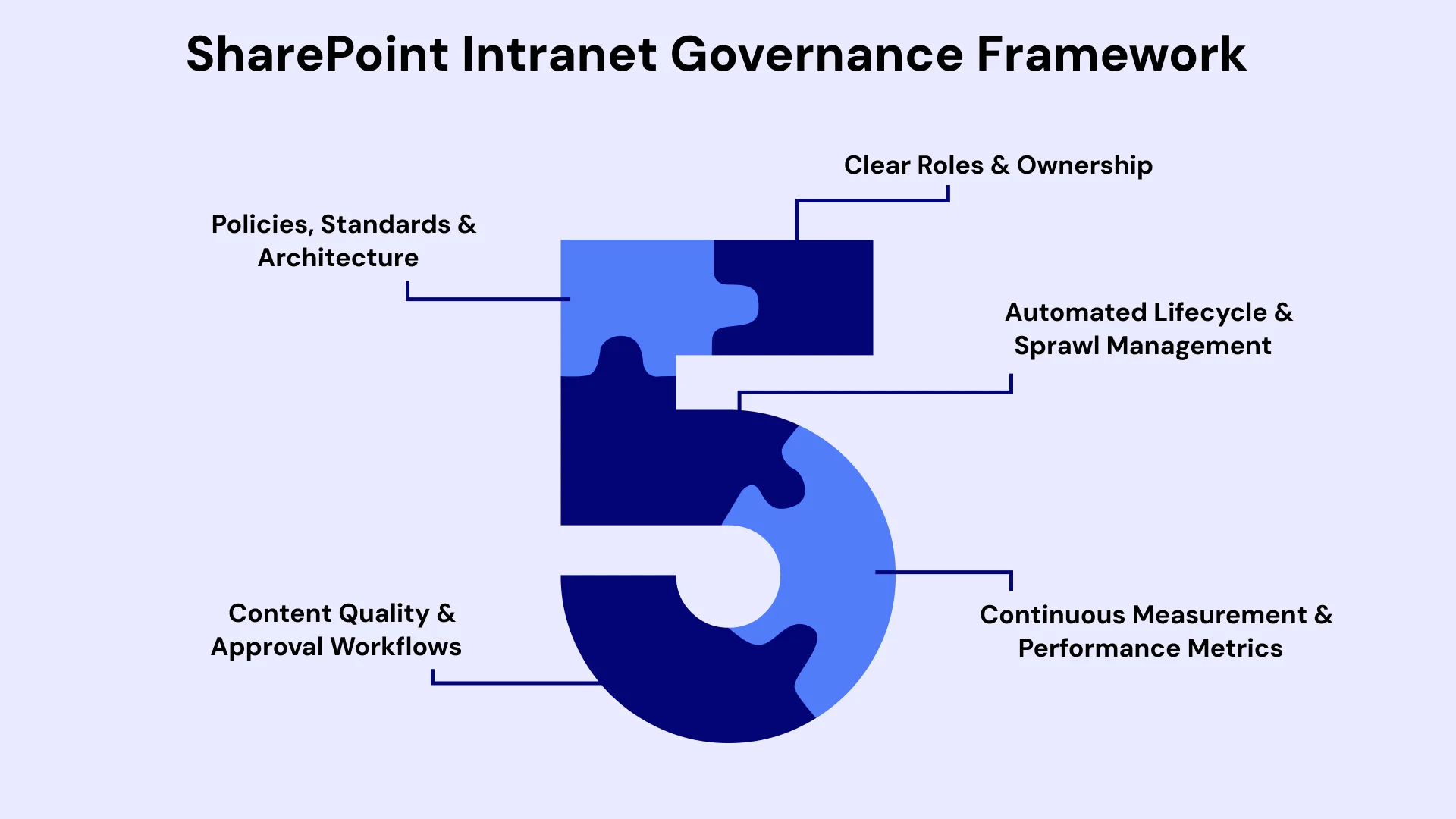
- Roles and ownership. Executive sponsor, intranet product owner, hub owners, site owners, content authors, and a steering group. Every page and site has a named owner.
- Policies and standards. Naming conventions, site templates, branding rules, accessibility requirements, and publishing standards.
- Lifecycle rules. How sites are requested, approved, reviewed, archived, and deleted.
- Content standards. Review cycles, approval workflows, and quality criteria.
- Measurement. Metrics for engagement, search success, content freshness, and compliance.
SharePoint Content Lifecycle Management
SharePoint content lifecycle management keeps information accurate and defensible. Use Microsoft Purview retention labels and policies to retain records for the required period and delete expired content. Add automated review reminders to page owners, flag pages with no activity, and archive inactive sites. This reduces risk, improves search quality, and lowers storage cost.
SharePoint Intranet Content Management Best Practices
These SharePoint intranet content management best practices keep content trustworthy:
- Assign an owner and review date to every policy, procedure, and form
- Keep one authoritative version of each document and link to it rather than copying
- Use metadata and content types rather than folder-heavy structures
- Archive or delete outdated content on a schedule
- Limit who can publish to high-visibility pages
- Audit permissions and sharing settings regularly
SharePoint Intranet Security and Compliance
SharePoint intranet security and compliance work is easiest when it begins in design. Security and compliance should shape the design from day one. A secure SharePoint intranet combines identity, permissions, data protection, and monitoring.
SharePoint Intranet Permissions and Access Control
Good SharePoint intranet permissions and access control follow a few rules:
- Use groups, not individuals. Manage access through Microsoft 365 groups or security groups.
- Apply least privilege. Give people only what they need; avoid broad "everyone" access on sensitive sites.
- Keep inheritance simple. Break permission inheritance sparingly and document every exception.
- Control external sharing. Set tenant and site-level sharing policies, and review guest access periodically.
- Use sensitivity labels. Classify content and apply protection consistently.
Microsoft Entra ID Integration
Microsoft Entra ID integration is the backbone of intranet security. Use it for single sign-on, multi-factor authentication, conditional access (for example, requiring compliant devices for sensitive hubs), and group-based access. Entra ID also drives dynamic groups, so audiences and permissions update automatically as people join, move, or leave.
Data Protection and Compliance Controls
- Sensitivity labels and data loss prevention for regulated content
- Retention and records management through Purview
- Audit logging and alerts for unusual access or sharing
- Encryption at rest and in transit, provided by the platform
- Regular access reviews for privileged roles and sensitive sites
Regional Considerations: North America, Canada, UAE, and India
Region influences where data sits and what rules apply. Treat the following as starting points and confirm details with your legal and compliance teams.
Region | Typical Considerations |
United States | Sector rules such as HIPAA for healthcare, financial regulations, and state privacy laws; government customers may need dedicated cloud environments |
Canada | Privacy laws such as PIPEDA and provincial rules; some organizations require Canadian data residency, which Microsoft supports through Canadian cloud regions |
UAE | Federal and free-zone data protection requirements; many organizations prefer in-country data residency, with Microsoft cloud regions available in the UAE |
India | The Digital Personal Data Protection Act and sector regulations; Microsoft cloud regions in India support residency needs |
Pro Tips: If your workforce spans several of these regions, evaluate SharePoint Multi-Geo capabilities and design hub structures that respect residency boundaries without fragmenting the employee experience.
How to Build an Enterprise Intranet on SharePoint: Step by Step
SharePoint intranet implementation goes best when it follows a staged plan. The SharePoint intranet implementation best practices below run through every phase.
If you're wondering how to build an enterprise intranet on SharePoint, follow this sequence. It doubles as a SharePoint intranet project plan.

Phase 1: Discover and Define (Weeks 1 to 4)
Among the most valuable SharePoint intranet implementation best practices is to finish discovery before design begins. Interview stakeholders, review analytics from any existing intranet, audit content and integrations, and define goals: faster access to information, better communications, fewer help desk requests, higher engagement. Agree on scope, success metrics, and the governance owner.
Phase 2: Architect and Design (Weeks 4 to 10)
Define the hub architecture, information architecture, content types, taxonomy, permissions model, and integration points (Teams, Viva, HR systems, ServiceNow, and others). Produce wireframes and test navigation with real employees.
Phase 3: Build and Configure (Weeks 8 to 18)
Reliable SharePoint intranet implementation depends on templates, standards, and reuse here. Create the home site, hubs, templates, and navigation. Configure search, audiences, and Microsoft Entra ID integration. Build forms and workflows with Power Platform and any custom components with SPFx. Apply sensitivity labels and retention policies.
Phase 4: Migrate and Implement (Weeks 14 to 24)
Handle SharePoint intranet migration and implementation together. Migrate only what you've cleaned: refresh, merge, or retire content before moving it. If you're coming from an older farm, note that SharePoint Server 2016 and 2019 reached end of support in July 2026, which makes migration to SharePoint Online or SharePoint Server Subscription Edition a security and compliance priority rather than an optional upgrade. Remediate legacy customizations, classic workflows, and InfoPath forms as part of this phase.
Phase 5: Pilot, Launch, and Optimize (Weeks 22 to 30)
This is where your SharePoint intranet solution meets real users, so protect the time for testing. Run a pilot with a representative group, fix issues, then launch in waves. Keep a feedback channel open, monitor analytics, and iterate in the first 90 days.
SharePoint Intranet Deployment Strategy and Rollout Plan
A sound SharePoint intranet deployment strategy reduces risk and builds momentum. A good SharePoint intranet rollout plan usually follows one of three patterns, and your SharePoint intranet rollout plan should name the pattern explicitly:
Approach | How It Works | Best For |
Big bang | Launch to everyone at once | Smaller organizations, clear cutover needs |
Phased by department | Roll out function by function | Large enterprises with different readiness levels |
Phased by region | Launch region by region | Global organizations with residency or language needs |
For most enterprises across North America, Canada, the UAE, and India, a regional or departmental phasing works best, because it allows localization, training, and support to be tuned for each audience.
Sample Rollout Plan
Use this as the delivery section of your SharePoint intranet project plan:
- Pilot (Weeks 1 to 4): 100 to 300 users across functions and regions
- Wave 1 (Weeks 5 to 8): Corporate functions and leadership
- Wave 2 (Weeks 9 to 14): Regional and business-unit rollout
- Wave 3 (Weeks 15 to 20): Frontline, field, and mobile-first populations
- Stabilize (Weeks 21 to 26): Retire legacy intranet, tune search and content, report results
SharePoint Intranet Launch Checklist
Use this SharePoint intranet launch checklist before each wave:
- Content owners assigned and trained
- Priority content reviewed, approved, and published
- Navigation and search tested with real tasks
- Permissions, sharing settings, and labels verified
- Microsoft Entra ID integration and conditional access tested
- Accessibility and mobile testing complete
- Redirects from the old intranet in place
- Help desk, support materials, and escalation paths ready
- Communications scheduled (leadership message, email, Teams posts)
- Analytics and feedback channels turned on
- Rollback and incident plan documented
SharePoint Intranet Adoption Strategy
Many intranet programs underinvest here, then wonder why usage plateaus. A strong SharePoint intranet adoption strategy covers:
- Executive sponsorship. Leaders should publish on the intranet, not just endorse it.
- Champions network. Recruit enthusiasts in each department and region to coach peers.
- Role-based training. Short, task-focused sessions for authors, owners, and general employees.
- Content that people need. Move high-traffic items, such as payslips, leave requests, and IT help, onto the intranet first.
- Communication plan. Teasers before launch, regular tips afterward, and recognition for active contributors.
- Measurement. Track weekly active users, search success rate, content freshness, and help desk ticket trends, then act on the results.
SharePoint Intranet Cost for Enterprise Businesses
SharePoint intranet cost for enterprise businesses depends on scope, integrations, content volume, and regional complexity. Treat the figures below as indicative planning ranges, not quotes.
Scope | Typical Project Range |
Foundation intranet (home site, a few hubs, standard features) | $50,000 to $120,000 |
Mid-sized enterprise intranet (multiple hubs, integrations, migration) | $120,000 to $300,000 |
Large multi-region enterprise intranet (multi-geo, advanced workflows, heavy migration) | $300,000 to $750,000+ |
What drives cost:
- Number of hubs, sites, and templates
- Content migration volume and cleanup effort
- Custom components, workflows, and integrations
- Languages and regional requirements
- Security and compliance depth
- Training, change management, and support
Ongoing costs to plan for: Microsoft 365 licensing (often already in place), governance and content operations, support, and periodic enhancements, commonly 15 to 25 percent of the build cost per year. Licensing choices matter; an experienced Microsoft Licensing Partner can help you right-size licenses and avoid paying for capabilities you won't use.
Choosing SharePoint Intranet Development Services
For SharePoint intranet migration and implementation work in particular, ask about legacy remediation experience.
The right SharePoint intranet development services partner brings architecture discipline, governance experience, and regional awareness. Ask potential partners:
- Have you delivered enterprise intranets of similar scale in our regions?
- How do you approach information architecture and content cleanup?
- What governance framework do you recommend, and how do you help us operate it?
- How do you handle Microsoft Entra ID integration, labels, and retention?
- What is your approach to migration, including legacy customizations?
- How do you measure adoption and success after launch?
- Who owns the documentation, templates, and source code?
- Can we speak with references in our industry and region?

Why Top Enterprises Trust Us for SharePoint Development
Building an enterprise intranet requires a strategic balance of user experience, seamless integration, and strict security. Our dedicated team provides end-to-end SharePoint intranet development, guiding organizations through strategic discovery, custom SPFx architecture, legacy migrations, governance, and user adoption. We design and build secure, intuitive portals that drive daily employee engagement while satisfying enterprise compliance standards.
SharePoint is rarely an isolated tool. As part of our comprehensive Microsoft Business Solutions practice, we connect your intranet with Microsoft Teams, Viva, Power Automate, and line-of-business systems (ERP, CRM, HRIS). By uniting publishing, automated workflows, and corporate systems into a single hub, we turn your SharePoint intranet into the central front door of your digital workplace rather than another isolated silo. Delivering enterprise solutions across North America, Canada, the UAE, and India, we help multi-region organizations modernize their internal communications with global delivery standards.
Wrapping Up!
An enterprise SharePoint intranet succeeds when it is architected, governed, and adopted as a product: a hub-based structure, a disciplined information architecture, clear ownership, security built on Microsoft Entra ID integration, and a rollout plan that respects regional realities. Start with discovery and content cleanup, design for tasks rather than decoration, put governance in place before launch, and invest in adoption as seriously as in build.
If you're evaluating a SharePoint intranet solution or rescuing an aging one, beginning with a short assessment of your content, architecture, and governance is the fastest way to turn a vague intranet wish list into a funded, sequenced plan.
Ready to take the next step? Contact our SharePoint specialists today to schedule your assessment and start building an enterprise intranet designed to last.

Vice President & Global Head of Digital, VLink Inc.
Amitabh is the Vice President and Global Head of Digital at VLink Inc., with over 20 years of leadership experience in IT strategy, digital transformation, and emerging technologies.

 Shivisha Patel